PowerEdge: Mellanox CX-6 NIC+RDMA Mode Incorrect Status in iDRAC UI
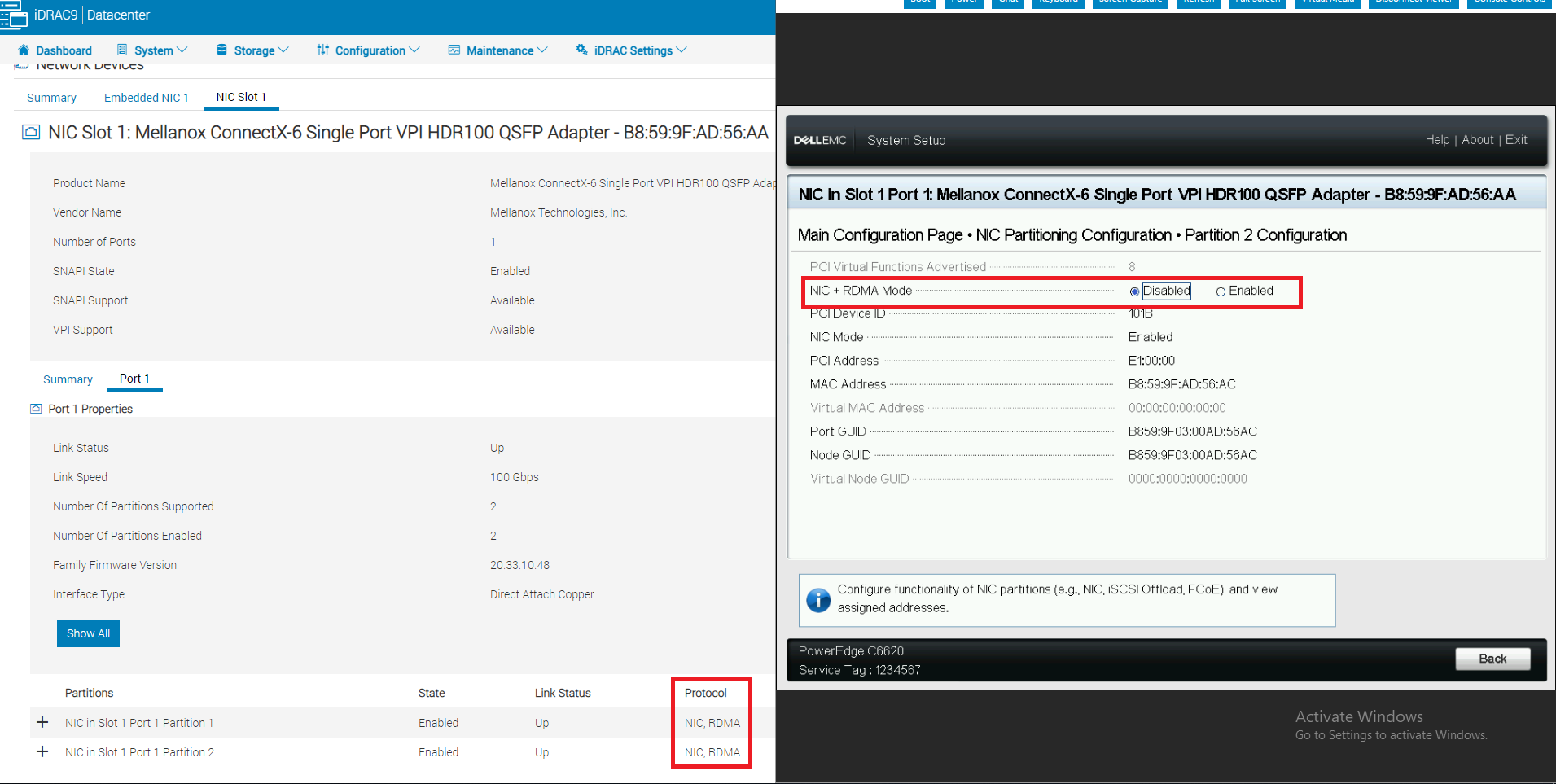
Summary: PowerEdge servers using Mellanox CX-6 Dell Part Number (DPN): 7TKND cards may report that the "NIC+RDMA mode" incorrectly shows "NIC, RDMA" on iDRAC UI.
This article applies to
This article does not apply to
This article is not tied to any specific product.
Not all product versions are identified in this article.
Symptoms
The NIC and RDMA Mode can be successfully disabled and enabled in the BIOS system setup configuration page.
The card's partition 1 and 2 protocol still shows RDMA on the iDRAC UI, like below:
Cause
The cause of the issue is related to the UI.
The UI is the root cause of the issue, leading to the incorrect display of the "NIC+RDMA mode" status in the iDRAC UI.
Resolution
- Do not replace hardware.
- Update the Mellanox firmware to the latest version.
Affected Products
Mellanox Family of Adapters, OEMR XL R570, OEMR XL R670, OEMR XL R770, OEMR XL R6715, OEMR XL R7715, OEMR XR4520c, Poweredge C4140, PowerEdge C6420, PowerEdge C6520, PowerEdge C6525, PowerEdge C6615, PowerEdge C6620, PowerEdge HS5610
, PowerEdge HS5620, PowerEdge R440, PowerEdge R450, PowerEdge R470, PowerEdge R540, PowerEdge R550, PowerEdge R570, PowerEdge R640, PowerEdge R650, PowerEdge R650xs, PowerEdge R6515, PowerEdge R6525, PowerEdge R660, PowerEdge R660xs, PowerEdge R6615, PowerEdge R6625, PowerEdge R670, PowerEdge R6715, PowerEdge R740, PowerEdge R740XD, PowerEdge R740XD2, PowerEdge R750, PowerEdge R750XA, PowerEdge R750xs, PowerEdge R7515, PowerEdge R7525, PowerEdge R760, PowerEdge R760XA, PowerEdge R760xd2, PowerEdge R760xs, PowerEdge R7615, PowerEdge R7625, PowerEdge R770, PowerEdge R7715, PowerEdge R840, PowerEdge R860, PowerEdge R940, PowerEdge R940xa, PowerEdge R960, PowerEdge T560, PowerEdge XE2420, PowerEdge XE7420, PowerEdge XE7440, PowerEdge XE8545, PowerEdge XE8640, PowerEdge XE9640, PowerEdge XE9680, PowerEdge XR11, PowerEdge XR12, PowerEdge XR4520c, PowerEdge XR5610, PowerEdge XR7620
...
Article Properties
Article Number: 000202125
Article Type: Solution
Last Modified: 27 Oct 2025
Version: 3
Find answers to your questions from other Dell users
Support Services
Check if your device is covered by Support Services.