Changing the Storage Controller Mode Causes Windows Blue Screen with INACCESSIBLE BOOT DEVICE Error
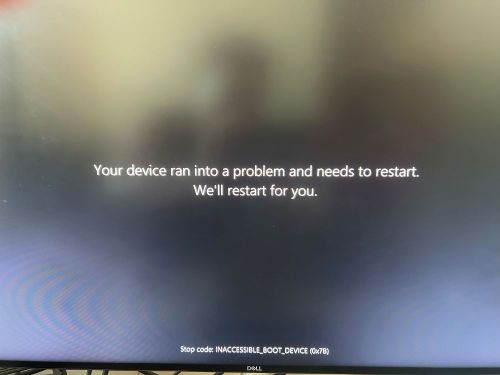
Summary: This article provides information about Windows blue screen issue with "INACCEESSIBLE_BOOT_DEVICE (0X7B)" error code.
This article applies to
This article does not apply to
This article is not tied to any specific product.
Not all product versions are identified in this article.
Symptoms
Affected Operating Systems:
- Windows
Note: If the user reimages or reinstalls the operating system, the computer cannot go through Dell SupportAssist OS recovery.
Users encounter extended long load times and an inability to boot into Windows or Blue Screen errors. These symptoms occur when users change the storage operation mode in the BIOS. Changing the computer storage SATA/NVMe Operation settings to the opposite option (from AHCI/NVMe to RAID ON or from RAID ON to AHCI/NVMe) in the BIOS, could cause windows to present an INACCESSIBLE BOOT DEVICE (0X7B) error while booting the computer, causing an inability to boot into the operating system.
Note: This is not the only reason that a user may experience an INACCESSIBLE BOOT DEVICE error while booting, use this as a troubleshooting step.
The Blue screen error occurs when the storage mode is not the same as the mode used when the operating system is installed. If the computer is operated in a different mode than shipped, installing the operating system with the controller in that mode is required. Example: If the controller is set to the AHCI/NVMe mode (RAID ON is default), then an operating system reinstall is required.
Cause
Changing the storage controller mode in the BIOS requires reinstallation of the operating system to align the storage driver configuration with the controller mode.
Resolution
Do one of the following to resolve:
- If Storage mode is changed, option (AHCI/NVMe to RAID ON or RAID ON to AHCI/NVMe) reinstallation of the operating system in that controller mode is required.
- Change the Storage controller settings back to the original configuration can resolve the blue screen error.
If you continue to get the blue screen or STOP error, check out our blue screen troubleshooting guide.
Article Properties
Article Number: 000216532
Article Type: Solution
Last Modified: 03 Dec 2025
Version: 8
Find answers to your questions from other Dell users
Support Services
Check if your device is covered by Support Services.