Precision 7920 Rack or 7920 XL Rack ASR0000 Watchdog Timer Expired Message
Summary: Learn how to fix a Precision Rack 7920 or 7920 XL Rack Lifecycle Controller log displaying error code ASR0000. The message states, "The watchdog timer expired."
This article applies to
This article does not apply to
This article is not tied to any specific product.
Not all product versions are identified in this article.
Symptoms
Users may report that a "The watchdog timer expired" (Code: ASR0000) entry randomly occurs on a Precision Rack 7920 or 7920 XL Rack. The message can be seen in the Lifecycle Controller log.
When the message gets logged, users might not note any impact to the functionality of the device.
The system status light of the chassis might blink amber to indicate that a critical event has been logged. In the following image, the system status light is indicated in the upper left of the Precision with 1.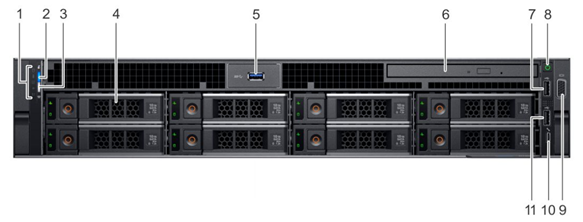
Affected Platforms:
- 7920 XL Rack
- Precision 7920 Rack
Cause
An iDRAC Service Module (ISM) component trying to communicate with an unsupported (or not present) software RAID component causes this error.
Resolution
Updating the iDRAC Service Module for Windows to version 5.3.0 or later resolves the issue. To download and install the update, reference the iDRAC Service Module for Windows update from:
Affected Products
7920 XL Rack, Precision 7920 RackArticle Properties
Article Number: 000220856
Article Type: Solution
Last Modified: 22 Sep 2025
Version: 3
Find answers to your questions from other Dell users
Support Services
Check if your device is covered by Support Services.