Period Key Above the Enter Key on Dell Thin Clients Does Not Work
Summary: This article provides information about the period key on the numerical keypad not working when pressed on Dell Thin Clients set to Brazilian Portuguese, when connecting to a remote computer using Windows RDP. ...
This article applies to
This article does not apply to
This article is not tied to any specific product.
Not all product versions are identified in this article.
Symptoms
Affected Platforms:
- OptiPlex 3000 Thin Client
- Wyse 5070
- Wyse 3040
Affected Operating Systems:
- Dell ThinOS 9.x
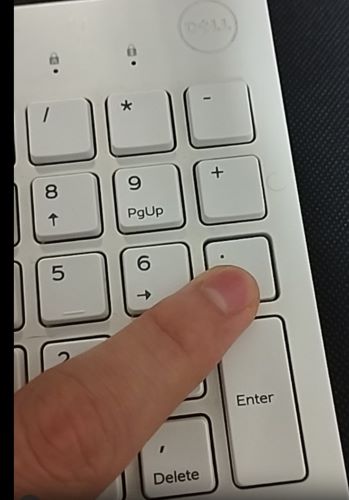
The issue occurs with the following keyboard layout and Windows language on Windows remote session and with the conditions bellow:
- Brazilian Portuguese ABNT and ABNT2 keyboard layout
- Brazilian Portuguese language and Brazilian Portuguese ABNT and ABNT2 keyboard layout on Windows session
- The issue occurs after updating from ThinOS 8 to ThinOS 9 versions but is not limited to upgrades, occurs on ThinOS 9.
- The issue occurs on wired and wireless Brazilian Portuguese ABNT and ABNT2 keyboards regardless of the make and model.
Cause
The issue is a combination of problems with WVD package and ThinOS 9.x, both have been fixed in ThinOS 2402 and later.
How to reproduce:
- Press any key.
- ThinOS computer sends key-code to the AVD package.
- AVD package transforms a key-code into a scan-code and sends the scan-code to the windows session.
- The key-code is encoded under Linux.
- The scan-key code is encoded under Windows.
- Some keys are coded differently, and AVD has to be able to map to them.
Note: The period key is one of the keys that did not get mapped. The fix is to add a mapping for these keys.
Resolution
The fix is available on ThinOS 2402 and later, download by going to Drivers & Downloads for your model Thin Client.
Affected Products
OptiPlex 3000 Thin Client, Wyse 3040 Thin Client, Wyse 5070 Thin ClientArticle Properties
Article Number: 000221577
Article Type: Solution
Last Modified: 16 Apr 2025
Version: 6
Find answers to your questions from other Dell users
Support Services
Check if your device is covered by Support Services.