The DirectX Diagnostic Tool Shows HDR is Supported when it Should Show Not Supported
Summary: Users may find that HDR shows as supported in the DirectX Diagnostic Tool when it should show as not supported on the XPS 14 9440 and 9340.
This article applies to
This article does not apply to
This article is not tied to any specific product.
Not all product versions are identified in this article.
Symptoms
Affected Platforms:
- XPS 14 9440
- XPS 14 9340
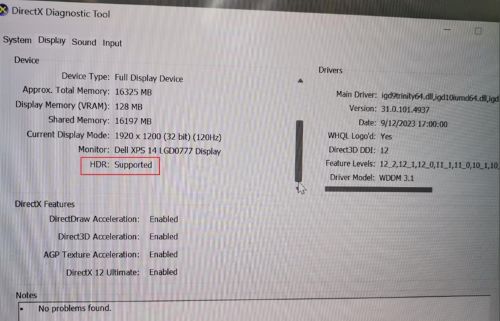
Cause
It is an operating system regression issue that DirectX UI displayed incorrectly in the tool. It only fails on Windows 11 23H2 and passes on Windows 11 22H2.
Resolution
Microsoft has fixed this issue in Windows 11 2024 Spring version v25967.1/25977.1.
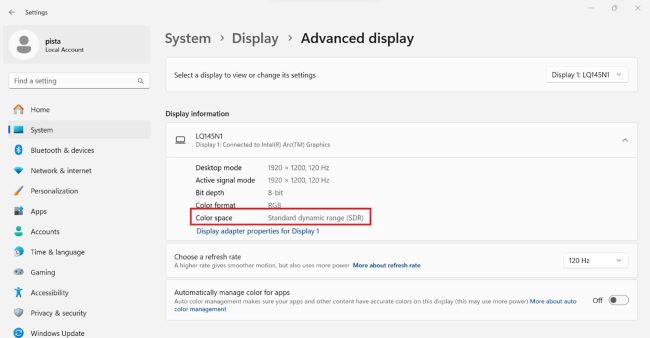
Users can find the correct information in the Windows display setting below.
Windows Setting > Display > Advanced display > Color Space > Standard dynamic range (SDR) = non HDR
Affected Products
XPS 13 9340, XPS 14 9440Article Properties
Article Number: 000222208
Article Type: Solution
Last Modified: 24 Apr 2025
Version: 5
Find answers to your questions from other Dell users
Support Services
Check if your device is covered by Support Services.