PowerVault MD24xx: Available Updates for PERC, iDRAC, and Dell Server Hardware Manager
Summary: This article lists available firmware versions for Dell PowerVault MD24 expander management modules (EMM), PERC and SAS HBAs, and iDRAC versions. Updating existing systems to the latest available versions may be necessary to enable management and operation with the MD24 series. ...
This article applies to
This article does not apply to
This article is not tied to any specific product.
Not all product versions are identified in this article.
Instructions
Minimum supported HBA and iDRAC firmware versions and supported configurations are listed in the Dell PowerVault MD24 Series Enclosure Support Matrix
For guidance on applying updates to Dell PowerEdge servers, see article Updating Firmware and Drivers on Dell PowerEdge Servers
| Product | Version | Available Date |
|---|---|---|
| MD2412 EMM | 7.4.1 (A05) | June 2025 |
| MD2424 EMM | 7.4.1 (A05) | June 2025 |
| MD2460 EMM | 7.4.1 (A05) | June 2025 |
| PowerTools Server Hardware Manager | 3.2.2.29 | March 2025 |
| Dell HBA355e SAS adapter firmware | 33.15.00.00 (A05) | June 2025 |
| HBA465e Adapter Non-RAID controller firmware | 8.14.0.0.15-14 (A05) | August 2025 |
| PERC H840 controller firmware | 51.16.0-5148 (A18) | October 2023 |
| PERC H965e RAID controller firmware | 8.11.2.0.18-26 (A07) | June 2025 |
| iDRAC (14 Gen PowerEdge) | 7.00.00.182 (A00) | August 2025 |
| iDRAC (15 Gen PowerEdge) | 7.20.60.50 (A00) | September 2025 |
| iDRAC (16 Gen PowerEdge) | 7.20.60.50 (A00) | September 2025 |
| iDRAC (17 Gen PowerEdge) | 1.20.60.50 (A00) | September 2025 |
The following host bus adapters (HBAs) are supported with PowerVault MD24 series enclosures.
-
HBA355e adapters are supported on 14G, 15G, and 16G PowerEdge servers. HBA355e does not provide hardware RAID offload, use the attached server host operating system disk management tools to manage disks and volumes with the PowerVault MD24 disk enclosure.
- HBA355e PCI-e cards are a separate drop in box item with Dell PowerEdge servers. For slot selection options, see article PowerEdge 16G models: HBA355e PCI-e Slot Selection
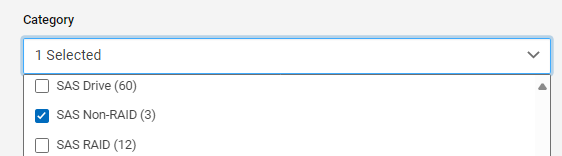
- Dell supplied drivers and firmware updates for HBA355e with PowerEdge servers are found on Dell Support, under the category SAS Non-RAID
Some host operating systems may already have the latest inbox drivers supplied with the operating system or service pack.
- HBA355e is a SAS3 HBA, and supports a maximum SAS link speed of 12 Gb/s. When a SAS4 cable is connected to a SAS3 HBA, the SAS connection LEDs on the MD24 EMMs turn amber to indicate that the port link is working at 12 Gb speed. In this case the amber LED does not indicate a fault, it is expected behavior when the SAS link does not negotiate 24 Gb/s.
- HBA465e nonraid SAS4 adapters are supported on 16G, and 17G PowerEdge servers up to 24 Gb (22.5 Gbaud) SAS link speed. HBA465e does not provide hardware RAID offload, use the attached server host operating system disk management tools to manage disks and volumes with the PowerVault MD24 disk enclosure.
- H840 PERC adapters are supported on 14G, and 15G PowerEdge servers.
- H840 PERC supports a maximum SAS link speed of 12 Gb/s. H840 PERC is a SAS3 generation HBA, and supports a maximum SAS link speed of 12 Gb/s. When a SAS4 cable is connected to a SAS3 HBA, the SAS connection LEDs on the MD24 EMMs turn amber to indicate that the port link is working at 12 Gb speed. In this case the amber LED does not indicate a fault, it is expected behavior when the link does not negotiate 24 Gb/s.
-
H965e PERC adapters are supported on 16G, 17G PowerEdge servers.
- H965e PERC is a SAS4 generation HBA and supports a maximum link speed of 24 Gb/s. When a SAS4 cable is connected to a SAS4 HBA, the SAS LEDs on the MD24 EMMs turn green to indicate that the port link is working at the SAS4 speed.
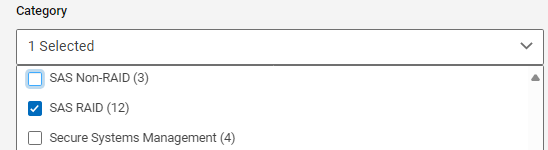
- Dell PERC HBA drivers and firmware updates for PowerEdge servers can be downloaded from Dell Support, under the category SAS RAID
MD24 Series enclosures are managed using either of the following tools:
- PowerTools Server Hardware Manager software: A Command-Line Interface (CLI) is used to obtain device and status information about storage and hardware components. For more information, see the PowerTools Server Hardware Manager Administrator's Guide or the PowerTools Server Hardware Manager Support Matrix on Dell Support.
- Integrated Dell Remote Access Controller (iDRAC): Used to manage, configure, and troubleshoot storage devices through a PowerEdge server. For more information, see the Integrated Dell Remote Access Controller User's Guide for your PowerEdge server model on Dell Support.
- Dell iDRAC firmware updates for PowerEdge servers can be downloaded from Dell Support, under the category iDRAC with LifeCycle controller

- Disk drive firmware updates for hard disk drives (HDDs) or solid state drives (SSDs) contained within the MD24xx series enclosure are available as a Dell Update Package (DUP) that can be downloaded under the PowerEdge or PowerVault MD24 model on Dell Support.
Affected Products
MD Series, PowerVault MD2412, PowerVault MD2424, PowerVault MD2460Article Properties
Article Number: 000223325
Article Type: How To
Last Modified: 17 Sep 2025
Version: 4
Find answers to your questions from other Dell users
Support Services
Check if your device is covered by Support Services.