XPS 14 9440 Keyboard Backlight Default Setting Changes to Disabled in BIOS Version 1.4.1
Summary: Information about the keyboard backlight default setting change in the new BIOS update on the XPS 14 9440.
This article applies to
This article does not apply to
This article is not tied to any specific product.
Not all product versions are identified in this article.
Symptoms
When you power on the XPS and it boots to Windows, the keyboard backlight default setting will change to off after updating the BIOS to version 1.4.1 or later.
It will not change the current User setting, but the BIOS default setting is changed to off. If the User loads to the default settings in the BIOS, it is set to off.
Keyboard Backlight Examples:
Figure 1: 1.3.1 BIOS or Earlier: Default On
Figure 2: 1.4.1 BIOS or Later: Default Off
Cause
This is caused by a new UX design.
Resolution
Keyboard Backlight Setting
Workaround:
You can change the Keyboard Backlight setting in the BIOS.
Change "Keyboard Backlight Sign of Life" from "Off" to "On" (Figure 3).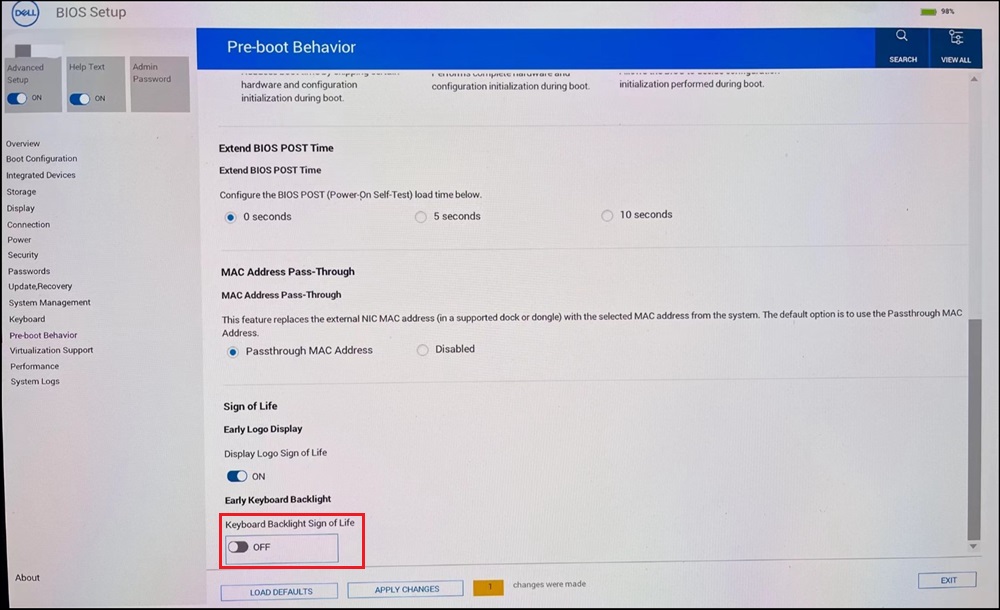
Figure 3
Affected Products
XPS 14 9440Article Properties
Article Number: 000225192
Article Type: Solution
Last Modified: 24 Apr 2025
Version: 3
Find answers to your questions from other Dell users
Support Services
Check if your device is covered by Support Services.