Creation of New NetWorker Data Domain Cloud Tier Volume Fails with Error: Unable to get data movement policy
Summary: Labeling a new volume in NetWorker for a Data Domain Cloud Tier device fails at the labeling device step with error "Unable to get the data movement policy for mtree xxxxxxx and cloud unit yyyyyyyyy: HTTP response 500 indicates an error." ...
This article applies to
This article does not apply to
This article is not tied to any specific product.
Not all product versions are identified in this article.
Symptoms
Labeling a new volume in NetWorker for a PowerProtect Data Domain Cloud Tier device fails at the labeling device step with: Unable to get the data movement policy for mtree xxxxxxx and cloud unit yyyyyyyyy: HTTP response 500 indicates an error.
Cause
The PowerProtect Data Domain user which is defined in NetWorker to perform this operation has a 'Management Role' of 'none'. This must be set to 'admin' in order for the labeling operation to succeed.
In the PowerProtect DD System Manager, check that the user-defined in NetWorker (DD Boost Credentials section) has the 'admin' role, see the example below.
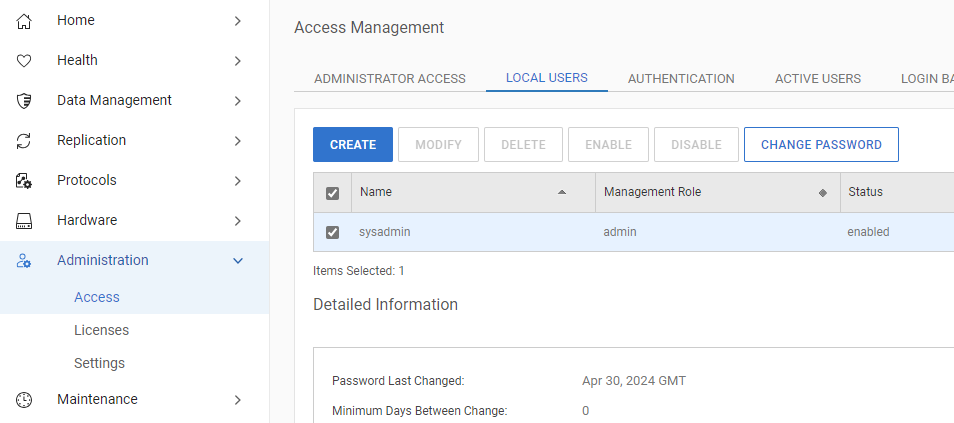
In the PowerProtect DD System Manager, check that the user-defined in NetWorker (DD Boost Credentials section) has the 'admin' role, see the example below.
Resolution
In order to change the Management Role to 'admin', you must follow the procedure outlined in the below article.
Data Domain: How to change the DD Boost user role to Admin.
Data Domain: How to change the DD Boost user role to Admin.
Products
NetWorkerArticle Properties
Article Number: 000226161
Article Type: Solution
Last Modified: 19 Jun 2024
Version: 1
Find answers to your questions from other Dell users
Support Services
Check if your device is covered by Support Services.