建立新的 NetWorker Data Domain Cloud Tier 磁碟區失敗,並傳回錯誤:無法取得資料移動原則
Summary: 在 NetWorker 中為 Data Domain Cloud Tier 裝置標記新磁碟區時,在標記裝置步驟失敗,並顯示錯誤「無法取得 mtree xxxxxxx 和雲端裝置 yyyyy 的資料移動原則:HTTP 回應 500 表示錯誤。」
This article applies to
This article does not apply to
This article is not tied to any specific product.
Not all product versions are identified in this article.
Symptoms
在 NetWorker 中為 PowerProtect Data Domain 雲端層裝置標記新磁碟區時,在標記裝置步驟失敗,發生以下動作:無法取得 mtree xxxxxxx 和雲端裝置 yyyyyy 的資料移動原則:HTTP 回應 500 指示錯誤。
Cause
在 NetWorker 中定義要執行此作業的 PowerProtect Data Domain 使用者的「管理角色」為「無」。必須將其設置為“admin”才能使標記操作成功。
在 PowerProtect DD System Manager 中,檢查 NetWorker (DD Boost 登入資料一節) 中的使用者定義是否具有「admin」角色,請參閱以下範例。
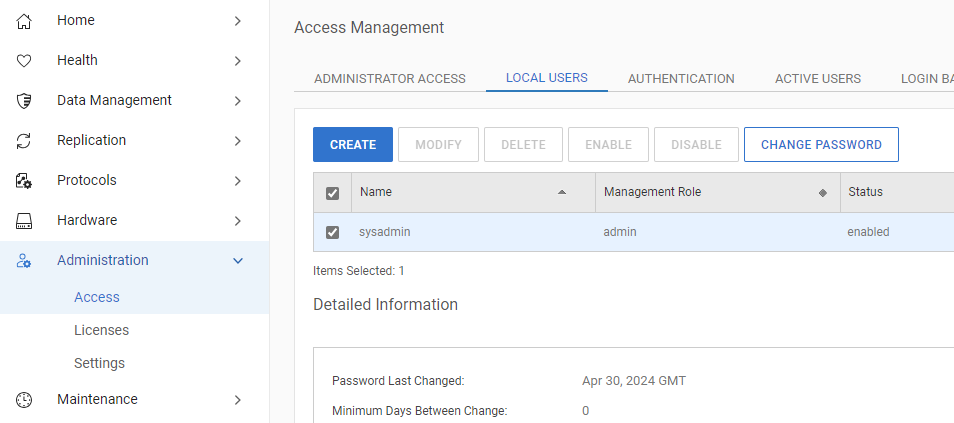
在 PowerProtect DD System Manager 中,檢查 NetWorker (DD Boost 登入資料一節) 中的使用者定義是否具有「admin」角色,請參閱以下範例。
Resolution
若要將管理角色變更為「admin」,您必須遵循以下文章中概述的程序。
Data Domain:如何將 DD Boost 使用者角色變更為管理員。
Data Domain:如何將 DD Boost 使用者角色變更為管理員。
Products
NetWorkerArticle Properties
Article Number: 000226161
Article Type: Solution
Last Modified: 19 Jun 2024
Version: 1
Find answers to your questions from other Dell users
Support Services
Check if your device is covered by Support Services.