PowerStore VSI-services zijn na de installatie nog niet allemaal actief
Summary: Na het installeren van Virtual Storage Integrator (VSI) wordt op het aanmeldingsscherm van VSI WebUI de volgende fout weergegeven: "VSI-services zijn nog niet allemaal actief. Geef een paar minuten de tijd en vernieuw dan deze pagina. Als het probleem zich langer dan 15 minuten blijft voordoen, start u de virtuele VSI-machine opnieuw op en probeert u het opnieuw" ...
This article applies to
This article does not apply to
This article is not tied to any specific product.
Not all product versions are identified in this article.
Symptoms
Fout bij het aanmeldingsscherm van VSI WebUI: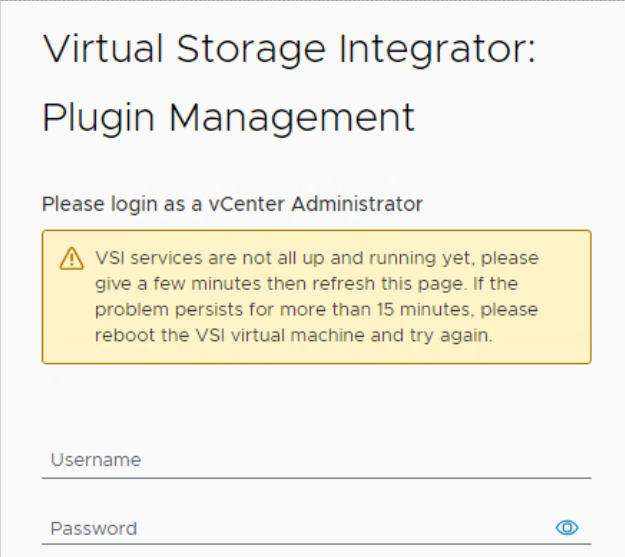
VSI-logboeken tonen de volgende herhalende foutmeldingen in het logboek "iapi-rest-error":
Caused by: java.util.concurrent.ExecutionException: org.redisson.client.RedisConnectionException: java.net.UnknownHostException: Failed to resolve 'redis' [A(1)] after 2 queries
De docker ps Met de opdracht run from VSI Virtual Machine (VM) wordt de Redis-container constant in een "restarting"-conditie weergegeven. De IAPI-container (Internet Application Programming Interface) wordt ook opnieuw opgestart, waardoor de uptime aanzienlijk korter is dan die van de andere containers.
root@photon [ ~ ]# docker ps
CONTAINER ID   IMAGE                                                                       COMMAND                  CREATED          STATUS                          PORTS                                           NAMES
475db176af94   amaas-eos-mw1.cec.lab.emc.com:8125/externals/redis:5.0                      "/bin/bash -c 'redis…"   26 minutes ago   Restarting (1) 17 seconds ago                                                   redis
b423bae65c3e   amaas-eos-mw1.cec.lab.emc.com:8125/dellemc/vsi-proxy:10.6.0-983             "/docker-entrypoint.…"   30 minutes ago   Up 10 minutes                   80/tcp, 0.0.0.0:443->443/tcp, :::443->443/tcp   vsi-proxy
f1c4b6edc1da   amaas-eos-mw1.cec.lab.emc.com:8125/dellemc/iapi:1.16.0-1371                 "/tini -g -v -- /opt…"   3 months ago     Up 12 seconds                   0.0.0.0:32851->8001/tcp, :::32851->8001/tcp     iapi
5c042bbd9a53   amaas-eos-mw1.cec.lab.emc.com:8125/dellemc/vsi-aggregation-service:10.6.0   "docker-entrypoint.s…"   3 months ago     Up 14 minutes                   0.0.0.0:32768->8082/tcp, :::32768->8082/tcp     vsi-aggregation-service
621ee8dab64a   amaas-eos-mw1.cec.lab.emc.com:8125/dellemc/vsi-ui:10.6.0-983                "/docker-entrypoint.…"   3 months ago     Up 14 minutes                   0.0.0.0:32769->80/tcp, :::32769->80/tcp         vsi-ui
Cause
Het databasewachtwoord heeft een # aan het begin van het wachtwoord, zoals #PassWord123!te installeren.
Gebruik geen # aan het begin van het wachtwoord om dit probleem te voorkomen.
Dit is de locatie waar het initiële wachtwoord wordt ingesteld.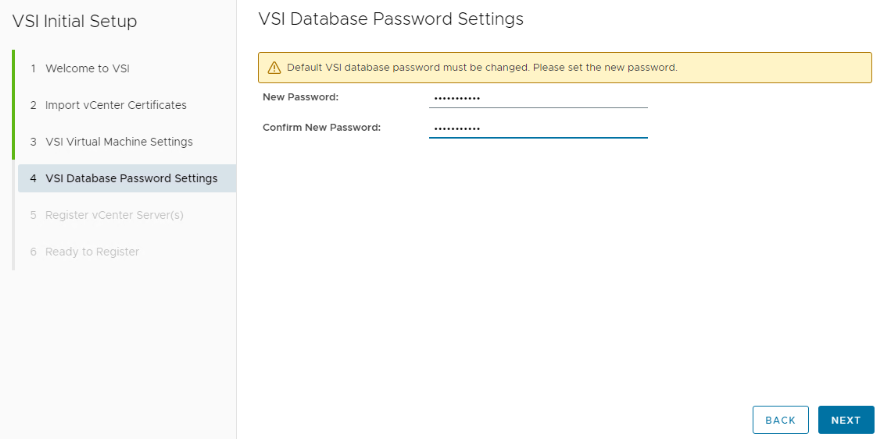
Resolution
Stel de Redis-database opnieuw in via de opdrachtregelinterface op de virtuele VSI-machine.
Meld u aan bij de VSI virtuele machine. Dit kan worden gedaan via VMware door een virtuele console te starten, of SSH naar de VSI VM. Als de VM nog nooit eerder is aangemeld, zijn de gebruikersnaam en het wachtwoord root. Na het inloggen moet het wachtwoord worden gewijzigd.
Voer de volgende opdracht uit om het Redis-wachtwoord opnieuw in te stellen:
root@photon [ ~ ]# /opt/files/iapi-maintenance-util/apis/redis/redis-config.sh --rollback
WARNING: The DOCKERHOST variable is not set. Defaulting to a blank string.
Stopping redis ... done
WARNING: The DOCKERHOST variable is not set. Defaulting to a blank string.
Going to remove redis
Removing redis ... done
WARNING: The DOCKERHOST variable is not set. Defaulting to a blank string.
WARNING: The create command is deprecated. Use the up command with the --no-start flag instead.
Creating redis ... done
WARNING: The DOCKERHOST variable is not set. Defaulting to a blank string.
Starting redis ... done
Successfully copied 2.56kB to iapi:/opt/iapi/conf/redisson.yaml
iapi
iapi
Nadat de opdracht is voltooid, meldt u zich aan bij de VSI-webinterface. De waarschuwing zou verdwenen moeten zijn.
Er is een waarschuwing bovenaan het venster om het Redis-wachtwoord opnieuw in te stellen.
Stel een Redis-wachtwoord in dat geen "# of !" heeft. Aan het begin van het wachtwoord, nadat het wachtwoord is ingesteld, kan het tot 5 minuten duren voordat het scherm wordt vernieuwd.
Additional Information
Acroniemdefinities:
VSI - Virtual Storage Integrator
VM - Virtual Machine
IAPI - Internet Application Programming Interface
Affected Products
PowerStore, Virtual Storage Integrator (VSI), PowerStoreOSArticle Properties
Article Number: 000227235
Article Type: Solution
Last Modified: 29 Jul 2025
Version: 3
Find answers to your questions from other Dell users
Support Services
Check if your device is covered by Support Services.