How to Fix Alienware Monitor Power Button Always On Issue
Summary: Having trouble with your Alienware monitor's power button turning back on despite choosing 'Off in On or Standby Mode' in the On-Screen Display (OSD)? Check out our guide for troubleshooting tips and solutions. ...
This article applies to
This article does not apply to
This article is not tied to any specific product.
Not all product versions are identified in this article.
Symptoms
The power Button is set to Off in On or Standby Mode in the OSD:
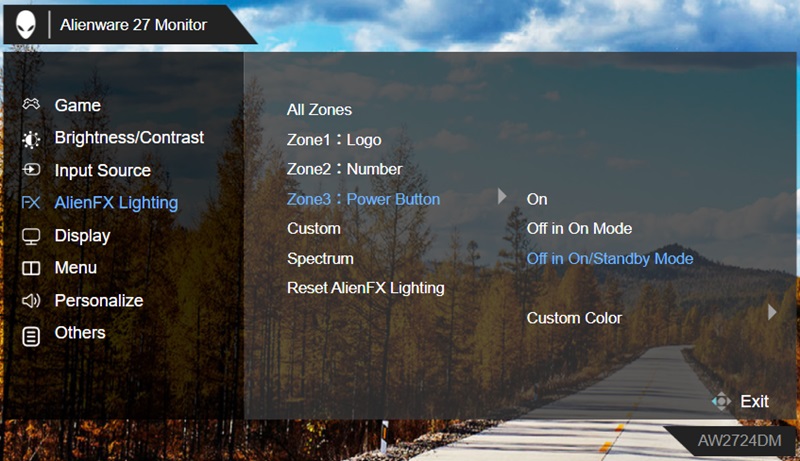
(Figure 1 - Power Button set to Off in On or Standby Mode)
If there is an AlienFX setting change in the Alienware Command Center (AWCC), the Power Button LED goes back to On.
Impacted Monitors:
- Alienware 27 Gaming Monitor AW2724DM
- Alienware 32 4K QD OLED Gaming Monitor AW3225QF
Cause
Not Applicable
Resolution
Updating Alienware AW2724DM Monitor firmware to version M2B104 and Alienware AW3225QF Monitor firmware to version M2B105 or later on the computer resolves the issue. To download and install the driver, reference How to Download and Install Dell Drivers.
Affected Products
Alienware 27 Gaming Monitor AW2724DMArticle Properties
Article Number: 000228484
Article Type: Solution
Last Modified: 22 Apr 2025
Version: 4
Find answers to your questions from other Dell users
Support Services
Check if your device is covered by Support Services.