NetWorker:如何使用 nsrwatch 确定服务器负载
Summary: 当 NetWorker Management Console (NMC) 图形用户界面 (UI) 或 NetWorker 用户界面 (NWUI) UI 不可用时,使用 nsrwatch 确定 NetWorker 服务器负载。
This article applies to
This article does not apply to
This article is not tied to any specific product.
Not all product versions are identified in this article.
Instructions
确定 NetWorker 服务器上的负载
要确定 NetWorker 服务器上的负载,请使用 nsrwatch,请按照下列步骤作:
- 登录到 NetWorker 服务器并启动
nsrwatch从管理员命令提示符或终端会话。
Launch nsrwatch
- 按以下顺序按键清除现有窗格;A、M、S、D 和 O。
Press a, then m, then s, then d, and lastly o
- 按 b 键以启动
nsrwatch。
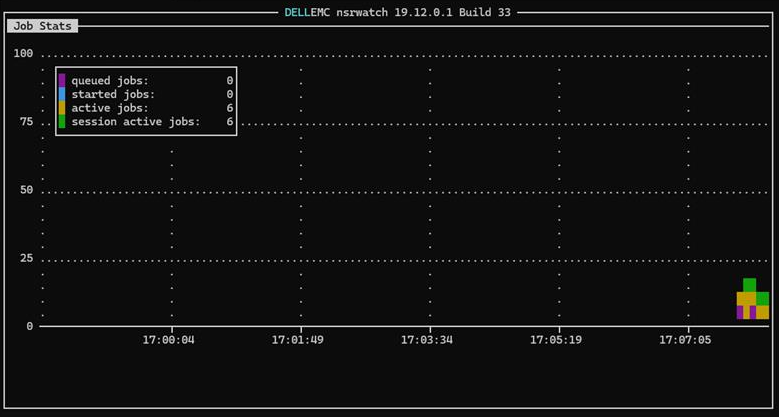
Press b to launch Job Stats
- 复制并粘贴以下各项的各行:
- 排队作业
- 已启动作业
- 活动作业
- 会话活动作业
重要说明:请勿发送屏幕截图或尝试复制和粘贴整个窗口。
- 要返回清除的屏幕,请键入 b。
Type b to get back to the cleared screen
- 要显示默认设置,请依次键入 o、d、s、m 和 a
Type o, then d, then s, then m, and lastly a
- 要退出
nsrwatch,键入 q。
Type q to quit
如需帮助,请键入 h并使用向下箭头向下滚动浏览帮助屏幕。键入 q 退出帮助屏幕。
下面是点击的 Job Stats 窗口的示例。
Additional Information
Affected Products
NetWorkerArticle Properties
Article Number: 000355575
Article Type: How To
Last Modified: 18 Sep 2025
Version: 2
Find answers to your questions from other Dell users
Support Services
Check if your device is covered by Support Services.