PowerEdge: PXE boot from Intel X710 failed and stuck at get client information screen
Summary: This article provides information about an issue seen when PXE booting from the Intel X710 NIC when LLDP is enabled.
This article applies to
This article does not apply to
This article is not tied to any specific product.
Not all product versions are identified in this article.
Symptoms
In this example, a PowerEdge R7525 failed to Install the OS using PXE from the Intel X710 and got stuck at the client information screen.
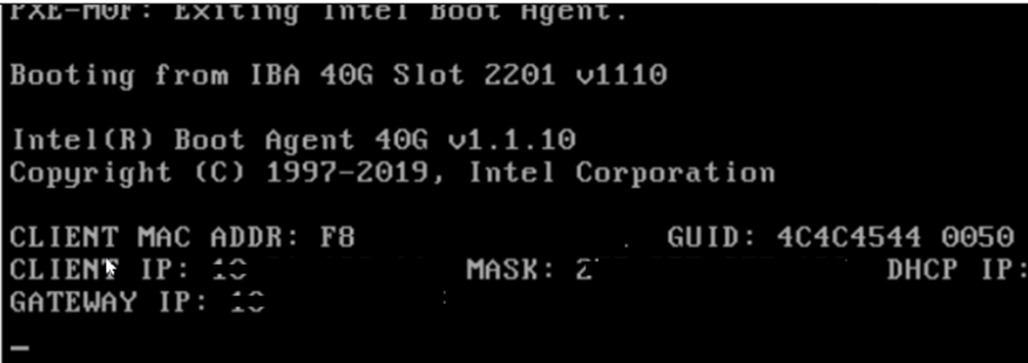
TSR confirmed that the NIC port was UP and no errors were seen.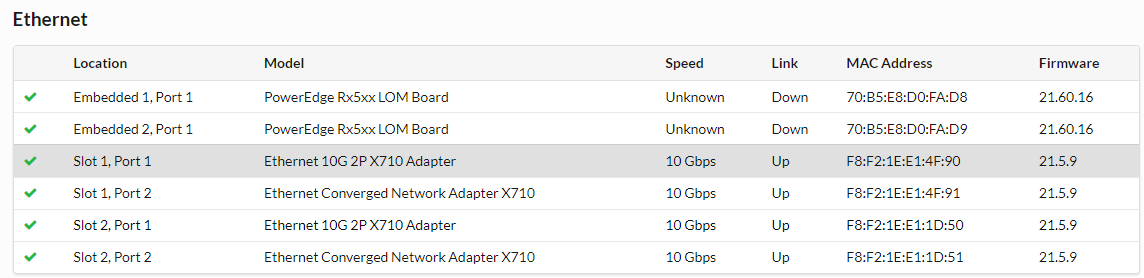
Cause
- NIC Firmware Issues: Some NICs, like the Intel X710, have a firmware-level LLDP agent that can interfere with the PXE boot process.
- Packet Handling: The NIC's LLDP agent might improperly handle or drop LLDP packets or other network traffic necessary for a successful PXE boot.
Resolution
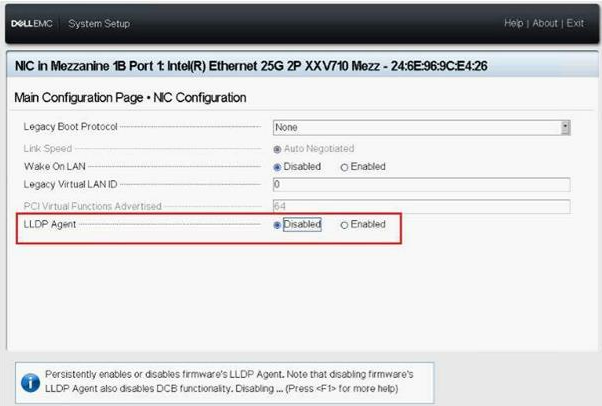
After disabling the Intel X710 firmware LLDP attribute, the server could complete PXE boot properly.
To disable the NICs LLDP Agent, follow the steps below:
- On boot press F2 to enter system setup.
- Click Device Settings > Intel X710 NIC > NIC Configuration
- On the LLDP Agent option select: Disabled
Affected Products
Intel PRO Family of Adapters, PowerEdge XR2, Poweredge C4140, PowerEdge C6420, PowerEdge C6520, PowerEdge C6525, PowerEdge FC640, PowerEdge M640, PowerEdge M640 (for PE VRTX), PowerEdge R240, PowerEdge R250, PowerEdge R340, PowerEdge R350
, PowerEdge R440, PowerEdge R450, PowerEdge R540, PowerEdge R550, PowerEdge R640, PowerEdge R6415, PowerEdge R650, PowerEdge R650xs, PowerEdge R6515, PowerEdge R6525, PowerEdge R740, PowerEdge R740XD, PowerEdge R740XD2, PowerEdge R7415, PowerEdge R7425, PowerEdge R750, PowerEdge R750XA, PowerEdge R750xs, PowerEdge R7515, PowerEdge R7525, PowerEdge R840, PowerEdge R940, PowerEdge R940xa, PowerEdge T140, PowerEdge T150, PowerEdge T340, PowerEdge T350, PowerEdge T440, PowerEdge T550, PowerEdge T640, PowerEdge XE7420, PowerEdge XE7440, PowerEdge XR11, PowerEdge XR12
...
Article Properties
Article Number: 000211622
Article Type: Solution
Last Modified: 16 Feb 2026
Version: 4
Find answers to your questions from other Dell users
Support Services
Check if your device is covered by Support Services.