Dell Command Integration Suite for System Center 无法导入 Windows 11 驱动程序包
Summary: 以下文章提供有关 Dell Command |Integration Suite for System Center 应用程序。
This article applies to
This article does not apply to
This article is not tied to any specific product.
Not all product versions are identified in this article.
Symptoms
受影响的产品:
- Dell Command | Integration Suite for System Center
客户可能会来电反映,他们无法使用 Dell Command |Integration Suite for System Center 应用程序。
他们报告“不是 Dell Command |系统驱动程序库“ 错误出现在屏幕上。
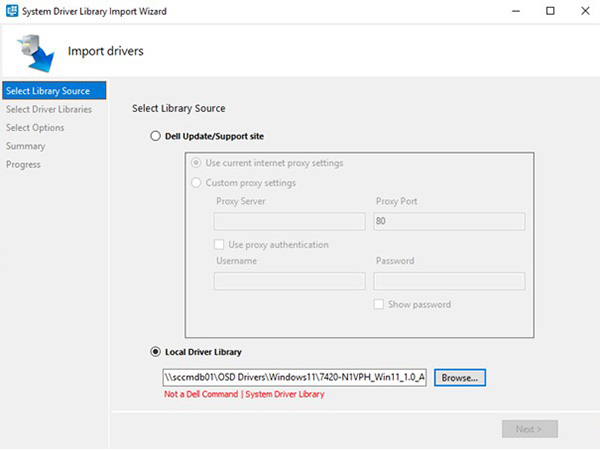
Cause
此问题归因于与驱动程序包一起使用的 Dell Update Package Framework 的问题。软件包框架在解压缩驱动程序包时出现问题。
对于受影响的产品 Windows 11 驱动程序包,此问题现已得到修复。
Resolution
为计算机手动下载最新的 Windows 11 驱动程序包可解决此问题。要下载并安装最新的 Windows 11 驱动程序包,请按照以下步骤作:
提醒:用户必须在故障计算机上具有管理员权限,才能更改作系统或更新软件。
- 浏览至 https://www.dell.com/support/drivers
- 识别他们的戴尔计算机。
- 单击 Download and Install SupportAssist 以自动检测戴尔计算机。按照屏幕上的说明安装 Dell SupportAssist。有关更多信息,请参阅戴尔知识库文章: Dell SupportAssist(以前称为 Dell System Detect):概览和常见问题
- 输入计算机的服务编号,然后单击 Search。
- 或者,单击 Browse all products,然后从目录中选择戴尔计算机。
- 选择戴尔计算机上安装的 Windows 11作系统 。
- 在 Category下,选择 System Management。
- 选择最新的 Dell Command Deploy 驱动程序包 或 Dell Command Deploy WinPE 驱动程序包。
提醒:您可以在以下戴尔知识库文章中找到有关部署驱动程序包的更多信息:
Affected Products
Dell Command | Integration Suite for Microsoft System CenterArticle Properties
Article Number: 000216651
Article Type: Solution
Last Modified: 17 Jul 2025
Version: 4
Find answers to your questions from other Dell users
Support Services
Check if your device is covered by Support Services.