NetWorker: La restauración realizada a través de NetWorker El usuario informa el error "Especifique AM o PM" cuando intenta cambiar la hora de navegación.
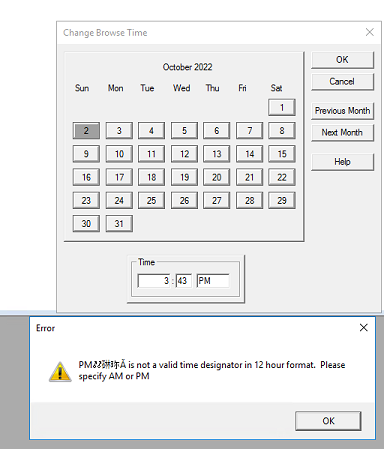
Resumen: Se está realizando una recuperación desde el software NetWorker User. Cuando se intenta cambiar el tiempo de navegación, aparece un error que indica lo siguiente: "PM@#$%# no es una designación de hora válida en formato de 12 horas. Especifique AM o PM" ...
Este artículo se aplica a
Este artículo no se aplica a
Este artículo no está vinculado a ningún producto específico.
No se identifican todas las versiones del producto en este artículo.
Síntomas
- Se está realizando una restauración mediante el programa NetWorker User.
- Se produce el siguiente error cuando se cambia la hora de navegación con el formato de 12 horas.
Causa
Fallo del código. Observado con el cliente NetWorker 19.7.0.1 en Windows Server 2016. NetWorker 19.7 está en el final del ciclo de vida de soporte (EOSL).
Resolución
Este problema no se observaba cuando se utilizaba el cliente de NetWorker 19.11.0 (o posterior) en Windows Server 2022 o 2025. Este problema es poco probable en las versiones actuales de NetWorker y en los sistemas operativos. Si se encuentra, utilice la solución alternativa que aparece a continuación.
Solución alternativa:
- En NetWorker User, seleccione View-Change> Browse Time
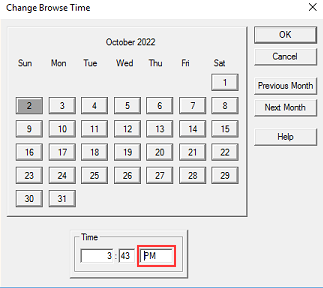
- Especifique una hora (en un formato de 12 horas) en la que le gustaría establecer el período de navegación. Inserte un espacio antes de AM o PM.
- Haga clic en Ok (Aceptar)
- La hora de navegación ahora debe reflejar la hora especificada.
Productos afectados
NetWorker Family, NetWorkerProductos
NetWorker SeriesPropiedades del artículo
Número del artículo: 000201625
Tipo de artículo: Solution
Última modificación: 30 dic 2025
Versión: 3
Encuentre respuestas a sus preguntas de otros usuarios de Dell
Servicios de soporte
Compruebe si el dispositivo está cubierto por los servicios de soporte.