Windows Server: How to install the Update Services with PowerShell
Resumen: This article is designed to address installing the Windows Server Update Services (WSUS) role using Windows PowerShell. This guide details adding the WSUS role with PowerShell, covering installation and management cmdlets like Get-WsusUpdate for update control and synchronization settings. ...
Instrucciones
- Type
Start PowerShellin the Command Prompt window to start Windows PowerShell. - To install the WSUS role, run the following command
Install-WindowsFeature UpdateServices
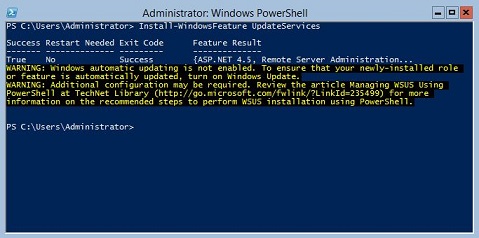
Additional Information:
The following WSUS role services can be installed using Windows PowerShell.
- Windows Internal Database (WID)
- WSUS Services
- Database
The WID Database and WSUS Services role services are installed after running the Install-WindowsFeature UpdateSevices cmdlet.
The following Windows PowerShell cmdlets are available for managing the WSUS role on a server running Windows Server Core.
To add a specified client computer to a specified target group.
Add-WsusComputer
To approve an update to be applied to clients.
Approve-WsusUpdate
To decline the update for deployment.
Deny-WsusUpdate
To Get the list of all WSUS classifications available in the system.
Get-WsusClassification
To get the WSUS computer object that represents the client computer.
Get-WsusComputer
To get the list of all products available on WSUS by category.
Get-WsusProduct
To get the value of the WSUS update server object.
Get-WsusServer
To get the WSUS update object with details about the update.
Get-WsusUpdate
To perform the process of cleanup on a specified WSUS server.
Invoke-WsusServerCleanup
To sets whether the classifications of updates that WSUS synchronizes are enabled or disabled.
Set-WsusClassification
To sets whether the product representing the category of updates to synchronize is enabled or disabled.
Set-WsusProduct
To sets whether the WSUS) server synchronizes from Microsoft Update, or an upstream server and the upstream server properties.
Set-WsusServerSynchronization