ECS: Licensed Capacity Entitlement exceeded
Resumen: Alert Licensed Capacity Entitlement exceeded, Symptom Code 997 is shown if the used capacity is larger than the licensed capacity. (Dell Technologies Correctable)
Síntomas
ECS UI Alert: Licensed Capacity Entitlement exceeded:
Severity               Description                                                                         Type                      Namespace        Timestamp
Info                      Registration Event                                                              License                                             2018-07-07 08:51:55
Error                    Licensed Capacity Entitlement Exceeded Event           License                                             2018-07-07 08:51:55
Causa
Resolución
If required, contact Dell Technical Support or your Authorized Service Representative, and quote this article ID.
Información adicional
There is no impact to the use of the ECS. Writes are not blocked in any way.
However, we can check the capacity in the current license from the UI:
If the total system capacity is more than the licensed capacity, then the alert is generated as expected.
For example:
- If the licensed capacity is 3000 TB (3 PiB) (found in UI in Settings > Licensing) and the total capacity of the system is 4000 TB (4 PiB) which is more than the licensed capacity, then the alert is expected.
- If the licensed capacity is 5000 TB (5 PiB) and the total capacity of the system is 3000 TB (3 PiB) which is below the licensed capacity, then no alert is expected.
- The alert can be triggered if the capacity license is not updated during a capacity expansion. Therefore, check the most recent date of capacity expansion and the date of the license update from the ECS UI license tab.
Command:svc_version history - If a storage disk is replaced with a higher capacity one during disk replacement (for example: a 1 TB disk is replaced with a 2 TB disk), it can cause the system capacity to exceed the licensed capacity. If this is identified as the cause of the alert, you can disregard the alert for now.
- If we believe that alert is not related to drive capacity update, contact your sales team about purchasing an extended capacity license.
- The licensing team must be contacted if the scenario matches Step 3 or 5. Get in touch with the PS/Accounts and SAM, create a service request with the appropriate serial numbers and purchase details of the racks which need an updated license and send it to the following queue: GL.DB.LOS.SW.VW.EN.BLND.BRICE or email to licensing@dell.com
See related article: ECS: How to install a license on an ECS system (login as a registered Dell Support user is required to view this article)
Example to find and compare capacity expansion history with an available license:
Command:
svc_version historyExample output:
admin@noder1n1:~> svc_version history
svc_version v1.5.0 (svc_tools v2.22.0)                 Started 2025-04-29 06:03:55


Timestamp            ECS Release               Version                              Node(s)
--------------------------------------------------------------------------------------------------------------------------------------
2019-11-12 21:34:13  3.3.0.1 GA                3.3.0.1.109311.635bd4c               XXXXXX-728e-48a8-XXXX-c59e4XXXX9d (nodes added)
2019-11-15 15:03:48  3.3.0.1 GA                3.3.0.1.109311.635bd4c               r1n1 - r1n6 (nodes added)
2020-10-06 03:37:09  3.5.1.0 GA                3.5.1.0.121394.b856add9376           r1n1 - r1n6
2021-02-18 10:12:23  <Could not determine>     3.6.0.1-126408.93a1ef191f5           r1n1 - r1n6
2021-07-04 09:42:23  3.6.0.1 IP 0.1 (GA xxxxx)  3.6.0.1.126414.c..._3_6_0_1_GA_xxxxx  r1n1 - r1n6
2022-07-03 09:20:37  3.7.0.2 GA                3.7.0.2.137731.5399f93c32e           r1n1 - r1n6
2023-03-05 04:52:16  3.7.0.2 IP 0.1 (xxxxx)     3.7.0.2-137732.d..._3_7_0_2_GA_xxxxx  r1n1 - r1n6
2023-05-12 18:28:29  3.7.0.2 IP 0.1 (xxxxx)     3.7.0.2-137732.d..._3_7_0_2_GA_xxxxx  r1n7 - r1n10 (nodes added)
2023-07-28 11:52:39  3.8.0.2 IP 0.1 (xxxxx)     3.8.0.2-138637.a..._3_8_0_2_GA_xxxxx  r1n1 - r1n10
2024-06-14 13:49:49  3.8.0.5 GP 1              3.8.0.5-138724.7320c2e326c.1         r1n1 - r1n10
2025-01-23 21:17:31  3.8.0.5 GP 1              3.8.0.5-138724.7320c2e326c.1         r1n11 - r1n12 (nodes added) # We can see capacity expansion on 2025-01-23
2025-03-03 14:34:50  3.8.1.3 IP 2.1 (02 xxxxx)  3.8.1.3-140163.1...8_1_3_GP_02_xxxxx  r1n1 - r1n12

admin@noder1n1:~>
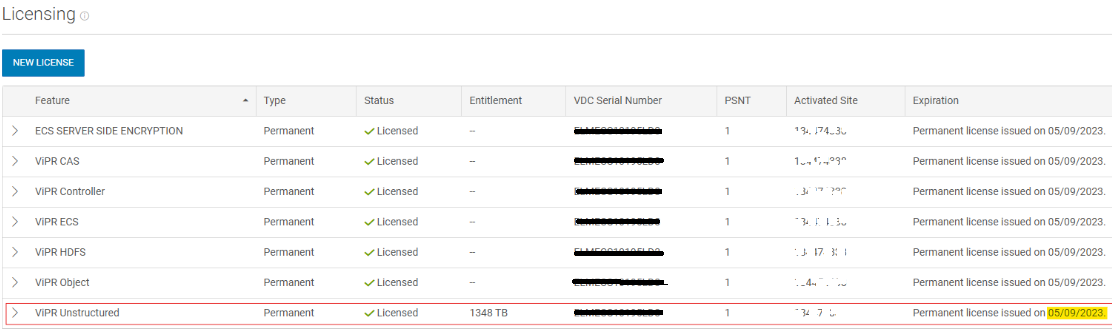
Compare the dates from the version history output with those in the ECS license tab to determine if there was a license update around the time of the capacity expansion, also compare licensed capacity and physical capacity.
Snippet of Licensing page from ECS UI
Check if any nodes in the cluster have had their disks replaced with larger capacity ones during a disk replacement.
Command:
svc_exec "alldisks -v"