Precision Tower 5820: Visual guide to your Computer
Resumen: This article is a visual guide to the external and internal ports and features of the Dell Precision 5820 Tower Workstation.
Este artículo se aplica a
Este artículo no se aplica a
Este artículo no está vinculado a ningún producto específico.
No se identifican todas las versiones del producto en este artículo.
Síntomas
The following article provides a visual guide to your Precision Tower 5820 Workstation and lists the external ports and features of your PC.
 Note: For a more detailed description about each location, please go to the system manuals at www.dell.com/support
Table of Contents:
Front View

(Fig.1 Front View)
| 1 | 5.25" ODD Bracket | 2 | Slim Optical Disc Drive (ODD) |
| 3 | Headset Connector | 4 | USB 3.1 Gen1 Type-C Connector |
| 5 | USB 3.1 Gen1 Type-C Connector with PowerShare | 6 | USB 3.1 Gen1 Connector x2 |
| 7 | SD Card Slot | 8 | HDD Status LED |
| 9 | Power Button |
Rear View
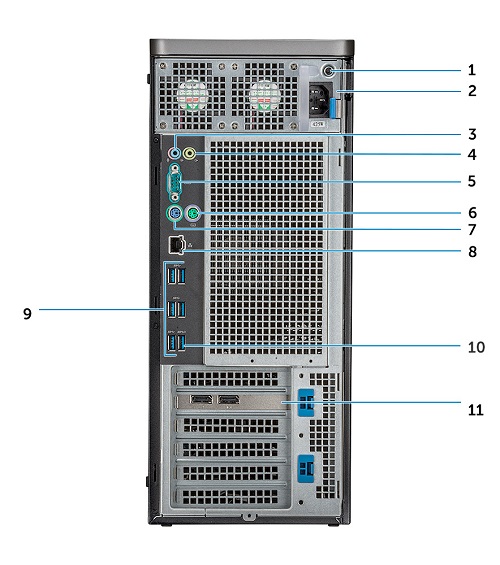
(Fig.2 Rear View)
| 1 | PSU BIST LED | 2 | Power Cable Connector |
| 3 | Microphone / Line in Connector | 4 | Line Out Connector |
| 5 | Serial Connector | 6 | PS/2 Mouse Connector |
| 7 | PS/2 Keyboard Connector | 8 | Network (NIC) Connector |
| 9 | USB 3.1 Gen1 Connector x5 | 10 | USB 3.1 Gen1 Connector (Supports Smart Power-On) |
| 11 | PCIe Expansion Card Slots x6 |
Internal Views

(Fig.3 Internal top View)
| 1 | PSU Bracket | 2 | HDD Bezel lock / qunlock Button |
| 3 | ODD 5.25" Bracket | 4 | Intrusion Switch |
| 5 | PCIe Holder | 6 | Coin Cell Battery |
| 7 | Powered GPU | 8 | Air Shroud |

(Fig.4 Internal motherboard View)
| 1 | Heat Sink | 2 | PSU Distribution Board |
| 3 | HDD Fan | 4 | Flex Bay |
| 5 | Speaker | 6 | Drive Access Release Latch |
| 7 | Motherboard |
Additional Info:
- Precision Tower 5820 Customer Replaceable Unit (CRU) part removal guide
- Precision Tower 5820 System Manual
Causa
N/A
Resolución
N/A
Productos afectados
Precision 5820 TowerPropiedades del artículo
Número del artículo: 000125796
Tipo de artículo: Solution
Última modificación: 05 may 2025
Versión: 7
Encuentre respuestas a sus preguntas de otros usuarios de Dell
Servicios de soporte
Compruebe si el dispositivo está cubierto por los servicios de soporte.