Virtualización de OpenShift: No se pudo tomar una instantánea de la VM desde la interfaz de usuario de OpenShift Virtualization.
Resumen: La toma de instantáneas de la VM a través de la interfaz de usuario de OpenShift Virtualization falla si hay I/O en ejecución en la VM en el clúster de OCP.
Este artículo se aplica a
Este artículo no se aplica a
Este artículo no está vinculado a ningún producto específico.
No se identifican todas las versiones del producto en este artículo.
Síntomas
La toma de instantáneas de VM a través de la interfaz de usuario de OpenShift Virtualization falló.
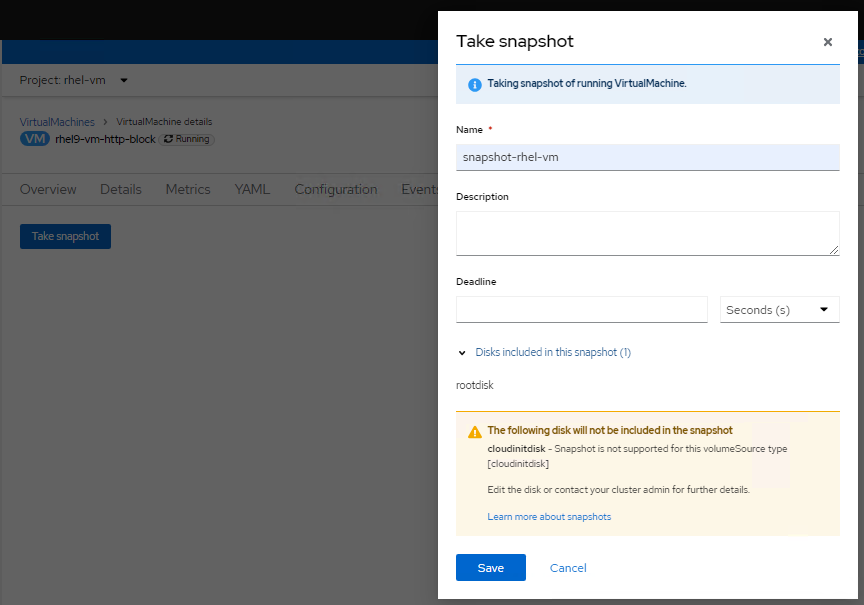
Al comprobar los registros del pod virt-handler (espacio de nombres openshift-cnnv), se muestran errores como los siguientes:
Al comprobar los registros del pod virt-handler (espacio de nombres openshift-cnnv), se muestran errores como los siguientes:
2023-08-14T02:23:33.722372232Z {"component":"virt-handler","kind":"","level":"error","msg":"No se pudo congelar VMI","name":"rhel9-vm-http-block",
"namespace":"rhel-vm","pos":"lifecycle.go:124","reason":"error del servidor.
La congelación del comando falló: \"LibvirtError(Code=1, Domain=10, Message='internal error: no se puede ejecutar el comando del agente QEMU 'guest-fsfreeze-freeze':
no se pudo abrir /zoner/sda: Permiso denegado')\"","timestamp":"2023-08-14T02:23:33.722321Z","uid":"c6894dc7-f29c-43e7-9817-3b12643040d1"}
"namespace":"rhel-vm","pos":"lifecycle.go:124","reason":"error del servidor.
La congelación del comando falló: \"LibvirtError(Code=1, Domain=10, Message='internal error: no se puede ejecutar el comando del agente QEMU 'guest-fsfreeze-freeze':
no se pudo abrir /zoner/sda: Permiso denegado')\"","timestamp":"2023-08-14T02:23:33.722321Z","uid":"c6894dc7-f29c-43e7-9817-3b12643040d1"}
Causa
Cree una VM a través de OpenShift Virtualization; el punto de montaje del LUN creado no se etiqueta como de confianza. Por lo tanto, durante el proceso de instantáneas de VM, el agente QEMU no puede abrir el punto de montaje (en este artículo de la base de conocimientos, el punto de montaje es /zoner/sda) y se le deniega el permiso mientras intenta realizar fsfreeze.
Resolución
Los pasos de resolución que se indican a continuación supondrán "/zoner/sda" como el punto de montaje.
Utilice el comando "df -h" y revise los registros de errores para confirmar el punto de montaje real de la VM que informa errores.
1. Confirme que el contexto de SELinux del punto de montaje muestre "unlabeled_t" mediante el siguiente comando:
# ls -lZd /zoner/sda/
2. Si se muestra "unlabeled_t", hay dos opciones para resolverlo.
- Opción 1: Para permitir que el agente de QEMU lea archivos no etiquetados.
# setsebool -P virt_qemu_ga_read_nonsecurity_files 1
- Option2: Para etiquetar el punto de montaje.
# restorecon -v /zoner/sda/
Productos afectados
APEX Cloud Platform for Red Hat OpenShiftPropiedades del artículo
Número del artículo: 000217270
Tipo de artículo: Solution
Última modificación: 18 sept 2026
Versión: 4
Encuentre respuestas a sus preguntas de otros usuarios de Dell
Servicios de soporte
Compruebe si el dispositivo está cubierto por los servicios de soporte.