Turno abierto: Falta cierta información de hardware en la página de vista Detalles del nodo de Red Hat Web Console
Resumen: Agregue nodos trabajadores a través de la función de adición de nodos de Dell APEX Cloud Platform. Falta la información de hardware de los nodos recién agregados en la página de vista Detalles de nodo de Red Hat Web Console. ...
Este artículo se aplica a
Este artículo no se aplica a
Este artículo no está vinculado a ningún producto específico.
No se identifican todas las versiones del producto en este artículo.
Síntomas
Inicie sesión en la consola web de Red Hat OpenShift, vaya al menú Compute, haga clic en el elemento Nodes y seleccione uno de los nodos trabajadores de la lista.
En la página Vista detallada del nodo, falta la información de CPU, discos y NIC, y se muestran 0 CPU, 0 discos y 0 NIC.
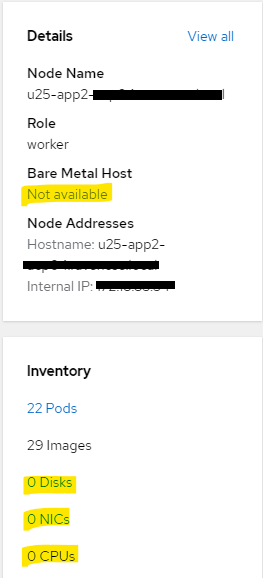
En la página Vista detallada del nodo, falta la información de CPU, discos y NIC, y se muestran 0 CPU, 0 discos y 0 NIC.
Causa
A fin de reforzar la seguridad en el entorno del cliente, el acceso a la red de iDRAC desde la red de administración no está permitido en la versión actual de Dell APEX Cloud Platform para RedHat Openshift.
Por lo tanto, después de agregar un nodo trabajador a través de la función de adición de nodos de Dell APEX Cloud Platform, la red de administración de nodos recién agregada no tendrá permiso para acceder a la red iDRAC del nodo y hará que falte información de hardware en la página de vista de nodos.
Este problema solo afecta al nodo trabajador que se agrega a través de la función de adición de nodos de Dell APEX Cloud Platform.
El nodo del plano de control no se ve afectado.
Este problema se corregirá en una versión futura de Dell APEX Cloud Platform para RedHat Openshift.
Por lo tanto, después de agregar un nodo trabajador a través de la función de adición de nodos de Dell APEX Cloud Platform, la red de administración de nodos recién agregada no tendrá permiso para acceder a la red iDRAC del nodo y hará que falte información de hardware en la página de vista de nodos.
Este problema solo afecta al nodo trabajador que se agrega a través de la función de adición de nodos de Dell APEX Cloud Platform.
El nodo del plano de control no se ve afectado.
Este problema se corregirá en una versión futura de Dell APEX Cloud Platform para RedHat Openshift.
Resolución
Para obtener la información de hardware faltante, el usuario puede navegar a la vista Inventario del plug-in de la consola web de Dell APEX Cloud Platform, los números de CPU se pueden encontrar en la vista de detalles del nodo y los detalles de la NIC se pueden encontrar en la vista posterior del nodo. Actualmente, los discos no se muestran en la vista Inventario para los nodos de clúster de computación.
Productos afectados
APEX Cloud Platform for Red Hat OpenShiftPropiedades del artículo
Número del artículo: 000217296
Tipo de artículo: Solution
Última modificación: 18 sept 2026
Versión: 5
Encuentre respuestas a sus preguntas de otros usuarios de Dell
Servicios de soporte
Compruebe si el dispositivo está cubierto por los servicios de soporte.