Turno abierto: La LCM del clúster fallaba durante el reinicio del nodo
Resumen: LCM fallaba durante el reinicio del nodo debido a que el pod de la controladora CSI y el pod del administrador de depósito entraban en interbloqueo.
Este artículo se aplica a
Este artículo no se aplica a
Este artículo no está vinculado a ningún producto específico.
No se identifican todas las versiones del producto en este artículo.
Síntomas
LCM fallaba durante la actualización de OCP o el reinicio del nodo; la interfaz de usuario de actualización perdía acceso.
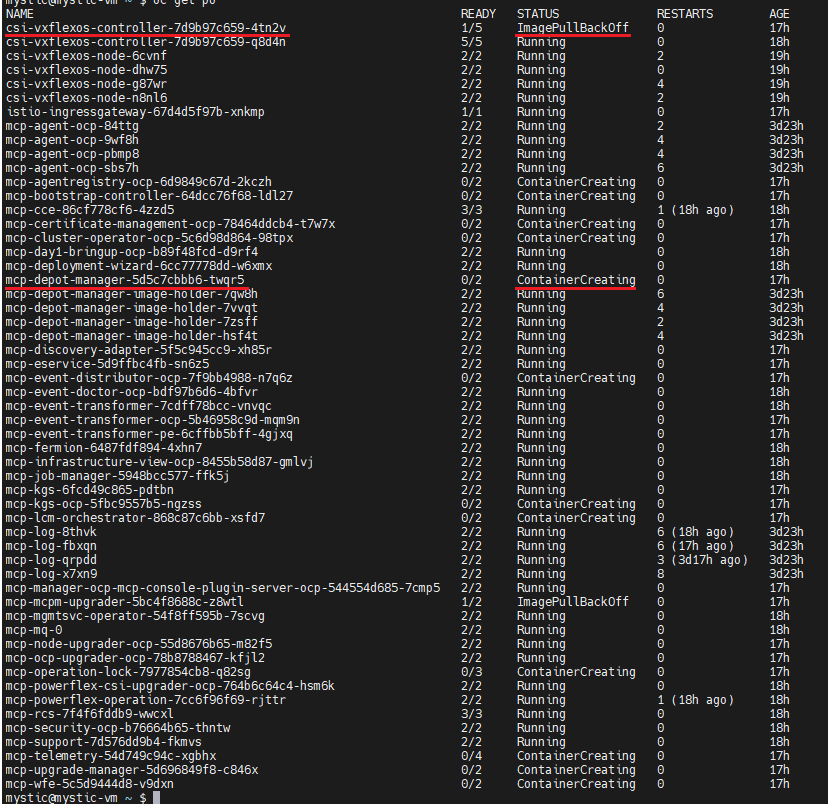
Inicie sesión en OCP, ejecute el comando "oc get pods -n dell-acp" para comprobar el estado de los pods, busque un pod csi-vxflexos-controller que esté en estado ImagePullBackOff y un pod mcp-depot-manager que esté en estado ContainerCreating Por ejemplo:
ejecute el comando "oc logs <pod_name> -n dell-acp -c driver" para comprobar los registros del pod.
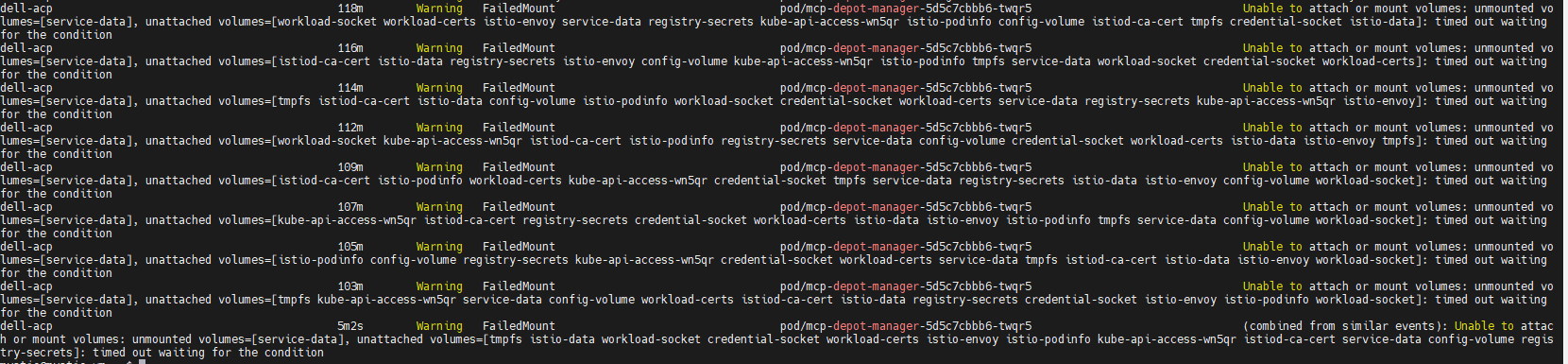
Ejecute el comando "oc describe pod <pod_name> -n dell-acp" para comprobar la creación del contenedor MCP-depot-manager (en la captura de pantalla de ejemplo anterior, el nombre del pod es mcp-depot-manager-5d5c7cbbb6-twqr5), informa la advertencia FailedMount de la siguiente manera:
ejecute el comando "oc get nodes" para comprobar el estado del nodo, hay un nodo en el estado SchedulingDisabled, por ejemplo:

Inicie sesión en OCP, ejecute el comando "oc get pods -n dell-acp" para comprobar el estado de los pods, busque un pod csi-vxflexos-controller que esté en estado ImagePullBackOff y un pod mcp-depot-manager que esté en estado ContainerCreating Por ejemplo:
ejecute el comando "oc logs <pod_name> -n dell-acp -c driver" para comprobar los registros del pod.
- En el pod en ejecución de csi-vxflexos-controller, el registro muestra que está intentando adquirir una concesión principal, por ejemplo:
mystic@mystic-vm:~$ oc logs csi-vxflexos-controller-7d9b97c659-q8d4n -n dell-acp -c driver
I0918 08:33:23.460955 1 leaderelection.go:248] Intentando adquirir el contrato de arrendamiento de líder dell-acp/driver-csi-vxflexos-dellemc-com...
I0918 08:33:23.460955 1 leaderelection.go:248] Intentando adquirir el contrato de arrendamiento de líder dell-acp/driver-csi-vxflexos-dellemc-com...
- En el pod ImagePullBackOff csi-vxflexos-controller, el registro muestra que adquirió correctamente el arriendo principal, por ejemplo:
mystic@mystic-vm:~$ oc logs csi-vxflexos-controller-7d9b97c659-4tn2v -n dell-acp -c driver
I0918 09:07:30.076298 1 leaderelection.go:248] Intentando adquirir el contrato de arrendamiento de líder dell-acp/driver-csi-vxflexos-dellemc-com...
I0918 09:07:46.074524 1 leaderelection.go:258] Arrendamiento adquirido correctamente dell-acp/driver-csi-vxflexos-dellemc-com
time="2023-09-18T09:07:46Z" level=info msg="configured 69de1f95f50e390f" allSystemNames= endpoint="https://dellpowerflex.h01.com" isDefault=true nasName=0xc000489950 nfsAcls= password="********" skipCertificateValidation=false systemID=69de1f95f50e390f user=admin
time="2023-09-18T09:07:46Z" level=info msg="archivo de configuración del controlador " file=/vxflexos-config-params/driver-config-params.yaml
time="2023-09-18T09:07:46Z" level=info msg="Leer CSI_LOG_FORMAT desde el archivo de configuración del registro" format=
text time="2023-09-18T09:07:46Z" level=info msg="Leer CSI_LOG_LEVEL desde el archivo de configuración del registro" fields.level=debug
time="2023-09-18T09:07:46Z" level=info msg="archivo de configuración de matriz" file=/vxflexos-config/config
time="2023-09-18T09:07:46Z" level=info msg="Sondeando todos los arreglos. Cantidad de arreglos: 1"
time="2023-09-18T09:07:46Z" level=info msg="el array predeterminado está configurado en array ID: 69de1f95f50e390f"
time="2023-09-18T09:07:46Z" level=info msg="69de1f95f50e390f es el arreglo predeterminado, omitiendo la actualización del mapa VolumePrefixToSystems. \n"
time="2023-09-18T09:07:46Z" level=info msg="array 69de1f95f50e390f probed successfully"
time="2023-09-18T09:07:46Z" level=info msg="configured csi-vxflexos.dellemc.com" IsApproveSDCEnabled=false IsHealthMonitorEnabled=false IsQuotaEnabled=false IsSdcRenameEnabled=false MaxVolumesPerNode=0 allowRWOMultiPodAccess=false autoprobe=true externalAccess= mode=controller nfsAcls= privatedir=/dev/disk/csi-vxflexos sdcGUID= sdcPrefix= thickprovision=false
time="2023-09-18T09:07:46Z" level=info msg="servicio de identidad registrado"
time="2023-09-18T09:07:46Z" level=info msg="servicio de controlador registrado"
time="2023-09-18T09:07:46Z" level=info msg="Registro de servidores GRPC adicionales"
time="2023-09-18T09:07:46Z" level=info msg=serving endpoint="unix:///var/run/csi/csi.sock"
I0918 09:07:30.076298 1 leaderelection.go:248] Intentando adquirir el contrato de arrendamiento de líder dell-acp/driver-csi-vxflexos-dellemc-com...
I0918 09:07:46.074524 1 leaderelection.go:258] Arrendamiento adquirido correctamente dell-acp/driver-csi-vxflexos-dellemc-com
time="2023-09-18T09:07:46Z" level=info msg="configured 69de1f95f50e390f" allSystemNames= endpoint="https://dellpowerflex.h01.com" isDefault=true nasName=0xc000489950 nfsAcls= password="********" skipCertificateValidation=false systemID=69de1f95f50e390f user=admin
time="2023-09-18T09:07:46Z" level=info msg="archivo de configuración del controlador " file=/vxflexos-config-params/driver-config-params.yaml
time="2023-09-18T09:07:46Z" level=info msg="Leer CSI_LOG_FORMAT desde el archivo de configuración del registro" format=
text time="2023-09-18T09:07:46Z" level=info msg="Leer CSI_LOG_LEVEL desde el archivo de configuración del registro" fields.level=debug
time="2023-09-18T09:07:46Z" level=info msg="archivo de configuración de matriz" file=/vxflexos-config/config
time="2023-09-18T09:07:46Z" level=info msg="Sondeando todos los arreglos. Cantidad de arreglos: 1"
time="2023-09-18T09:07:46Z" level=info msg="el array predeterminado está configurado en array ID: 69de1f95f50e390f"
time="2023-09-18T09:07:46Z" level=info msg="69de1f95f50e390f es el arreglo predeterminado, omitiendo la actualización del mapa VolumePrefixToSystems. \n"
time="2023-09-18T09:07:46Z" level=info msg="array 69de1f95f50e390f probed successfully"
time="2023-09-18T09:07:46Z" level=info msg="configured csi-vxflexos.dellemc.com" IsApproveSDCEnabled=false IsHealthMonitorEnabled=false IsQuotaEnabled=false IsSdcRenameEnabled=false MaxVolumesPerNode=0 allowRWOMultiPodAccess=false autoprobe=true externalAccess= mode=controller nfsAcls= privatedir=/dev/disk/csi-vxflexos sdcGUID= sdcPrefix= thickprovision=false
time="2023-09-18T09:07:46Z" level=info msg="servicio de identidad registrado"
time="2023-09-18T09:07:46Z" level=info msg="servicio de controlador registrado"
time="2023-09-18T09:07:46Z" level=info msg="Registro de servidores GRPC adicionales"
time="2023-09-18T09:07:46Z" level=info msg=serving endpoint="unix:///var/run/csi/csi.sock"
Ejecute el comando "oc describe pod <pod_name> -n dell-acp" para comprobar la creación del contenedor MCP-depot-manager (en la captura de pantalla de ejemplo anterior, el nombre del pod es mcp-depot-manager-5d5c7cbbb6-twqr5), informa la advertencia FailedMount de la siguiente manera:
ejecute el comando "oc get nodes" para comprobar el estado del nodo, hay un nodo en el estado SchedulingDisabled, por ejemplo:
Causa
Si el pod activo csi-controller y mcp-depot-manager se encuentran en el mismo nodo, cuando LCM reinicie el nodo, csi-controller y depot-manager se reprogramarán en los nuevos nodos. Durante el arranque del pod, csi-controller y depot-manager entran en un punto muerto y no pueden arrancar.
Resolución
1. Ejecute el comando "oc get pods -n dell-acp |grep csi" para identificar el nombre del pod de la controladora de CSI con estado incorrecto.
2. Ejecute el comando "oc delete pod <pod_name> -n dell-acp" para eliminar el pod o los pods identificados.
Por ejemplo:

3. Espere varios minutos y ejecute el comando "oc get pods -n dell-acp" para asegurarse de que todos los pods estén en estado Running. Si aún hay un pod csi-controller o mcp-depot-manager que no se están ejecutando, vuelva a intentarlo en el paso anterior.
4. Hasta que todos los pods se encuentren en estado Running, vuelva a intentar la LCM para continuar con la actualización del clúster.
2. Ejecute el comando "oc delete pod <pod_name> -n dell-acp" para eliminar el pod o los pods identificados.
Por ejemplo:
3. Espere varios minutos y ejecute el comando "oc get pods -n dell-acp" para asegurarse de que todos los pods estén en estado Running. Si aún hay un pod csi-controller o mcp-depot-manager que no se están ejecutando, vuelva a intentarlo en el paso anterior.
4. Hasta que todos los pods se encuentren en estado Running, vuelva a intentar la LCM para continuar con la actualización del clúster.
Propiedades del artículo
Número del artículo: 000217992
Tipo de artículo: Solution
Última modificación: 18 sept 2026
Versión: 4
Encuentre respuestas a sus preguntas de otros usuarios de Dell
Servicios de soporte
Compruebe si el dispositivo está cubierto por los servicios de soporte.