How to Download the CrowdStrike Falcon Sensor
Resumen: Learn how to download the CrowdStrike Falcon Sensor from the Falcon Console for Windows, macOS, or Linux.
Este artículo se aplica a
Este artículo no se aplica a
Este artículo no está vinculado a ningún producto específico.
No se identifican todas las versiones del producto en este artículo.
Instrucciones
Note: The process to access the CrowdStrike Falcon Sensor download is the same regardless of if it is purchased from Dell or CrowdStrike.
- In a web browser, go to https://falcon.crowdstrike.com/login/
.
- Log In to the Falcon Console.

- In the left menu pane, click Host setup and management and then select Sensor Downloads.
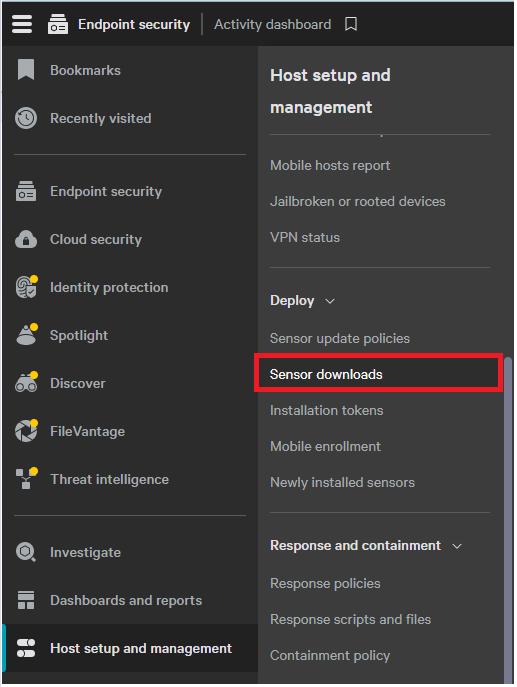 Note: The layout in the example may differ slightly from your environment.
 - Click the Download icon on the appropriate operating system.
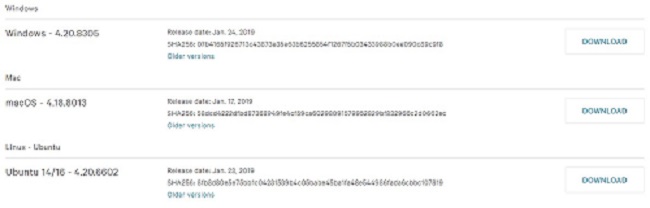
Note: The operating system versions may differ from the example.
Productos afectados
CrowdStrikePropiedades del artículo
Número del artículo: 000156053
Tipo de artículo: How To
Última modificación: 10 ago 2026
Versión: 20
Encuentre respuestas a sus preguntas de otros usuarios de Dell
Servicios de soporte
Compruebe si el dispositivo está cubierto por los servicios de soporte.