NetWorker: Unable to log in to the NMC. NetWorker AUTHC server encounters 'java.io.IOException: toDERInputStream: tag 45'
Resumen: The NetWorker Management Console (NMC) fails to launch due to a connection issue with the server on port 9090.
Este artículo se aplica a
Este artículo no se aplica a
Este artículo no está vinculado a ningún producto específico.
No se identifican todas las versiones del producto en este artículo.
Síntomas
The following error appears while logging in to the NetWorker Management Console (NMC):
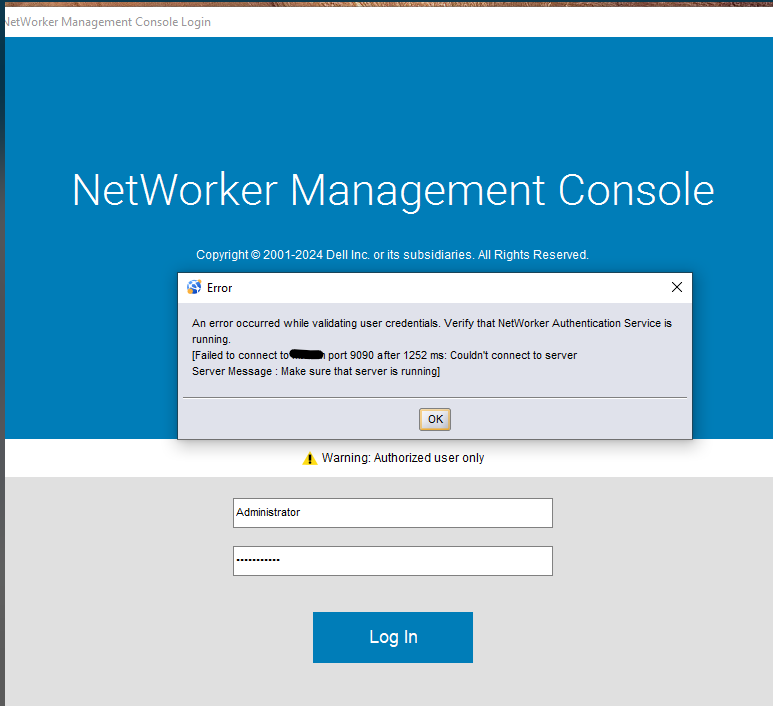
nsrlogin fails with the following error:
Authentication library error: Failed to connect to localhost port 9090 after 1220 ms: Couldn't connect to server
Server Message: Make sure that server is running
Error when verifying contents of authc.keystore:
keytool -list -keystore "C:\Program Files\EMC NetWorker\nsr\authc-server\tomcat\conf\authc.keystore" -storepass <password>"

Error: `java.io.IOException: toDERInputStream: tag 45`
NOTE: The above path assumes the default installation path on Windows. If NetWorker was installed in another location, use the full path for
..\nsr\authc-server\tomcat\conf\authc.keystore. The file is located under /nsr/authc/conf/authc.keystore on Linux.
The following is seen in the NetWorker server's authc-server.log:
- Linux:
/nsr/authc/logs/authc-server.log - Windows:
C:\Program Files\EMC NetWorker\nsr\authc-server\tomcat\logs\authc-server.log:
Failed to load server keys from key store: An error occurred while loading server keys: Failed to initialize key store <Path to-nsr>\nsr\authc-server\tomcat\conf\authc.keystore
Default server keys will be used
Server certificate is not available, please check your configuration
Causa
The authc.keystore was accidentally overwritten with a certificate private key instead of a valid JKS format, resulting in authentication errors.
Resolución
The authc.keystore must be re-created.
NOTE: If the NetWorker Authentication service (AUTHC) was previously configured to use CA-signed certificates. The certificates must be reimported after performing the below procedure. This process is documented in the articles listed in the Additional Info section.
Linux Server:
- Stop NetWorker services:
nsrshutdown -forsystemctl stop networker - Rerun the AUTHC configuration script:
/opt/nsr/authc-server/scripts/authc_configure.sh
When prompted if you would like to use the existing keystore. Enter "n" and a new keystore is created.
root@lnx-srvr03:~# /opt/nsr/authc-server/scripts/authc_configure.sh

Specify the directory where the Java Standard Edition Runtime Environment (JRE) software is installed [/opt/nre/java/latest]:

The installation process will install an Apache Tomcat instance.
For optimum security, EMC NetWorker Authentication Service will
use a non-root user (nsrtomcat) to start the Apache Tomcat instance.
If your system has special user security requirements, ensure that proper
operational permissions are granted to this non-root user (nsrtomcat).
Please refer to NetWorker Installation Guide.

The Apache Tomcat will use "lnx-srvr03.networker.lan" as the host name.
The Apache Tomcat will use "9090" as the port number.

The NetWorker Authentication Service requires a keystore file to configure encryption and to provide SSL support.

EMC recommends that you specify a keystore password that has a minimum of six characters.

Do you want to use the existing keystore /nsr/authc/conf/authc.keystore [y]? n

The installation process will create a new keystore file.

Specify the keystore password:
Confirm the password:

Creating the installation log in /opt/nsr/authc-server/logs/install.log.

Performing initialization. Please wait...


The installation completed successfully.
- Start NetWorker services:
systemctl start networker - Validate that authentication works:
nsrlogin -u administrator`
You are prompted to enter the NetWorker administrator password. If authentication succeeds, run:nsrlogout
Windows Server:
- Uninstall NetWorker.
NOTE: This does not remove any NetWorker configurations or files. The
authc.keystore and authc.truststore files are created during AUTHC installation.
- Rename
authc.keystore,authc.truststore. Default path:
C:\Program Files\EMC NetWorker\nsr\authc-server\tomcat\conf\authc.keystoreC:\Program Files\EMC NetWorker\nsr\authc-server\conf\authc.truststore
- Reinstall NetWorker over the previous installation path.
- Post-installation validation, run:
nsrlogin -u administrator`
You are prompted to enter the NetWorker administrator password. If authentication succeeds, run:nsrlogout
Información adicional
Productos afectados
NetWorkerProductos
NetWorker FamilyPropiedades del artículo
Número del artículo: 000388699
Tipo de artículo: Solution
Última modificación: 07 ene 2026
Versión: 1
Encuentre respuestas a sus preguntas de otros usuarios de Dell
Servicios de soporte
Compruebe si el dispositivo está cubierto por los servicios de soporte.