Dell EMC Unity:NDMPを有効にして構成する方法(ユーザー修正可能)
Resumen: アレイでNDMPを構成する方法
Este artículo se aplica a
Este artículo no se aplica a
Este artículo no está vinculado a ningún producto específico.
No se identifican todas las versiones del producto en este artículo.
Instrucciones
Unisphere GUIから:
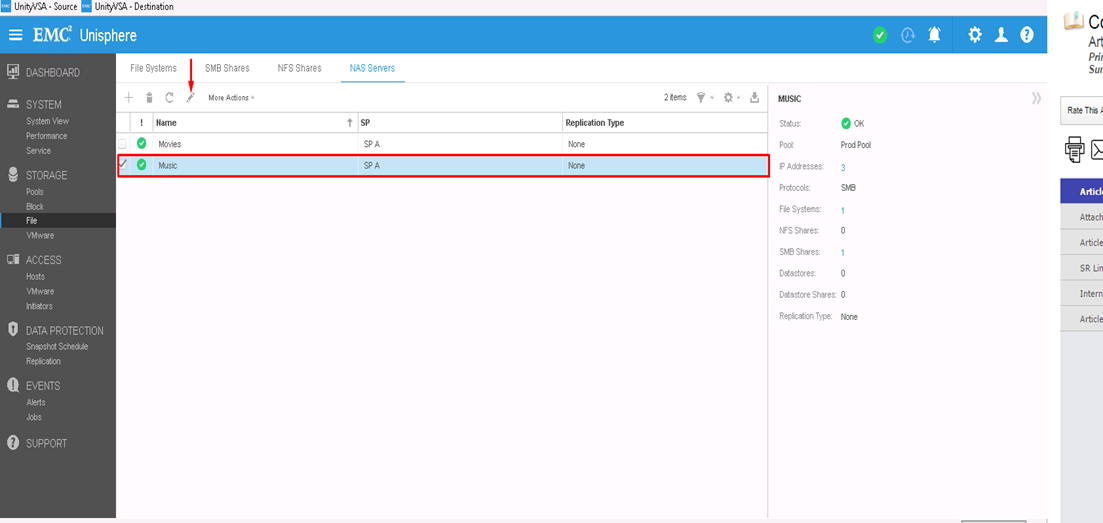
- まず、NDMPを構成するNASサーバーを選択し、編集アイコンをクリックして変更します
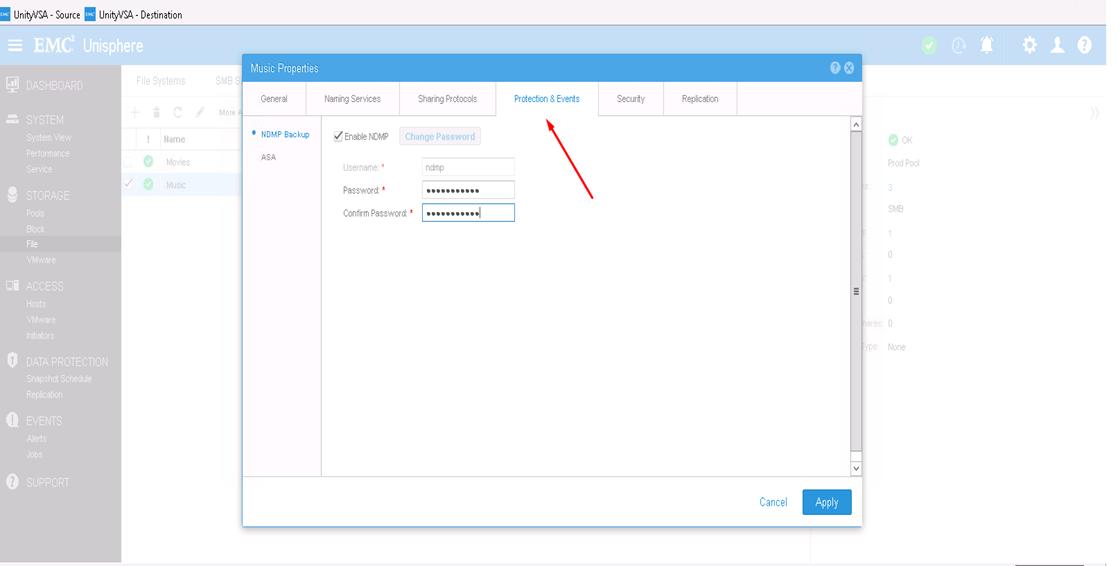
- [Protection & events]タブでは、定義したユーザー名とパスワードを使用してNDMPチェック ボックスを有効にできます
CLIから:
1) uemcli -d <array_ip> -u admin -p <admin_pwd> /net/nas/server show
を使用して、NASサーバーのリソースIDを確認します。uemcli -d <array_ip> -u admin -p <admin_pwd /net/nas/ndmp -server><nas_x> set enabled yes passwd ndmp_pwd
上記では、ユーザー名「ndmp」を使用してUnityでNDMPを有効にします。
バックアップ クライアントからは、NASサーバーのIPアドレス、ログイン ユーザーとしての「ndmp」、NDMPバックアップ用に構成されたパスワードを使用できます。
Productos afectados
Dell EMC Unity FamilyProductos
Dell EMC Unity Family, VNXe1 Series, VNXe2 SeriesPropiedades del artículo
Número del artículo: 000022637
Tipo de artículo: How To
Última modificación: 16 oct 2025
Versión: 3
Encuentre respuestas a sus preguntas de otros usuarios de Dell
Servicios de soporte
Compruebe si el dispositivo está cubierto por los servicios de soporte.