Latitude 3510: Vejledning til tastaturfunktioner
Resumen: Følgende vejledning viser de tilgængelige tastaturgenveje og de funktioner, som de udfører på en bærbar Dell Latitude 3510-pc.
Este artículo se aplica a
Este artículo no se aplica a
Este artículo no está vinculado a ningún producto específico.
No se identifican todas las versiones del producto en este artículo.
Síntomas
Tastaturgenvejsfunktioner
Nedenstående tabel er en liste over funktioner af genvejstastekombinationer på Latitude 3510 Notebook
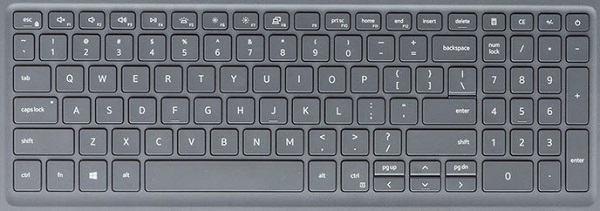
| Taster | Primær funktion | Sekundær funktion (FN +-tast) |
|---|---|---|
| Fn + Esc | Esc |
Slå Fn-nøglelås til og fra |
| Fn + F1 |
Slå lyd fra |
F1 |
| Fn + F2 |
Lydstyrke ned |
F2 |
| Fn + F3 |
Lydstyrke op |
F3 |
| Fn + F4 |
Slå mikrofon fra |
F4 |
| Fn + F5 |
Tænd/sluk for tastaturets baggrundsbelysning |
F5 |
| Fn + F6 |
Reducer lysstyrke |
F6 |
| Fn + F7 |
Øg lysstyrke |
F7 |
| Fn + F8 |
Skift til ekstern skærm |
F8 |
| Fn + F10 |
Print Screen |
F10 |
| Fn + F11 |
Start |
F11 |
| Fn + F12 |
End |
F12 |
| Fn + CTRL |
Åbn programmenuen |
-- |
Bemærk: Tastaturets baggrundsbelysningsfunktion afhænger af, om der er monteret et tastatur med mulighed for baggrundsbelysning på din bærbare computer.
Causa
Ikke relevant.
Resolución
 Besøg vores vidensbase for tastaturer for at få flere ressourcer og oplysninger.
 Du kan finde yderligere artikler og oplysninger på vores supportside for berøringsplade.
 Du kan også finde yderligere artikler og oplysninger på vores side med support til mus.
Productos afectados
Latitude 3510Propiedades del artículo
Número del artículo: 000129906
Tipo de artículo: Solution
Última modificación: 19 abr 2026
Versión: 8
Encuentre respuestas a sus preguntas de otros usuarios de Dell
Servicios de soporte
Compruebe si el dispositivo está cubierto por los servicios de soporte.