Dell Encryption Uninstaller falla con un error genérico debido a tener activada la autenticación previa al arranque
Resumen: En este artículo, se describe la falla de Dell Encryption Uninstaller en las terminales que tienen activada la autenticación previa al arranque (PBA).
Síntomas
Productos afectados:
- Dell Encryption Self-Encrypting Drive Manager
- Dell Full Disk Encryption
Versiones afectadas:
- v10.6 y posteriores
Sistemas operativos afectados:
- Windows
Causa
Si intenta desinstalar Dell Encryption mediante el archivo ejecutable de Dell Encryption Uninstaller (C:\Program Files (x86)\Dell\Dell Data Protection\DataSecurityUninstaller.exe) en terminales que tengan activada la autenticación previa al arranque, el desinstalador se cerrará de inmediato con un error genérico.
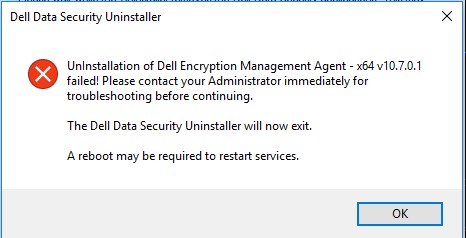
El archivo DDPUninstall_Main.log en C:\ProgramData\Dell\Dell Data Protection\ no muestra ninguna información adicional sobre el error.
2021-07-22 14:31:24,873 [3] INFO  CommonLib.Log - Worker.UninstallApps: Beginning uninstall for Dell Encryption Management Agent - x64 v10.7.0.1

2021-07-22 14:31:24,873 [3] DEBUG CommonLib.Log - MSIPackage.InstallApplication: Starting install of Dell Encryption Management Agent - x64 v10.7.0.1 version  with command line - C:\Windows\system32\msiexec.exe /x "{2D4F7762-D922-4F2C-85FB-07B0E17EA5F8}" /qn REBOOT=ReallySuppress  /l*v "C:\ProgramData\dell\Dell Data Protection\DDP_ClientSecurityFramework_Uninstall_MSI.log"

2021-07-22 14:31:28,373 [3] INFO  CommonLib.Log - MSIPackage.InstallApplication: Installation of Dell Encryption Management Agent - x64 v10.7.0.1 complete. Return code = 1603

2021-07-22 14:31:28,373 [3] ERROR CommonLib.Log - UnInstallation of Dell Encryption Management Agent - x64 v10.7.0.1 failed! Please contact your Administrator immediately for troubleshooting before continuing.
Si revisa el archivo DDP_ClientSecurityFramework_Uninstall_MSI.log, es posible leer el siguiente error en el momento del intento de desinstalación.
MSI (s) (C4:F4) [14:31:28:279]: Product: Dell Encryption Management Agent - x64 -- The PBA must be deactivated prior to uninstall. Retry this uninstallation after the PBA is deactivated.

The PBA must be deactivated prior to uninstall. Retry this uninstallation after the PBA is deactivated.
Resolución
Para ejecutar el desinstalador de Dell Encryption en una terminal protegida con Dell Full Disk Encryption o Dell Encryption Self-Encrypting Drive Manager, primero debe desactivar la autenticación previa al arranque.
Para desactivar la autenticación previa al arranque, consulte la Guía de instalación avanzada de Dell Encryption Enterprise.