AppSync: How to determine the version in use
Resumen: How to determine the version of AppSync in use.
Este artículo se aplica a
Este artículo no se aplica a
Este artículo no está vinculado a ningún producto específico.
No se identifican todas las versiones del producto en este artículo.
Instrucciones
To determine the current version of AppSync software in use, follow one of the methods listed below:
AppSync UI:
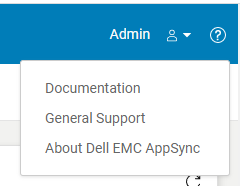
Fig.2
AppSync Logs:
Note: The version of AppSync displayed in "Control Panel\Programs\Programs and Features" is not sufficient as it does not confirm whether AppSync hotfixes have been installed.
AppSync UI:
- Open the AppSync UI and login.
- Click on "?" in the top right of the window. (Fig.1)
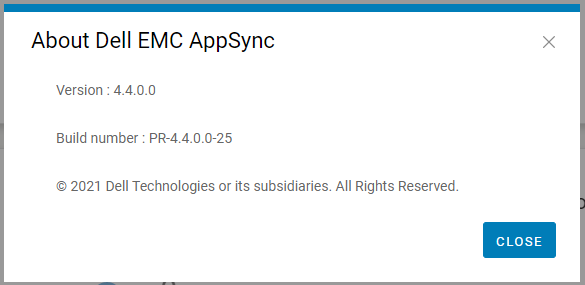
- Click on "About Dell EMC Appsync". (Fig.2)
- Quote this version and build number displayed to Dell AppSync technical support.
Fig.2
AppSync Logs:
- On the AppSync server, navigate to the logs directory in the install location (typically C:\EMC\AppSync\jboss\logs).
- Open server.log using a text editor.
- The first two line indicates the version of AppSync in use and whether any hotfixes are installed.
e.g. Sample server.log snippet (version = 4.3.0.0 & hotfix 3315_R1 is installed)
The current version of AppSync Server is 4.3.0.0_3315_R1
4. Quote this version and hotfix status displayed to Dell AppSync technical support.
The current version of AppSync Server is 4.3.0.0_3315_R1
Note: The version of AppSync displayed in "Control Panel\Programs\Programs and Features" is not sufficient as it does not confirm whether AppSync hotfixes have been installed.
Productos afectados
AppSync, AppSyncPropiedades del artículo
Número del artículo: 000199464
Tipo de artículo: How To
Última modificación: 14 may 2026
Versión: 7
Encuentre respuestas a sus preguntas de otros usuarios de Dell
Servicios de soporte
Compruebe si el dispositivo está cubierto por los servicios de soporte.