vProtect:備份失敗,並顯示「無法從裝置讀取:/dev/sdX - 檢查 vProtect 使用者許可權」
Resumen: 備份失敗並出現許可權問題:「無法從裝置 /dev/sdX 讀取 - 檢查 vProtect 使用者許可權。」即使 vProtect 共用的許可權和 vProtect 使用者擁有正確的許可權,仍會發生這種情況。
Este artículo se aplica a
Este artículo no se aplica a
Este artículo no está vinculado a ningún producto específico.
No se identifican todas las versiones del producto en este artículo.
Síntomas
備份失敗並出現許可權問題:「無法從裝置 /dev/sdX 讀取 - 檢查 vProtect 使用者許可權。」即使 vProtect 共用的許可權和 vProtect 使用者擁有正確的許可權,仍會發生這種情況。
當附加備份的磁片未分離時,會產生此錯誤。這可能是因為 Hypervisor 未根據分離要求採取行動,或 LVM 篩選器未正確設定,且作業系統保留磁片。
Causa
/etc/lvl/lvm.conf 檔案未正確設定。沒有設定 LVM 篩選準則。
# cat lvm.conf | grep filter

# is used to drive LVM filtering like MD component detection, multipath
        # Configuration option devices/filter.
        # Run vgscan after changing the filter to regenerate the cache.
        # filter = [ "a|.*|" ]
        # filter = [ "r|/dev/cdrom|" ]
        # filter = [ "a|loop|", "r|.*|" ]
        # filter = [ "a|loop|", "r|/dev/hdc|", "a|/dev/ide|", "r|.*|" ]
        # filter = [ "a|^/dev/hda8$|", "r|.*|" ]
        # filter = [ "a|.*|" ]
        # Configuration option devices/global_filter.
        # Because devices/filter may be overridden from the command line, it is
        # not suitable for system-wide device filtering, e.g. udev.
        # Use global_filter to hide devices from these LVM system components.
        # The syntax is the same as devices/filter. Devices rejected by
        # global_filter are not opened by LVM.
        # global_filter = [ "a|.*|" ]
        # This is a quick way of filtering out block devices that are not
        # the LVs with device filters. Also, when this setting is enabled,
        # filtered), which can cause performance problems on systems with
        # an LV. The LVs are ignored using a built in device filter that
        # Configuration option activation/mlock_filter.
        # mlock_filter = [ "locale/locale-archive", "gconv/gconv-modules.cache" ]
對於作業系統來說,這點非常重要,而且所需的磁片磁碟機會位於 lvm.conf 檔案的裝置區段中的篩選器中。
Resolución
vProtect 節點附加的虛擬機器磁片可能是其專屬的複製 (例如,從範本部署節點)。您必須在節點上設定 LVM,以免掃描連接磁片的 LVM 磁片區。
- 在裝置區段中設定 /etc/lvm/lvm.conf 中的下列變數,以便 LVM 精靈僅偵測系統磁片區 (在此範例中,SDA 磁片具有兩個分割區;sda1 和 sda2):
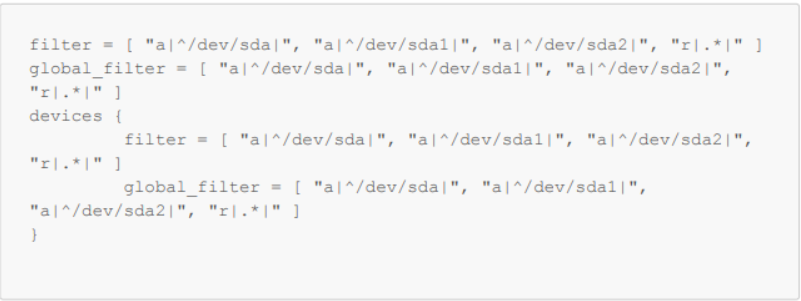
圖 1:在 /etc/lvm/lvm.conf 中設定變數
- 請與 vgscan 確認是否仍在偵測到您的作業系統磁片區:
-vvv

圖 2:檢查是否偵測到作業系統磁片區。
- 重新啟動
Productos afectados
vProtectPropiedades del artículo
Número del artículo: 000218735
Tipo de artículo: Solution
Última modificación: 31 oct 2023
Versión: 2
Encuentre respuestas a sus preguntas de otros usuarios de Dell
Servicios de soporte
Compruebe si el dispositivo está cubierto por los servicios de soporte.