Dell EMC Unity: Snapshots stuck in "Destroying" state (User Correctable)
Resumen: This article provides an overview on why Snapshots may get stuck in "Detroy" status for a while, and what can be done in order to resolve it.
Este artículo se aplica a
Este artículo no se aplica a
Este artículo no está vinculado a ningún producto específico.
No se identifican todas las versiones del producto en este artículo.
Síntomas
- Snapshots hung in "Destroy" status for several days, and everyday there's 1 more.
- When attempting to delete them CLI/GUI, error message is prompt:
"Failed: Unable to proceed with the requested operation because the specified snapshot if being deleted. (Error Code: 0x6000beb)"
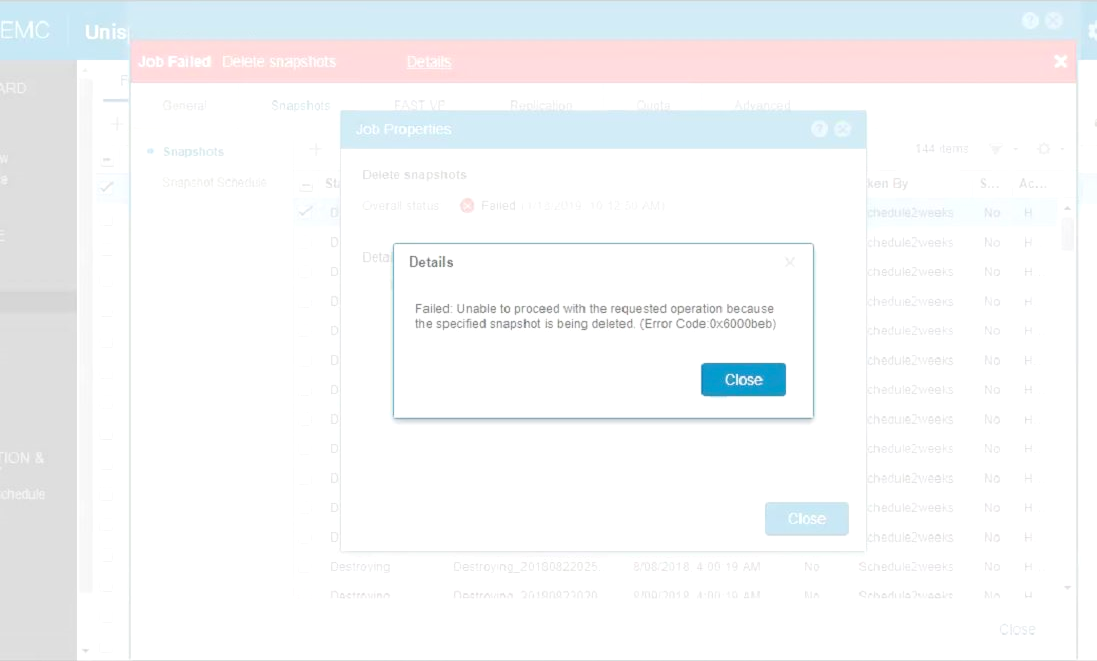
- Example FileSystem currently has 144 snapshots that were created by snapshot schedule Schedule2weeks (snapSch_01).
- snapSch_01 (Schedule2weeks) rule it's to create a snapshot Every day at 02:00 (UTC), retain for 14 days.
- This is also part of Replication, which means that it should have at most 16 snapshots at any one time; 2 for replication and 14 taken by the schedule.
- Checking this FileSystem 2 days later has shown that the Snap Count had increased by 43.
Causa
There are several causes for this issue to occur:
2. Pausing session does not unprotect snapshots, so when it's in "Destroying" state it's skipped for transfer, and it won't be unprotected.
1. Snapshots are too large, and require a long time to destroy.
2. Pausing session does not unprotect snapshots, so when it's in "Destroying" state it's skipped for transfer, and it won't be unprotected.
Resulting in, when the Unity Administrator pauses sessions and deletes protected snapshots, those cannot be completely destroyed, leaving then at a "hung" status.
Resolución
In most cases, waiting until the snapshots are cleared ends up by destroying the snapshots.
However, you may attempt a Workaround, which is deleting the replication session(s).
Please note that, this issue is common to Unity OE Code 4.2.x and was permanently fixed on Unity OE Version 4.3.1.1525703027.
For more information on Unity OE Releases, please see Article Number 000489694 - Dell EMC Unity: OE Revision Matrix, at https://www.dell.com/support.
Alternatively, contact Dell EMC Support and reference this Knowledge Base Article.
However, you may attempt a Workaround, which is deleting the replication session(s).
Please note that, this issue is common to Unity OE Code 4.2.x and was permanently fixed on Unity OE Version 4.3.1.1525703027.
For more information on Unity OE Releases, please see Article Number 000489694 - Dell EMC Unity: OE Revision Matrix, at https://www.dell.com/support.
Alternatively, contact Dell EMC Support and reference this Knowledge Base Article.
Productos afectados
Dell EMC Unity FamilyProductos
Dell Unity 300, Dell EMC Unity 300F, Dell EMC Unity 350F, Dell EMC Unity XT 380, Dell EMC Unity 400, Dell EMC Unity 400F, Dell EMC Unity 450F, Dell EMC Unity XT 480, Dell EMC Unity XT 480F, Dell EMC Unity 500, Dell EMC Unity 500F, Dell EMC Unity 550F
, Dell EMC Unity 600, Dell EMC Unity 600F, Dell EMC Unity 650F, Dell EMC Unity XT 680, Dell EMC Unity XT 680F, Dell EMC Unity XT 880, Dell EMC Unity XT 880F, Dell EMC Unity Family |Dell EMC Unity All Flash, Dell EMC Unity Family, Dell EMC Unity Hybrid
...
Propiedades del artículo
Número del artículo: 000057265
Tipo de artículo: Solution
Última modificación: 17 abr 2026
Versión: 4
Encuentre respuestas a sus preguntas de otros usuarios de Dell
Servicios de soporte
Compruebe si el dispositivo está cubierto por los servicios de soporte.