PowerStore: NDU Fails with "Cluster upgrade failed. Appliance upgrade succeeded" Due to VASA Bind/Unbind Operations
Resumen: A Non-Disruptive Upgrade (NDU) may fail while VMware vVol operations are active.
Este artículo se aplica a
Este artículo no se aplica a
Este artículo no está vinculado a ningún producto específico.
No se identifican todas las versiones del producto en este artículo.
Síntomas
Users running an NDU may observe the following error during or after the upgrade process:
com.emc.bedrock.core.exceptions.ServiceMessageException: Cluster upgrade failed. Appliance upgrade succeeded. Failed to perform post upgrade commands: The following commands cannot be running during upgrade: [BindVirtualVolumeCommand(26), UnbindVirtualVolumeCommand(6)]. Please run upgrade again after these operations completeSeen in Job Details pane in PowerStore Manager:
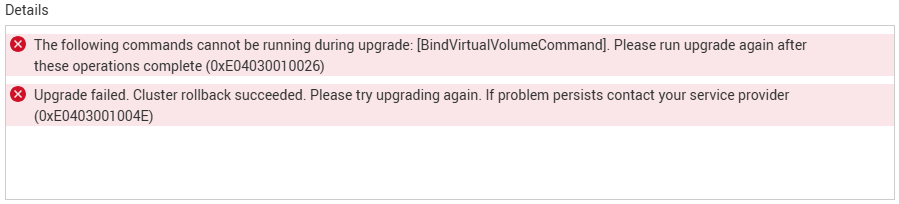
The failure typically occurs during the DataMigrationTasks phase of the NDU workflow. In affected environments, VMware VASA bind and unbind operations remain in progress while the upgrade is executing.
Causa
This issue is caused by a design inconsistency between the VASA provider and the NDU command validation process:
- VASA bind and unbind operations are permitted to start during an NDU.
- NDU validation logic does not allow these commands to remain active during upgrade completion.
- As a result, the upgrade detects the commands as incomplete and fails the cluster upgrade workflow.
Resolución
Immediate Recovery
No service procedure is required.
- Verify that VMware vVol-related operations have completed.
- Ensure no large-scale VM power-on or power-off activities are occurring.
- Retry the NDU after the VASA bind and unbind operations have finished.
Recommended Workaround
To minimize the likelihood of encountering this issue during NDU:
- Place ESXi hosts in maintenance mode before starting the upgrade when operationally feasible.
- Avoid VM provisioning activities during the NDU window.
- Avoid host registration and unregistration operations.
- Avoid vMotion activities.
- Avoid DRS (Distributed Resource Scheduler) operations.
- Avoid other dynamic VMware resource management activities.
- Schedule NDU during periods of low VMware workload activity.
Productos afectados
PowerStorePropiedades del artículo
Número del artículo: 000500940
Tipo de artículo: Solution
Última modificación: 09 sept 2026
Versión: 1
Encuentre respuestas a sus preguntas de otros usuarios de Dell
Servicios de soporte
Compruebe si el dispositivo está cubierto por los servicios de soporte.