Dell Networking SONiC Static y LACP PortChannel
Resumen: En este artículo, se explica Static y LACP PortChannel en switches que ejecutan SoNiC OS de Dell Networking. En este artículo, no se aborda MC-LAG. En este artículo, se utiliza un switch que ejecuta Dell SONiC 4.1. ...
Instrucciones
Requisitos previos del artículo
Utilizamos la denominación de interfaz estándar en la configuración. Para obtener más información acerca de los diversos modos de asignación de nombres de interfaces en Dell SONiC, consulte Dell Networking serie S: Configuración de interfaz básica: SONiC 4.0
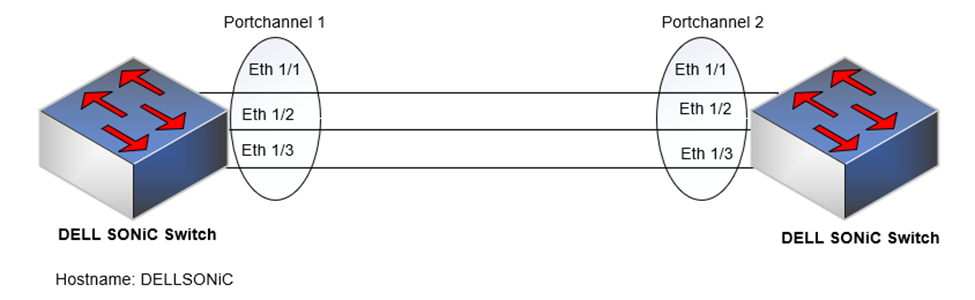
Las interfaces que se agregarán en PortChannel, Eth 1/1, 1/2 y 1/3 se deben configurar para la misma velocidad, dúplex y MTU.
Índice
¿Qué es portchannel?
Puntos para recordar
PortChannel estático o modo
ONPortChannel de LACP o modo
activoMínimo de enlaces
MTU
¿Qué es portchannel?
Un canal de puerto es un conjunto de uno o más enlaces que se pueden agregar juntos para formar un canal adherido (grupo de agregación de enlaces, LAG o PortChannel).
Beneficios de crear un PortChannel
- Esto proporciona redundancia, mayor ancho de banda y mejor balanceo de carga de tráfico.
- Un canal de puerto agrega el ancho de banda de los vínculos miembros.
- Si un puerto miembro falla, el tráfico se redirige a los puertos restantes.
Tipos de canal de puerto
PortChannel se puede configurar como
- PortChannel estático o modo ON
- PortChannel de LACP o modo activo
Puntos para recordar
- Utilice LLDP para verificar las conexiones de enlace si el lado par es compatible con LLDP
- La cantidad máxima de interfaces en un PortChannel es 32
- Un PortChannel se puede configurar como modo de switchport L2 y modo de puerto enruido L3 (asignar dirección Ipv4/IPV6)
A continuación, se muestran los puntos que se deben recordar cuando se agrega una interfaz a un portchannel.
- Todos los miembros deben ser del mismo tipo de interfaz (como Ethernet).
- Todas las interfaces miembro deben tener la misma velocidad/dúplex/MTU.
- Una interfaz no debe contener ajustes de configuración L2/L3 no predeterminados. Solo se admiten los comandos de descripción y apagado o sin apagado.
- No podemos agregar una dirección IP o una dirección MAC estática a una interfaz miembro.
- Podemos asignar una interfaz a un solo canal de puerto.
| Información |
Lets Cleanup the configuration of Eth 1/1 before adding the interface to portchannel DELLSONiC# show running-configuration interface Eth 1/1 ! interface Eth1/1 mtu 9100 speed 25000 shutdown switchport trunk allowed Vlan 1-4094 Lets execute default interface Eth1/1 DELLSONiC# configure DELLSONiC(config)# default interface Eth 1/1 We can see the interface configuration is defaulted DELLSONiC(config)# do show running-configuration interface Eth 1/1 ! interface Eth1/1 mtu 9100 speed 25000 shutdown DELLSONiC(config)# |
PortChannel estático o modo ON
El PortChannel estático o el modo ON es una manera simple de configurar un PortChannel. Este modo se puede utilizar si el dispositivo conectado no es compatible con LACP. Un LAG estático no tiene ningún mecanismo para intercambiar información de agregación como LACP, por lo que inicia el reenvío de paquetes cuando aparece uno de sus vínculos.
Configurar PortChannel
Agregar interfaces a Portchannel.
Sintaxis de configuración
| Configuración |
Explicación |
|---|---|
DELLSONiC(config)# interface Ethernet |
Configure la interfaz. |
DELLSONiC(config)# interface range Ethernet |
Opcional: Configure un rango de interfaces. |
DELLSONiC(conf-if-EthernetX)# channel-group |
Defina portchannel en la interfaz. |
DELLSONiC(conf-if-EthernetX)# no channel-group |
Elimine una interfaz de un portchannel. |
DELLSONiC(conf-if-EthernetX)# no shutdown |
Habilite la interfaz. |
Configuración de muestra
Lets Configure Portchannel 1 admin@DELLSONiC:~$ sonic-cli DELLSONiC# configure DELLSONiC(config)# interface PortChannel 1 mode on DELLSONiC(config-if-po1)# no shutdown DELLSONiC(config-if-po1)# exit Lets add interface Eth 1/1 as part of Portchannel 1 DELLSONiC(config)# interface Eth 1/1 DELLSONiC(config-if-Eth1/1)# channel-group 1 DELLSONiC(config-if-Eth1/1)# no shutdown DELLSONiC(config-if-Eth1/1)# exit Lets use interface range command to add interface Eth 1/2 and Eth 1/3 as part of Portchannel 1 DELLSONiC(config)# interface range Eth 1/2-1/3 %Info: Configuring only existing interfaces in range DELLSONiC(config-if-range-eth**)# channel-group 1 DELLSONiC(config-if-range-eth**)# no shutdown DELLSONiC(config-if-range-eth**)# end DELLSONiC# |
Utilice el comando show interface PortChannel y show PortChannel summary para verificar el estado de PortChannel.
Ejemplo de salida
DELLSONiC# show interface PortChannel 1
PortChannel1 is up, line protocol is up, reason oper-up, mode Static
Hardware is PortChannel, address is XX:XX:XX:XX:XX:XX
Minimum number of links to bring PortChannel up is 1
Mode of IPV4 address assignment: not-set
Mode of IPV6 address assignment: not-set
Graceful shutdown: Disabled
MTU 9100
LineSpeed 75.0GB
Events:
all-links-down at 2023-09-19T17:24:05.257874Z
lacp-fail at 2023-09-19T17:25:15.406803Z
portchannel-up at 2023-09-19T17:25:15.417415Z
Members in this channel: Eth1/1
Members in this channel: Eth1/2
Members in this channel: Eth1/3
Last clearing of "show interface" counters: never
10 seconds input rate 2 packets/sec, 2968 bits/sec, 371 Bytes/sec
10 seconds output rate 0 packets/sec, 0 bits/sec, 0 Bytes/sec
Input statistics:
          1320 packets, 243306 octets
          0 Multicasts, 0 Broadcasts, 1320 Unicasts
          0 error, 28 discarded
Output statistics:
          818 packets, 190127 octets
          0 Multicasts, 0 Broadcasts, 818 Unicasts
          0 error, 0 discarded
Time since last interface status change: 00:03:23 |
DELLSONiC# show PortChannel summary
Flags(oper-status):  D - Down U - Up (portchannel) P - Up in portchannel (members)
----------------------------------------------------------------------------------------------------------------------------
Group               PortChannel                   Type                Protocol          Member Ports
----------------------------------------------------------------------------------------------------------------------------
1                   PortChannel1   (U)            Eth                 NONE                 Eth1/1(P)
                                                                                           Eth1/2(P)
Eth1/3(P) |
PortChannel de LACP o modo activo
Un canal de puerto es un conjunto de uno o más enlaces que se pueden agregar juntos para formar un canal adherido (grupo de agregación de enlaces, LAG o canal de puerto).
El protocolo de control agregado de enlaces (LACP) utiliza intercambios de pares (LACPDU) en los vínculos para determinar, de manera continua, la funcionalidad de agregación de varios enlaces y proporciona continuamente el nivel máximo de funcionalidad de agregación que se puede alcanzar entre un par determinado de sistemas.
Configurar la sintaxis de configuración de PortChannel
| Configuración |
Explicación |
|---|---|
admin@DELLSONiC:~$ sonic-cli |
Inicie sesión en DELL MF-CLI |
DELLSONiC# configure terminal |
Ingrese al modo de configuración. |
DELLSONiC(config)# interface PortChannel |
Configure PortChannel como LACP active portchannel. |
sonic(config)# interface PortChannel mode active |
(Opcional) Configure PortChannel como PortChannel activo de LACP. Puede especificar un modo activo. (predeterminado) |
DELLSONiC(conf-if-poX)# no shutdown |
Quite el portchannel. |
DELLSONiC(conf-if-poX)#exit |
Salga de PortChannel. |
Agregar interfaces a un Portchannel.
Sintaxis de configuración
| Configuración |
Explicación |
|---|---|
DELLSONiC(config)# interface Ethernet |
Configure la interfaz. |
DELLSONiC(config)# interface range Ethernet |
Opcional: Configure un rango de interfaces. |
DELLSONiC(conf-if-EthernetX)# channel-group |
Defina portchannel en la interfaz. |
DELLSONiC(conf-if-EthernetX)# no channel-group |
Elimine una interfaz de un portchannel. |
DELLSONiC(conf-if-EthernetX)# no shutdown |
Habilite la interfaz. |
Configuración de muestra
Lets Configure Portchannel 1 admin@DELLSONiC:~$ sonic-cli DELLSONiC# configure DELLSONiC(config)# interface PortChannel 1 DELLSONiC(config-if-po1)# no shutdown DELLSONiC(config-if-po1)# exit Lets add interface Eth 1/1 as part of Portchannel 1 DELLSONiC(config)# interface Eth 1/1 DELLSONiC(config-if-Eth1/1)# channel-group 1 DELLSONiC(config-if-Eth1/1)# no shutdown DELLSONiC(config-if-Eth1/1)# exit Lets use interface range command to add interface Eth 1/2 and Eth 1/3 as part of Portchannel 1 DELLSONiC(config)# interface range Eth 1/2-1/3 %Info: Configuring only existing interfaces in range DELLSONiC(config-if-range-eth**)# channel-group 1 DELLSONiC(config-if-range-eth**)# no shutdown DELLSONiC(config-if-range-eth**)# end DELLSONiC# |
Utilice el comando show interface PortChannel y show PortChannel summary para verificar el estado de PortChannel.
Ejemplo de salida
DELLSONiC# show interface PortChannel 1
PortChannel1 is up, line protocol is up, reason oper-up, mode LACP
Hardware is PortChannel, address is XX:XX:XX:XX:XX:XX
Minimum number of links to bring PortChannel up is 1
Mode of IPV4 address assignment: not-set
Mode of IPV6 address assignment: not-set
Fallback: Disabled
Graceful shutdown: Disabled
MTU 9100
LineSpeed 75.0GB
Events:
all-links-down at 2023-09-19T16:19:23.406682Z
lacp-fail at 2023-09-19T16:37:02.782825Z
portchannel-up at 2023-09-19T16:37:42.564118Z
LACP mode ACTIVE interval SLOW priority 65535 address XX:XX:XX:XX:XX:XX
Members in this channel: Eth1/1(Selected)
LACP Actor port 1  address XX:XX:XX:XX:XX:XX key 1
LACP Partner port 1  address XX:XX:XX:XX:XX:XX key 1
Members in this channel: Eth1/2(Selected)
LACP Actor port 2  address XX:XX:XX:XX:XX:XX key 1
LACP Partner port 2  address XX:XX:XX:XX:XX:XX key 1
Members in this channel: Eth1/3(Selected)
LACP Actor port 3  address XX:XX:XX:XX:XX:XX key 1
LACP Partner port 3  address XX:XX:XX:XX:XX:XX key 1
Last clearing of "show interface" counters: never
10 seconds input rate 0 packets/sec, 0 bits/sec, 0 Bytes/sec
10 seconds output rate 0 packets/sec, 0 bits/sec, 0 Bytes/sec
Input statistics:
          107 packets, 20173 octets
          0 Multicasts, 0 Broadcasts, 107 Unicasts
          0 error, 16 discarded
Output statistics:
          209 packets, 34421 octets
         0 Multicasts, 0 Broadcasts, 209 Unicasts
          0 error, 0 discarded
Time since last interface status change: 00:02:04 |
DELLSONiC# show PortChannel summary
Flags(oper-status):  D - Down U - Up (portchannel) P - Up in portchannel (members)
----------------------------------------------------------------------------------------------------------------------------
Group               PortChannel                   Type                Protocol          Member Ports
----------------------------------------------------------------------------------------------------------------------------
1                   PortChannel1   (U)            Eth                 LACP                 Eth1/1(P)
                                                                                           Eth1/2(P)
Eth1/3(P) |
Mínimo de enlaces
Podemos configurar la cantidad mínima de enlaces para activar el canal de puerto mediante el comando min-links. El valor predeterminado es 0.
Ejemplo de configuración
admin@DELLSONiC:~$ sonic-cli DELLSONiC# configure DELLSONiC(config)# interface PortChannel 1 DELLSONiC(config-if-po1)# min-links 2 DELLSONiC(config-if-po1)# end DELLSONiC# |
Ejemplo de salida
DELLSONiC# show PortChannel summary
Flags(oper-status):  D - Down U - Up (portchannel) P - Up in portchannel (members)
----------------------------------------------------------------------------------------------------------------------------
Group               PortChannel                   Type                Protocol          Member Ports
----------------------------------------------------------------------------------------------------------------------------
1                   PortChannel1   (U)            Eth                 LACP                 Eth1/1(P)
                                                                                           Eth1/2(P)
Eth1/3(P |
Considere el puerto Eth 1/2 y el enlace Eth 1/3 no funciona. Eth 1/1 está activo. Dado que solo hay un vínculo activo y el vínculo mínimo es 2, PortChannel 1 deja de funcionar.
Podemos ver que Portchannel 1 está inactivo y que el motivo son los enlaces mínimos.
Ejemplo de salida
DELLSONiC# show interface status (Output grepped for brevity) -------------------------------------------------------------------------------------------------------------------------------------- Name Description Oper Reason AutoNeg Speed MTU Alternate Name -------------------------------------------------------------------------------------------------------------------------------------- Eth1/1 - up oper-up off 25000 9100 Ethernet0 Eth1/2 - down admin-down off 25000 9100 Ethernet1 Eth1/3 - down admin-down off 25000 9100 Ethernet2 PortChannel1 - down min-links - 75000 9100 - |
MTU
Podemos configurar MTU en una interfaz portchannel. A continuación, se encuentran los puntos clave que debemos conocer antes de configurar la MTU en un PortChannel.
- Configure la MTU en la interfaz asignada a un canal de puerto antes de configurar la MTU del canal de puerto.
- La MTU predeterminada de un PortChannel es 9100.
- Todos los miembros de un canal de puerto deben tener el mismo valor de MTU.
- Las interfaces miembro con VLAN etiquetadas deben tener una MTU de vínculo 4 bytes mayor que los miembros sin etiquetar para tener en cuenta la etiqueta de paquete.
- Asegúrese de que la MTU de las interfaces miembro del canal de puerto sea mayor o igual que la MTU del canal de puerto.
- El sistema selecciona el valor de MTU más bajo configurado en el canal de puerto o los miembros del canal de puerto para que sea la MTU del canal de puerto.
Ejemplo
Tenga en cuenta que el canal de puerto contiene miembros etiquetados con MTU de enlace de 1522 y MTU de IP de 1500 y miembros sin etiquetar con MTU de enlace de 1518 y MTU de IP de 1500.
La MTU de enlace del canal de puerto no puede ser superior a 1518 bytes y su MTU IP no puede ser superior a 1500 bytes.
NOTA:
|
Ejemplo de salida
Cambiemos la MTU de PortChannel a 1500 (el valor predeterminado es 9100)
DELLSONiC# configure DELLSONiC(config)# interface PortChannel 1 DELLSONiC(config-if-po1)# mtu 1500 DELLSONiC(config-if-po1)# end DELLSONiC# |
Ejemplo de salida
DELLSONiC# show interface PortChannel 1
PortChannel1 is up, line protocol is up, reason oper-up, mode LACP
Hardware is PortChannel, address is XX:XX:XX:XX:XX:XX
Minimum number of links to bring PortChannel up is 1
Mode of IPV4 address assignment: not-set
Mode of IPV6 address assignment: not-set
Fallback: Disabled
Graceful shutdown: Disabled
MTU 1500
LineSpeed 75.0GB
Events:
all-links-down at 2023-09-19T16:50:29.006155Z
lacp-fail at 2023-09-19T16:50:30.833807Z
portchannel-up at 2023-09-19T16:50:30.83887Z
LACP mode ACTIVE interval SLOW priority 65535 address XX:XX:XX:XX:XX:XX
Members in this channel: Eth1/1(Selected)
LACP Actor port 1  address XX:XX:XX:XX:XX:XX key 1
LACP Partner port 1  address XX:XX:XX:XX:XX:XX key 1
Members in this channel: Eth1/2(Selected)
LACP Actor port 2  address XX:XX:XX:XX:XX:XX key 1
LACP Partner port 2  address XX:XX:XX:XX:XX:XX key 1
Members in this channel: Eth1/3(Selected)
LACP Actor port 3  address XX:XX:XX:XX:XX:XX key 1
LACP Partner port 3  address XX:XX:XX:XX:XX:XX key 1
Last clearing of "show interface" counters: never
10 seconds input rate 0 packets/sec, 0 bits/sec, 0 Bytes/sec
10 seconds output rate 0 packets/sec, 0 bits/sec, 0 Bytes/sec
Input statistics:
          274 packets, 59031 octets
          0 Multicasts, 0 Broadcasts, 274 Unicasts
          0 error, 19 discarded
Output statistics:
          385 packets, 78115 octets
          0 Multicasts, 0 Broadcasts, 385 Unicasts
          0 error, 0 discarded
Time since last interface status change: 00:01:18 |