NetWorker - NMM SQL Flat File Restore from Clone copy is not possible in SQL Plugin Gui
Resumen: NetWorker - NMM SQL Flat File Restore from Clone copy is not possible in SQL Plugin Gui
Este artículo se aplica a
Este artículo no se aplica a
Este artículo no está vinculado a ningún producto específico.
No se identifican todas las versiones del producto en este artículo.
Síntomas
NetWorker - NMM SQL Flat File Restore from Clone copy is not possible in SQL Plugin Gui
Causa
NetWorker - NMM SQL Flat File Restore from Clone copy is not possible in SQL Plugin Gui.
This is by design.
This is by design.
Resolución
The select restore pool option is disabled in Gui during flat file restores.
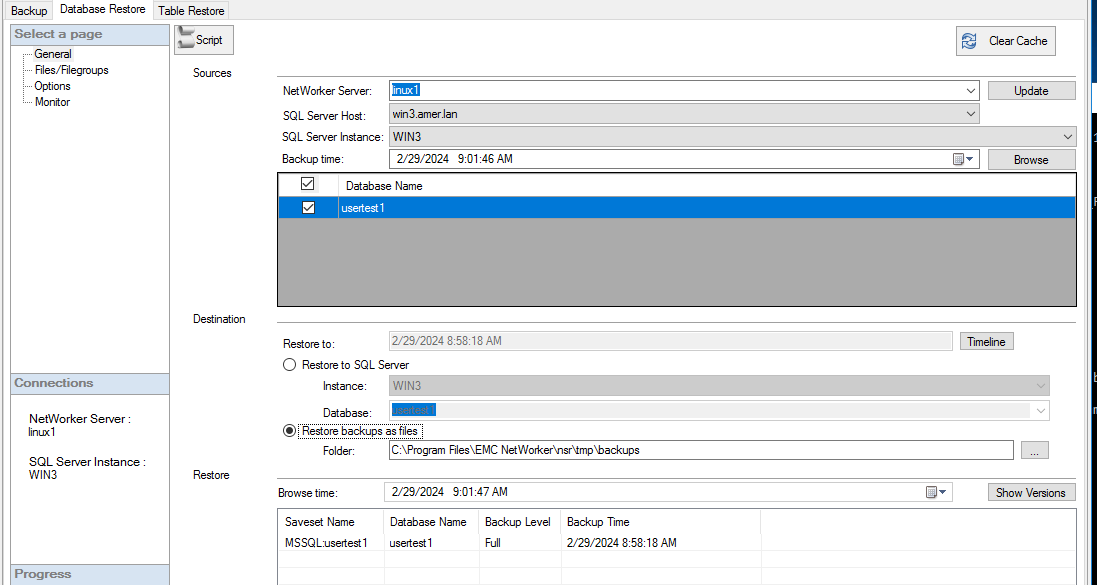
Work Around
The only work around is to perform command line flat file restore. This procedure explains the steps necessary to generate a scxript and edit the script to use a clone pool instead of the primary backup pool.- Open NMM SQL Plugin gui.
- Select Clear Cache. This clear pervious selections and starts with new parameters.
- Enter the Networker Server name. Click Update.
- Select SQL Server host.
- Select SQL Server instance.
- Select the save set ( database to restore)
- Select the save time – this is important. Do this first before next step.
- Select “Restore backups as files” – leave the restore Folder for now – we will edit this later in script.
- Click Script button.
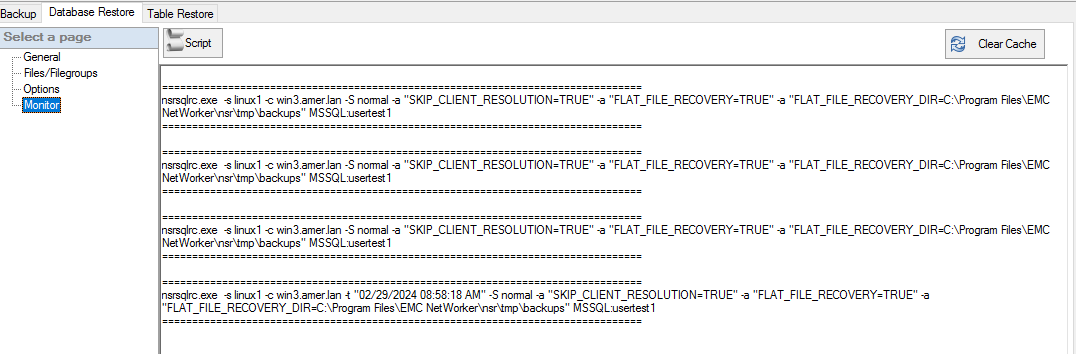
- Copy the script. Open Notepad editor or similar text editor and paste the output script into editor.
- Add the following to the script;
-b clonepoolname
- Edit the FLAT_FILE_RECOVERY_DIR=”NewDestination” for example, FLAT_FILE_RECOVERY_DIR=”D:\RecoveryData”
- NOTE – RECOVERY_DIR Must already exist.
- Save the script as batch file eg. testsql.bat
- Open Command Prompt with Runas Administrator and run the testsql.bat script.
nsrsqlrc.exe -s linux1 -c win3.amer.lan -t "02/29/2024 08:58:18 AM" -S normal -a "SKIP_CLIENT_RESOLUTION=TRUE" -a "FLAT_FILE_RECOVERY=TRUE" -a "FLAT_FILE_RECOVERY_DIR=C:\Program Files\EMC NetWorker\nsr\tmp\backups" MSSQL:usertest1After it is edited would have something like this to reflect -b clonepool and new recovery folder.
nsrsqlrc.exe -s linux1 -c win3.amer.lan -t "02/29/2024 08:58:18 AM" -S normal -b ddclone -a "SKIP_CLIENT_RESOLUTION=TRUE" -a "FLAT_FILE_RECOVERY=TRUE" -a "FLAT_FILE_RECOVERY_DIR=C:\sharepoint\backup” MSSQL:usertest1
Propiedades del artículo
Número del artículo: 000222645
Tipo de artículo: Solution
Última modificación: 01 mar 2024
Versión: 1
Encuentre respuestas a sus preguntas de otros usuarios de Dell
Servicios de soporte
Compruebe si el dispositivo está cubierto por los servicios de soporte.