Data Domain: DD Boost Configuration Guide for CommVault
Resumen: This article provides basic information about configuration of DD Boost with CommVault Application. This article also describes the prerequisites required for configuring DD Boost with CommVault and supported configuration/workflows with CommVault 11.30.x and 11.32.x software versions. ...
Este artículo se aplica a
Este artículo no se aplica a
Este artículo no está vinculado a ningún producto específico.
No se identifican todas las versiones del producto en este artículo.
Instrucciones
Software configuration
Table: prerequisites for Data Domain (DD) and Commvault required versions.
| DDOS Version | DDBoostSDK | CommServe/Media Agent Version |
| DDOS 7.8 or later | DD Boost SDK 7.11 - integrated in Commvault 11.30.x and 11.32.x Media Agent Package | 11.30.x (DD Boost Access) |
| DDOS 7.8 or later | DD Boost SDK 7.11 - integrated in Commvault 11.30.x and 11.32.x Media Agent Package | 11.32.x (DD Boost Client Direct) |
Note: DD Boost Client is supported with fresh deployments, no migration is supported either from DD Boost Access (CV 11.30.x) or from prior CV versions.
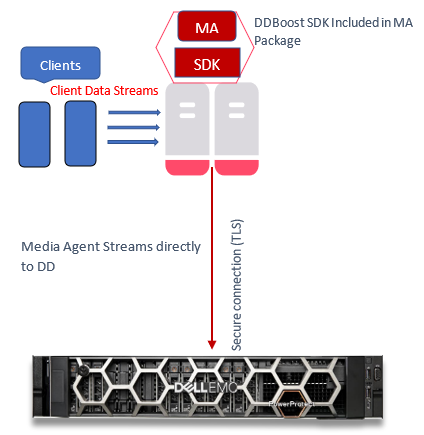
Supported Configuration/workflows with Commvault 11.30.x
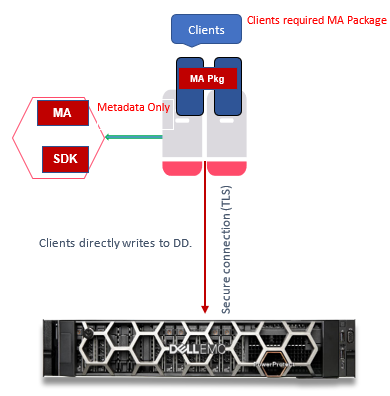
Workflow I: Data Path Media Agent to Data Domain
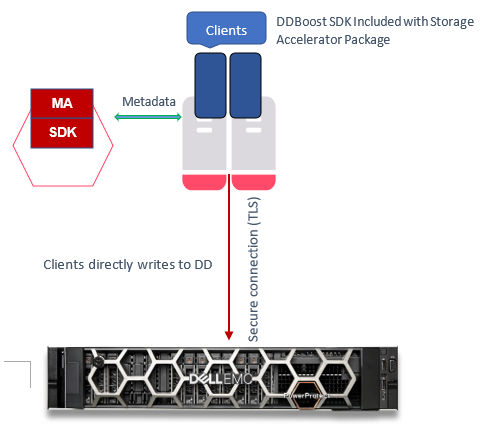
Workflow II: Data Path Client to Data Domain
Supported workflows for 11.32.x
Workflow I: Data Path is Client to Data Domain (DD Client-Side Deduplication)
Note: For Full Backup and Incremental Backups Only, Restore Only.
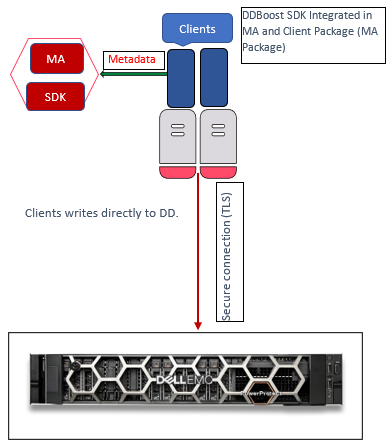
Workflow II: Data Path is Client to Data Domain (DD Client-Side Deduplication)
Note: For Synthetic Full (DD VS - Virtual Synthetics) Backup Only
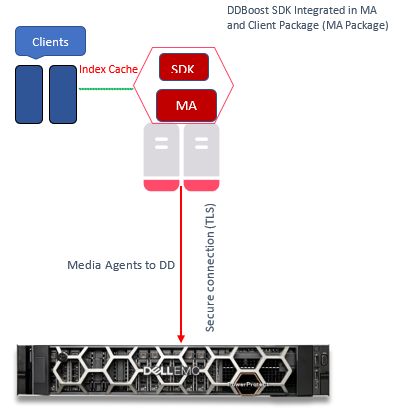
Workflow III: Clients to Media Agent to Data Domain
Data Path is Media Agent to Data Domain.
Note: Preferred for DD non-Client-Side Deduplication
Configuration Steps
This section explains the steps required to configure a DD appliance.
Note: DD Boost SDK is installed by default when CommVault Media Agent and CommServe are installed on hosts.
Verify that the DD has a valid license, and the filesystem and DD Boost are enabled.
- Check license:
sysadmin@DataDomain# elicense show Licensing scheme: EMC Electronic License Management System (ELMS) node-locked mode Capacity licenses: ## Feature Shelf Model Capacity Type State Expiration Date Note -- ------------------ ----------- ----------- --------------- ------ --------------- ---- 1 CAPACITY-ACTIVE ES40 1135.04 TiB permanent (int) active n/a 2 CLOUDTIER-CAPACITY n/a 9.09 TiB permanent (int) active n/a -- ------------------ ----------- ----------- --------------- ------ --------------- ---- Licensed Active Tier capacity: 1135.04 TiB* * Depending on the hardware platform, usable filesystem capacities may vary. Feature licenses: ## Feature Count Type State Expiration Date Note -- ------------------------- ----- --------------- ------ --------------- ---- 1 REPLICATION 1 permanent (int) active n/a 2 VTL 1 permanent (int) active n/a 3 DDBOOST 1 permanent (int) active n/a 4 RETENTION-LOCK-GOVERNANCE 1 permanent (int) active n/a 5 ENCRYPTION 1 permanent (int) active n/a - Check filesystem status:
sysadmin@DataDomain# filesys status The filesystem is enabled and running. - Check DD Boost status:
sysadmin@DataDomain# ddboost status DD Boost status: enabled - Check DD Boost options for DSP:
sysadmin@DataDomain# ddboost option show Option Value ------------------------------ -------- distributed-segment-processing enabled virtual-synthetics enabled fc disabled global-authentication-mode none global-encryption-strength none ------------------------------ -------- - Create DD Boost Storage Unit:
sysadmin@DataDomain# ddboost storage-unit create DDSTU_P2WIN_COMP_3 user sysadmin Created storage-unit "DDSTU_P2WIN_COMP_3" for "sysadmin". - List the DD Boost Storage Unit:
sysadmin@DataDomain# ddboost storage-unit show
Name                 Pre-Comp (GiB)   Status   User       Report Physical
                                                             Size (MiB)
------------------   --------------   ------   --------   ---------------
DDSTU_P2WIN_COMP_3              0.0   RW       sysadmin                 -
------------------   --------------   ------   --------   ---------------
 D    : Deleted
 Q    : Quota Defined
 RO   : Read Only
 RW   : Read Write
 RD   : Replication Destination
 M    : Mobile
 m    : Migratable
Note: For more information about the Commvault DD Boost Storage Library feature, including configuring a DD Boost Storage Library, see Commvault Data Domain Boost Storage Library in the Commvault documentation.
Creating a DD Boost Client Library using CommVault 11.32.x
After taking care of all prerequisites for configuring a Commvault DD Boost Storage Library, create a Client Direct DD Boost Client Library:
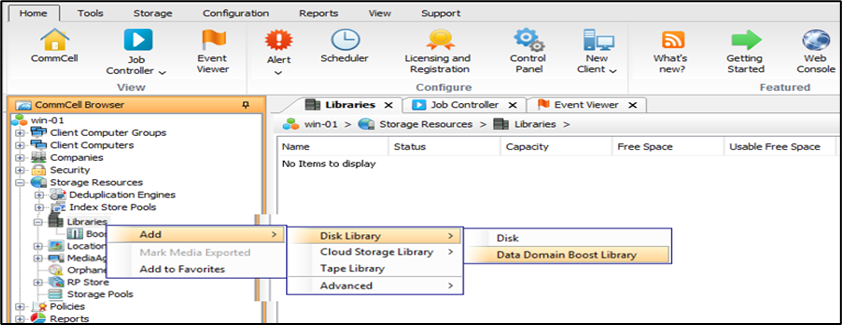
- From the CommCell Browser, expand "Storage Resources."
- Right-click Libraries, and then click "Add > Disk Library > Data Domain Boost Library."
- The "
Add DD Boost Storage" dialog box is displayed. - In the Name box, type a name for the library.
- In the Type box, select
DD Boost Client. - From the Media Agent list, select the appropriate Client.
- In the DD appliance host box, type the IP address associated with the Data Domain library.
- From the Credentials list, choose a predefined credential or click
Create Newto create a credential to access the DD series appliance library. - In the Storage unit box, type the name of the storage unit provided in the DD series appliance console.
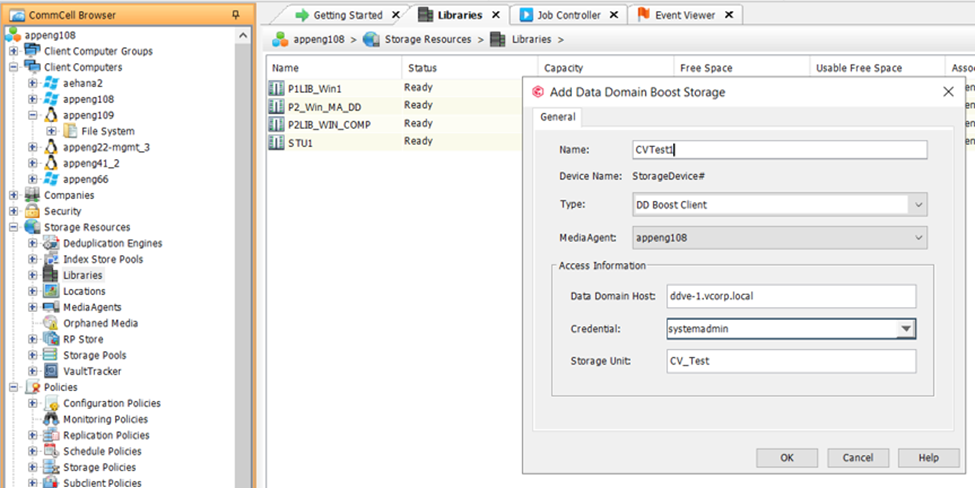
- Click
OK.
The new Client Direct DD Boost Storage Library is shown in the CommCell Browser under "Storage Resources | Libraries."
Productos afectados
Data Domain, Data Domain BoostPropiedades del artículo
Número del artículo: 000219165
Tipo de artículo: How To
Última modificación: 27 ene 2026
Versión: 1
Encuentre respuestas a sus preguntas de otros usuarios de Dell
Servicios de soporte
Compruebe si el dispositivo está cubierto por los servicios de soporte.