Dell Unity:Unity NAS 上的 Eicar 惡意軟體測試發生網路錯誤
Resumen: 使用者在 Unity NAS 伺服器中經過 Eicar 惡意軟體測試,顯示網路錯誤「存取 \\172.xx.xx.xx\abc (NasIP \testfolder) 時發生問題」。此錯誤可由使用者更正。
Este artículo se aplica a
Este artículo no se aplica a
Este artículo no está vinculado a ningún producto específico.
No se identifican todas las versiones del producto en este artículo.
Síntomas
EICAR反病毒測試檔或EICAR測試檔是由歐洲計算機反病毒研究所(EICAR)和計算機反病毒研究組織(CARO)開發的計算機檔,用於測試計算機防病毒(AV)程序的回應。
使用者是 Sophos Central Intercept X 的 AV 第三方引擎。
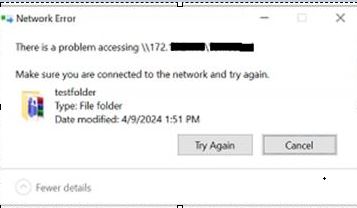
使用者是 Sophos Central Intercept X 的 AV 第三方引擎。
There is a problem accessing \\172.xx.xx.xx\abc  (NasIP \testfolder )
You have received this message because an event that has occurred on your Unity system requires your attention. The alert is:
"The virus checker server 172.xx.xx.xx has encountered an error and is no longer operational.(Error: OFFLINE, httpStatus: 1006 Connection Disconnected)"
The virus checker server 172.xx.xx.xx has encountered an error and is no longer operational.(Error: ERROR_AVINTERFACE)"
"No virus checker server is available."
Causa
此錯誤清楚地表明,在警報時間範圍內,運行第三方AV軟體和Cava Agent的Windows Server無法提供服務。如果 Unity 裝置在其他方面狀況良好,則問題可能與網路中斷有關或與 Windows Server 相關,或可能與 AV 服務有關。使用者或 Windows 系統管理員必須檢查「Windows 警示記錄」,以找出明確的根本原因。
Resolución
Unity 的故障診斷步驟:
- 在 Unity 記錄位置中搜尋:
EMCSystemBackup.log  - cd /EMC/C4core/log/
grep -i infect EMCSystemBackup.log
grep -i blocked EMCSystemBackup.log

c4_safe_ktrace.log – cd /EMC/C4core/log/
grep -i "virus checker" c4_safe_ktrace.log
zgrep -i "virus checker" /EMC/C4core/log/c4_safe_ktrace.log*
Uemcli svc_cava 含 NAS 伺服器名稱的服務指令檔會提供 CAVA 版本和防毒引擎名稱。
Nas server name/IP : OV-xx-x-xxx-xx-001/ 172.xx.xx.xx
AV server IP address: 172.xx.xx.xx
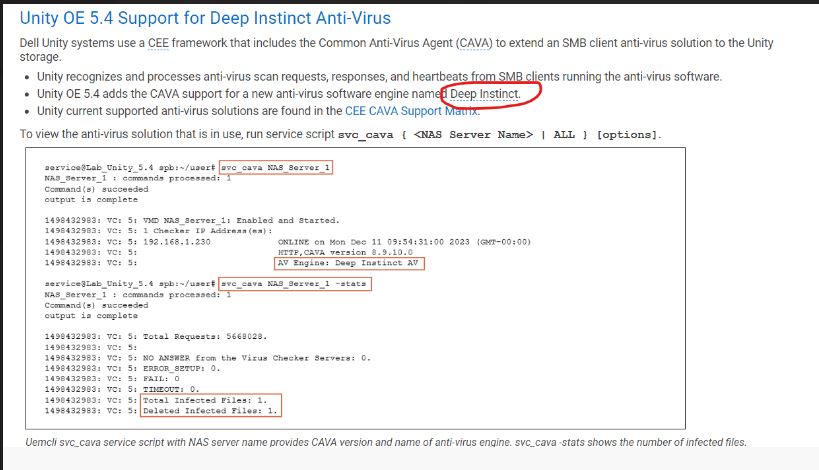
命令清單:
Command Usage: svc_cava
svc_cava { <NAS_Server_Name> | ALL }
 [-h | --help]
 | <no option>
 | -stats
 | [ -set accesstime={ now | none | [[[[yy]mm]dd]hh]mm[.ss] }]
 | [ -fsscan [<fs_mountpath> { -list | -create | -delete } ]
Example : svc_cava -stats
svc_cava nas1 -stats
svc_cava nas1
命令用法:
08:38:39 root@DE4142343780xx spa:/EMC/C4Core/log# svc_cava OV-xxx-x-xxx-xx-001 -stats
OV-xxx-x-xxx-xx-001 : commands processed: 1
command(s) succeeded
output is complete
1712653384: VC: 5: Total Requests: 0.
1712653384: VC: 5:
1712653384: VC: 5: NO ANSWER from the Virus Checker Servers: 0.
1712653384: VC: 5: ERROR_SETUP: 0.
1712653384: VC: 5: FAIL: 0.
1712653384: VC: 5: TIMEOUT: 0.
1712653384: VC: 5:
1712653384: VC: 5: 0 files in the collector queue.
1712653384: VC: 5: 0 files processed by the AV threads.
Command succeeded
- 下載 viruschecker.config 檔案,並確認是否顯示 shutdown=no 或 shutdown=viruscheck:
開啟 Unity UI>儲存 > 裝置 NAS 伺服器 >安全性>防毒 >軟體 擷取目前組態 (檢視檔案)
- 更新 viruschecker.conf 值 (上傳新組態),並套用變更:
# Example: OV-xxx-x-xxx-xx-001
#
masks=*.EXE:*.COM:*.DOC:*.DOT:*.XL?:*.MD?:*.VXD:*.386:*.SYS:*.BIN:*.ppt:*docx:*.rar:*.zip:*.txt
excl=pagefile.sys:*.tmp
# masks=*.RTF:*.OBD:*.DLL:*.SCR:*.OBT:*.PP?:*.POT:*.OLE:*.SHS:*.MPP
# masks=*.MPT:*.XTP:*.XLB:*.CMD:*.OVL:*.DEV
# masks=*.ZIP:*.TAR:*.ARJ:*.ARC:*.Z
addr=172.xx.xx.xx >> AV Server IP address
shutdown=no (update the value to shutdown=viruschecking and upload the viruschecker.conf file to unity GUI)
# Stops SMB/CIFS if no AV machine available.(No Windows clients can access any Unity share)
08:18:51 root@DE414234378xxx spa:/cores/service/user# svc_cava OV-xxx-x-xxx-xx-001
OV-xxx-x-xxx-xx-001: commands processed: 1
command(s) succeeded
output is complete
1712650760: VC: 5: OV-xxx-x-xxx-xx-001: Enabled and Started.
1712650760: VC: 5: 1 Checker IP Address(es):
1712650760: VC: 5: 172.xx.xx.xx                                   ONLINE at Tue Apr  9 08:19:14 2024 (GMT-00:00)
1712650760: VC: 5:                                                HTTP, CAVA version: 8.9.10.0
1712650760: VC: 5:                                                AV Engine: Microsoft Antivirus ( Third party AV Engine )
1712650760: VC: 5:                                                Remediation Window: 30 seconds
1712650760: VC: 5:                                                Server Name: 172.xx.xx.xx
1712650760: VC: 5:                                                Last time signature updated: Tue Apr  9 05:29:36 2024 (GMT-00:00)
1712650760: VC: 5:
1712650760: VC: 5: 15 File Mask(s):
1712650760: VC: 5: *.EXE *.COM *.DOC *.DOT *.XL? *.MD? *.VXD *.386 *.SYS *.BIN *.PPT *DOCX *.RAR
1712650760: VC: 5: *.ZIP *.TXT
1712650760: VC: 5: 2 Excluded File(s):
1712650760: VC: 5: PAGEFILE.SYS *.TMP
1712650760: VC: 5: Share \\ov-yml-p-ser-fs-001.yoma.com.mm\CHECK$.
1712650760: VC: 5: RPC request timeout=25000 milliseconds.
1712650760: VC: 5: RPC retry timeout=5000 milliseconds.
1712650760: VC: 5: High water mark=200.
1712650760: VC: 5: Low water mark=50.
1712650760: VC: 5: Scan all virus checkers every 10 seconds.
1712650760: VC: 5: When all virus checkers are offline:
1712650760: VC: 5: Continue to work with Virus Checking and CIFS.
1712650760: VC: 5: Scan on read disable.
1712650760: VC: 5: MS-RPC User: OV-xxx-x-xxx-xx-001-FS$
1712650760: VC: 5: MS-RPC ClientName: ov-xxx-x-xxx-xx-001.abc
 Command succeeded
問題已解決,CAVA 在變更網路 IP 後也開始正常運作。
建議故障診斷:
- 確認 viruschecker.conf 設定。(關閉 = 病毒檢查)
- 確認 CAVA 服務正在使用 AV 使用者帳戶執行。
- 確認已安裝的防毒軟體 (Sophos、TrendMicro、McAfee 等) 服務正在使用本機系統帳戶執行。
-
確認 AV 使用者是每個 AV 伺服器上本地管理員組的成員。
-
確認防毒軟體和 CEE 的安裝順序正確,先是 CEE,然後安裝防毒
-
將 CAVA 服務重新開機
-
重新啟動 AV 伺服器一次
-
確認 CAVA 伺服器只有一個網路介面。
-
向使用者確認是否為用戶端電腦分配了相同或不同的 NAS 伺服器網路 IP(始終建議它位於同一網路中)
1712650760: VC: 5:                                                HTTP, CAVA version: 8.9.10.0
1712650760: VC: 5:                                                AV Engine: Microsoft Antivirus ( Third party AV Engine )
最佳實務:
- 請勿設定原則 VirusChecking=No,因為這可能會導致封鎖的執行緒,且不被視為最佳實務。
- 請勿使用單個 AV 伺服器,因為不建議這樣做。
- 請勿將單個 AV 伺服器用於多個平臺,因為不建議這樣做,應將其視為不受支援。
如果問題仍然存在,使用者必須聯絡第三方防毒廠商支援,以取得進一步協助。
Información adicional
請參閱以下文件,以獲得更多資訊:

Productos afectados
Dell EMC Unity Family |Dell EMC Unity All Flash, Dell EMC Unity FamilyPropiedades del artículo
Número del artículo: 000224432
Tipo de artículo: Solution
Última modificación: 16 oct 2025
Versión: 3
Encuentre respuestas a sus preguntas de otros usuarios de Dell
Servicios de soporte
Compruebe si el dispositivo está cubierto por los servicios de soporte.