NetWorker: Cómo especificar un intervalo de tiempo en el comando gstclreport
Resumen: En este artículo, se muestra cómo configurar un rango de tiempo con el comando gstclreport para generar informes de NetWorker Management Console (NMC).
Este artículo se aplica a
Este artículo no se aplica a
Este artículo no está vinculado a ningún producto específico.
No se identifican todas las versiones del producto en este artículo.
Instrucciones
La variable gstclreport El comando se utiliza para generar informes de NMC mediante la línea de comandos en el servidor de NetWorker Management Console (NMC).
usage: gstclreport [-h] -r reportname -u username
     [-P password] [-a chartselector] [-c charttype]
     [-f filename] [-n fontfamily] [-o orientation]
     [-v viewtype] [-x exporttype] [-C Category argument]
     [-C "Event Time" argument] [-C "Object Name" argument]
     [-C "Object Type" argument] [-C Operation argument]
     [-C "Server Name" argument] [-C "Server Type" argument]
     [-C "User Name" argument]
where:
    -h                          Print this help message
    -r  reportname      The name of the report to run, or full path name like "/Reports/Users/User List"
    -u  username        Log into GST server with given name
    -P  password        Log into GST server with given password
    -a  chartselector   The set of Y axis to display in a chart
    -c  charttype       The chart type [bar | pie | plot | "stacking bar"]
    -f  filename        The name of the export file
    -n  fontfamily      A font family to override the default(COURIERNEW). Please note if invalid
    -o  orientation     The orientation [portrait | landscape]
    -v  viewtype        The view type [table | chart]
    -x  exporttype      The type of export [ pdf | postscript | html | csv | print]
    -C  Category argument       Where argument is a comma separated list of Categorys
    -C  "Event Time" argument   Where argument is a From and To date. Date & Time format is MM/DD/YY & hh:mm:ss
    -C  "Object Name" argument  Where argument is a single Object Name
    -C  "Object Type" argument  Where argument is a single Object Type
    -C  Operation argument      Where argument is a comma separated list of Operations
    -C  "Server Name" argument  Where argument is a comma separated list of Server Names
    -C  "Server Type" argument  Where argument is a single Server Type
    -C  "User Name" argument    Where argument is a comma separated list of User Names
Distintos informes utilizan distintos operadores de hora:
- En todas las estadísticas de políticas, excepto en Action Details, se usa "Workflow StartTime". En el informe Action Details, se utiliza la "Action Start Time"
- Todas las estadísticas de recuperación utilizan la "Hora de inicio".
- En la utilización del dispositivo, se utiliza "Time".
- La auditoría del usuario utiliza la "hora del evento".
gstclreport -r "REPORT_PATH -u USER_NAME -P 'PASSWORD' -x REPORT_TYPE -f FILE_NAME -v REPORT_FORMAT -C "OPERATOR" "MONTH DD, YYYY HH:mm AM/PM" "MONTH DD, YYYY HH:mm AM/PM"
O:
gstclreport -r "REPORT_PATH -u USER_NAME -P 'PASSWORD' -x REPORT_TYPE -f FILE_NAME -v REPORT_FORMAT -C "OPERATOR" "MM/DD/YY HH:mm:SS AM/PM" "MM/DD/YY HH:mm:SS AM/PM"
Ejemplo:
nve:/opt/lgtonmc/bin # ./gstclreport -r "/Reports/Users/User Audit" -u administrator -P '!Password1' -x pdf -f test  -v table -C "Event Time" "February 13, 2026 12:00 AM" "February 18, 2026 11:59 PM"
java version "17.0.17" 2025-10-21 LTS
Java(TM) SE Runtime Environment (build 17.0.17+8-LTS-360)
Java HotSpot(TM) 64-Bit Server VM (build 17.0.17+8-LTS-360, mixed mode, sharing)
java version "17.0.17" 2025-10-21 LTS
Java(TM) SE Runtime Environment (build 17.0.17+8-LTS-360)
Java HotSpot(TM) 64-Bit Server VM (build 17.0.17+8-LTS-360, mixed mode, sharing)
Generated report "User Audit" as file test.pdf
El informe se genera con el rango de tiempo especificado: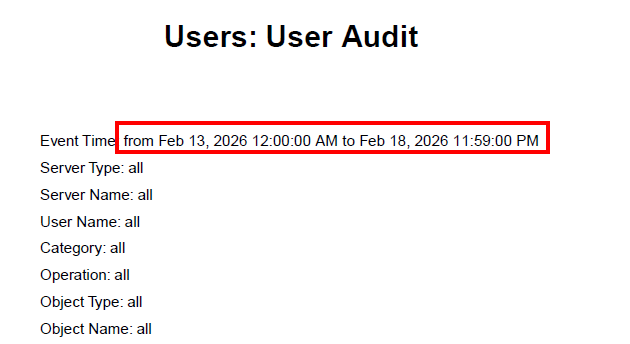
Información adicional
Productos afectados
NetWorkerProductos
NetWorkerPropiedades del artículo
Número del artículo: 000023243
Tipo de artículo: How To
Última modificación: 19 feb 2026
Versión: 7
Encuentre respuestas a sus preguntas de otros usuarios de Dell
Servicios de soporte
Compruebe si el dispositivo está cubierto por los servicios de soporte.