영어가 아닌 SQL 인스턴스에서 내부 또는 datetime varchar 변환 오류 발생
Resumen: Dell Security Management Server(이전 Dell Data Protection | Enterprise Edition)가 영어가 아닌 서버 운영 체제(예: 프랑스어)에 설치된 경우 WebUI 콘솔에서 "내부 오류" 또는 "데이터 액세스 오류"가 발생할 수 있습니다.
Este artículo se aplica a
Este artículo no se aplica a
Este artículo no está vinculado a ningún producto específico.
No se identifican todas las versiones del producto en este artículo.
Síntomas
영향을 받는 제품:
- Dell Data Protection | Enterprise Edition
영향을 받는 버전:
- v9.7 이하
해당되는 플랫폼:
- Windows Server
호환성 로그는 다음과 유사한 오류를 보고합니다. varchar 데이터 형식을 datetime 데이터 형식으로 변환하면 값이 범위를 벗어났습니다.
Causa
해당 사항 없음
Resolución
이 경우:
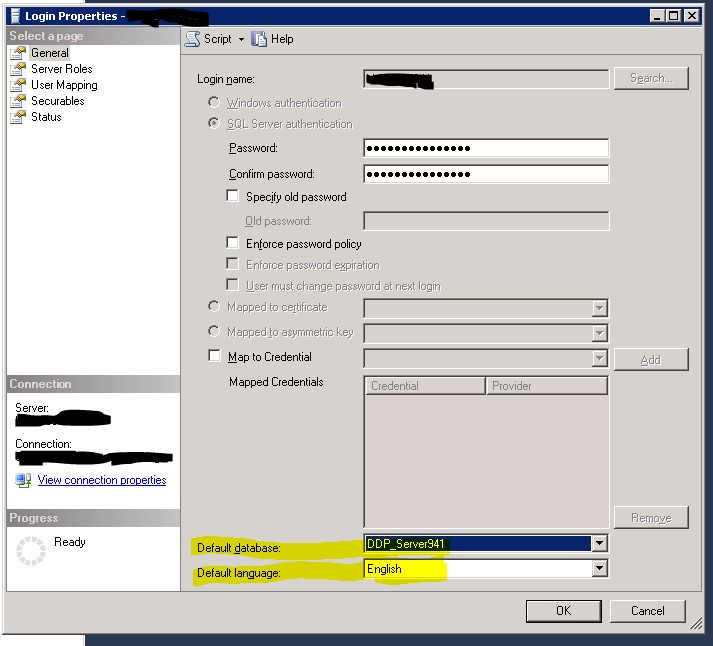
- SQL Server Management Studio를 엽니다.
- 로그인 속성으로 이동합니다.
참고: Dell Data Protection 서비스에서 Dell Data Protection 데이터베이스에 연결하는 데 사용하는 database\Security 아래의 사용자가 아닌 instance\Security 아래의 로그인
- 기본 데이터베이스가 Dell Data Protection 데이터베이스로 설정되어 있는지 확인합니다.
- 기본 언어 는 영어로 설정됩니다.
- 그런 다음 Security 및 Compatibility Server 서비스를 다시 시작합니다.
Productos afectados
Dell EncryptionPropiedades del artículo
Número del artículo: 000126660
Tipo de artículo: Solution
Última modificación: 18 sept. 2026
Versión: 9
Encuentre respuestas a sus preguntas de otros usuarios de Dell
Servicios de soporte
Compruebe si el dispositivo está cubierto por los servicios de soporte.