NetWorker: 19.7.0.3 veya 19.8.0.2 ve öncesi Sürümlere Yükseltmeden Sonra Kümelenmiş Linux Sunucusu üzerinde Önyükleme Yedekleme ve Kimlik Doğrulama Komutları Başarısız Oluyor
Resumen: NetWorker sunucusu, kümelenmiş bir Linux NetWorker sunucusuna dağıtılır. NetWorker sürümünü 19.7.0.3 veya 19.8.0.2 ve öncesi sürümlere yükselttikten sonra Sunucu Koruması önyükleme yedeklemesi başarısız olur. Kimlik doğrulama hizmeti komutları (nsrlogin, authc_config, authc_mgmt) da başarısız olur. Döndürülen hata, kimlik doğrulama hizmetinin HTTP hatası 404 ile kullanılamaz (bulunamadı) olduğu şeklindedir. ...
Este artículo se aplica a
Este artículo no se aplica a
Este artículo no está vinculado a ningún producto específico.
No se identifican todas las versiones del producto en este artículo.
Síntomas
NetWorker sunucusu, Red Hat Pacemaker (pcs) Yüksek Kullanılabilirlik kümesine dağıtılır.
NetWorker, 19.7.0.4 sürümüne yükseltildi.
NetWorker hizmet başlangıcı başarılı olur, tüm küme kaynakları küme düğümlerden biri üzerinde "started" (başlatıldı) olarak gösterilir:
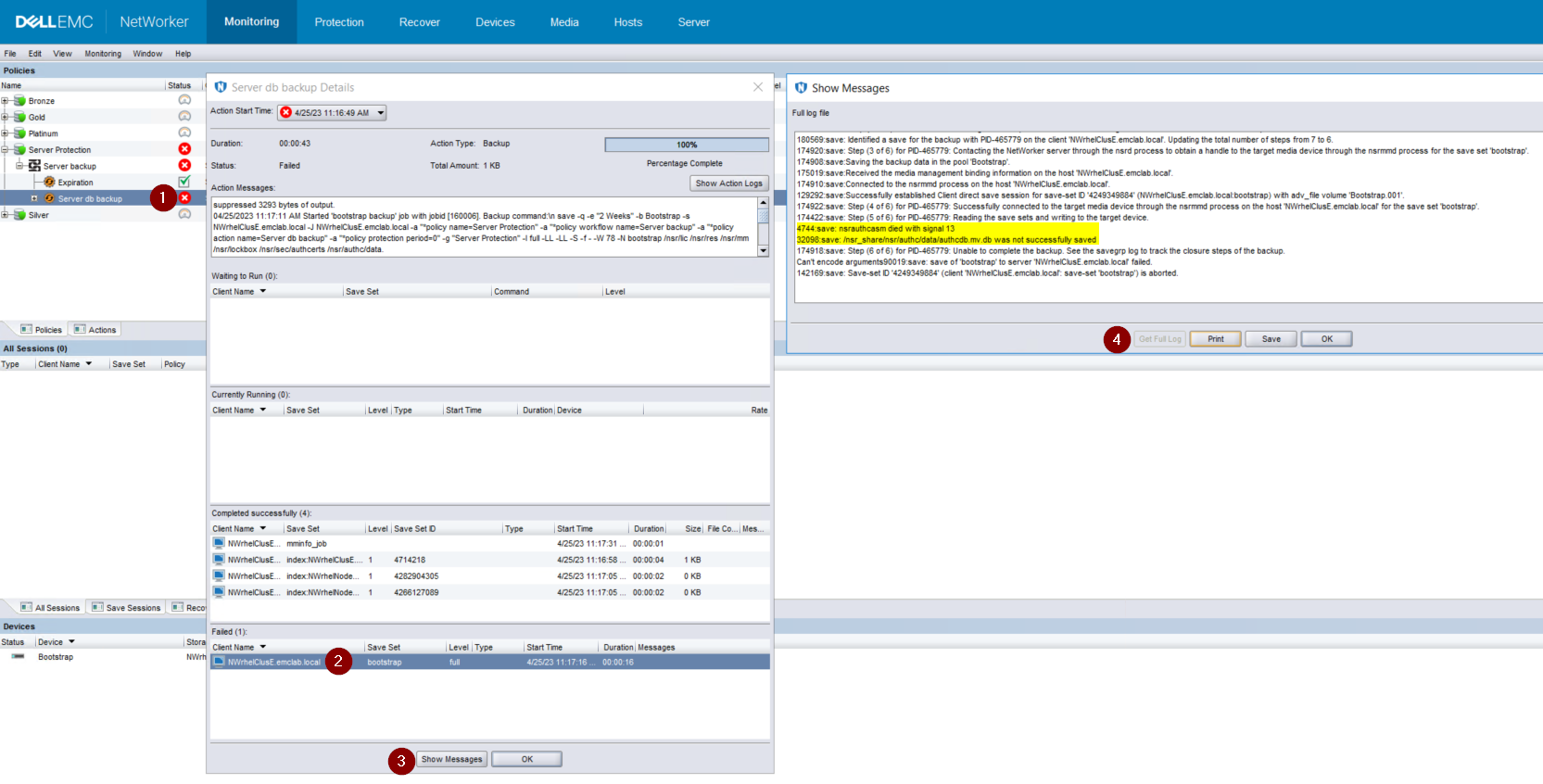
Şekil 1: Bootstrap Backup Fails to Backup To Backup To Backup the authcdb (Önyükleme Yedeklemesi authcdb'yi Yedekleyeme başarısız oluyor)
NetWorker, 19.7.0.4 sürümüne yükseltildi.
NetWorker hizmet başlangıcı başarılı olur, tüm küme kaynakları küme düğümlerden biri üzerinde "started" (başlatıldı) olarak gösterilir:
root@NWrhelNodeG:~# pcs resource * Resource Group: NW_group: * fs (ocf::heartbeat:Filesystem): Started NWrhelNodeG.emclab.local * ip (ocf::heartbeat:IPaddr): Started NWrhelNodeG.emclab.local * nws (ocf::EMC_NetWorker:Server): Started NWrhelNodeG.emclab.localnsrlogin komutu HTTP hatası 404 ile başarısız oluyor (bulunamadı):
[admin@NWrhelNodeG linux_x86_64]$ nsrlogin -u Administrator 130136:nsrlogin: Please enter password: 117849:nsrlogin: Authentication library error: GET failed with HTTP-ERROR: 404 Server Message : Could not parse server-response from json string Server Message : Make sure that server is running"Server Protection" önyükleme yedeklemesi, authcdb'yi yedeklemede başarısız oluyor:
Şekil 1: Bootstrap Backup Fails to Backup To Backup To Backup the authcdb (Önyükleme Yedeklemesi authcdb'yi Yedekleyeme başarısız oluyor)
Causa
Yükseltme sırasında authc'de yapılan değişiklikler küme paylaşılan authcdb'ye işlendi. Yükseltme işlemi sırasında pcs NWS kaynağı devre dışı bırakılır veya PCS küme kaynağı tamamen durdurulur. NWS çalışmıyorsa /nsr dizini simgesel olarak /nsr dizinine bağlanır (işaret etme). /nsr_share yerine NetWorker.local.
/Nsr. NetWorker.local, fiziksel düğümler /nsr dizinidir ve yalnızca istemciyle ilgili klasörleri içerir. A /nsr. NetWorker.local/authc klasörü var ancak NetWorker sunucusunun authcdb'sine özgü dosyalardan herhangi birini içermezse bu, /nsr_share/nsr/authc altında bulunur.
NetWorker yükseltmesinden sonra authc, kimlik doğrulama dosyalarının "B sürümünü" bekliyor ancak yükseltmeden önce dosyaların "A sürümü" görüyor.
/Nsr. NetWorker.local, fiziksel düğümler /nsr dizinidir ve yalnızca istemciyle ilgili klasörleri içerir. A /nsr. NetWorker.local/authc klasörü var ancak NetWorker sunucusunun authcdb'sine özgü dosyalardan herhangi birini içermezse bu, /nsr_share/nsr/authc altında bulunur.
NetWorker yükseltmesinden sonra authc, kimlik doğrulama dosyalarının "B sürümünü" bekliyor ancak yükseltmeden önce dosyaların "A sürümü" görüyor.
Resolución
NetWorker'i aşağıdaki sürümlerden (veya sonraki sürümlerden) biri ile yükseltin:
19.8.0.4 veya 19.9.0.2 ve üzeri sürümler kullanıyorsanız aşağıdakileri gerçekleştirin:
Nsrlogin denemeleri ve önyükleme yedeklemeleri başarılı olacaktır.
- 19.8.0.4
- 19.9.0.2
19.8.0.4 veya 19.9.0.2 ve üzeri sürümler kullanıyorsanız aşağıdakileri gerçekleştirin:
- Kümedeki her düğümde /opt/nsr/authc-server/conf/h2_db.properties adını yeniden adlandırın:
mv /opt/nsr/authc-server/conf/h2_db.properties /opt/nsr/authc-server/conf/h2_db.properties.bak
- Her düğümde, authc'i yeniden yapılandırmak için /opt/nsr/authc-server/scripts/authc_configure.sh komutunu yeniden başlatın. Bu, daha önce kimlik doğrulamasında yapılan ayarları veya yapılandırmaları sılmıyor.
Etkin düğümde bu, aşağıdaki gibi görünür:
Pasif düğümlerde bu, aşağıdaki gibi görünür:
root@NWrhelNodeH:~# /opt/nsr/authc-server/scripts/authc_configure.sh

Specify the directory where the Java Standard Edition Runtime Environment (JRE) software is installed [/opt/nre/java/latest]:

The installation process will install an Apache Tomcat instance. For optimum security, EMC NetWorker Authentication Service will use a non-root user (nsrtomcat) to start the Apache Tomcat instance. If your system has special user security requirements, ensure that proper operational permissions are granted to this non-root user (nsrtomcat).
Please refer to NetWorker Installation Guide.

WARNING: Port 9090 is already in use.

Do you wish to specify a different port number [y]? n

The Apache Tomcat will use "NWrhelNodeH.emclab.local" as the host name. The Apache Tomcat will use "9090" as the port number.

The NetWorker Authentication Service requires a keystore file to configure encryption and to provide SSL support.

EMC recommends that you specify a keystore password that has a minimum of six characters.

Do you want to use the existing keystore /nsr/authc/conf/authc.keystore [y]?

Specify password for the existing keystore:
The install will use the existing certificate "emcauthctomcat" for Apache Tomcat.
The install will use the existing certificate "emcauthcsaml" for Authentication Service.

Creating the installation log in /opt/nsr/authc-server/logs/install.log.

Performing initialization. Please wait...

The installation completed successfully.
Pasif düğümlerde bu, aşağıdaki gibi görünür:
root@NWrhelNodeG:~# /opt/nsr/authc-server/scripts/authc_configure.sh

Specify the directory where the Java Standard Edition Runtime Environment (JRE) software is installed [/opt/nre/java/latest]:

The installation process will install an Apache Tomcat instance. For optimum security, EMC NetWorker Authentication Service will use a non-root user (nsrtomcat) to start the Apache Tomcat instance. If your system has special user security requirements, ensure that proper operational permissions are granted to this non-root user (nsrtomcat).
Please refer to NetWorker Installation Guide.

The Apache Tomcat will use "NWrhelNodeG.emclab.local" as the host name. The Apache Tomcat will use "9090" as the port number.

The NetWorker Authentication Service requires a keystore file to configure encryption and to provide SSL support.

EMC recommends that you specify a keystore password that has a minimum of six characters.

Do you want to use the existing keystore /nsr/authc/conf/authc.keystore [y]?

Specify password for the existing keystore:
The install will use the existing certificate "emcauthctomcat" for Apache Tomcat.
The install will use the existing certificate "emcauthcsaml" for Authentication Service.

The NetWorker Authentication Service defines automatically an administrator user account named administrator in the NetWorker Authentication Service local database. This account is specific to the administration of the NetWorker Authentication Service, and is not related to other administrator accounts on this system.

*******************************************************************************************
Password criteria: Minimum required characters - 9 and Maximum allowed characters - 126 Minimum [alphabetic - 2, Uppercase - 1, Lowercase - 1, Numeric - 1, Special character - 1]
********************************************************************************************

Specify an initial password for administrator:
Confirm the password:

Creating the installation log in /opt/nsr/authc-server/logs/install.log.

Performing initialization. Please wait...

The installation completed successfully.
NOT: Pasif düğümde, NetWorker Yönetici hesabı için yeni bir parola oluşturmanız istenir. Bu, mevcut parolanın kayıp olduğu anlamına gelir. Bu, küme tarafından kullanılan authcdb'nin /nsr_share/nsr/authc altında olması ve yalnızca etkin düğümde mevcut olması nedeniyle gerçekleşir. Pasif bir düğüm yeni etkin düğüm olduğunda paylaşılan authcdb'yi kullanır. Authc_configure.sh komut dosyası, her düğüm için yerel olan /opt/nsr/authc-server/conf/h2_db.properties dosyasını yeniden oluşturmak için her düğümde çalıştırılır.
- NWS kaynağını yeniden başlatın:
pcs resource restart nws
- NWS kaynağının başlatıldıktan sonra:
pcs resource

root@NWrhelNodeH:~# pcs resource
   * Resource Group: NW_group:
      * fs (ocf::heartbeat:Filesystem): Started
NWrhelNodeH.emclab.local
      * ip (ocf::heartbeat:IPaddr): Started
NWrhelNodeH.emclab.local
      * nws (ocf::EMC_NetWorker:Server): Started
NWrhelNodeH.emclab.local
Nsrlogin denemeleri ve önyükleme yedeklemeleri başarılı olacaktır.
Productos afectados
NetWorkerProductos
NetWorker Family, NetWorker SeriesPropiedades del artículo
Número del artículo: 000212755
Tipo de artículo: Solution
Última modificación: 12 abr. 2024
Versión: 6
Encuentre respuestas a sus preguntas de otros usuarios de Dell
Servicios de soporte
Compruebe si el dispositivo está cubierto por los servicios de soporte.