Openshift: OCP upgrade precheck failed for dryrun drain node error
Resumen: OCP upgrade precheck failed for dryrun drain node error, due to some VM cannot be live migrated or some pod cannot be evicted.
Este artículo se aplica a
Este artículo no se aplica a
Este artículo no está vinculado a ningún producto específico.
No se identifican todas las versiones del producto en este artículo.
Síntomas
During LCM precheck, there could be a dryrun drain node failure which will block the LCM process.
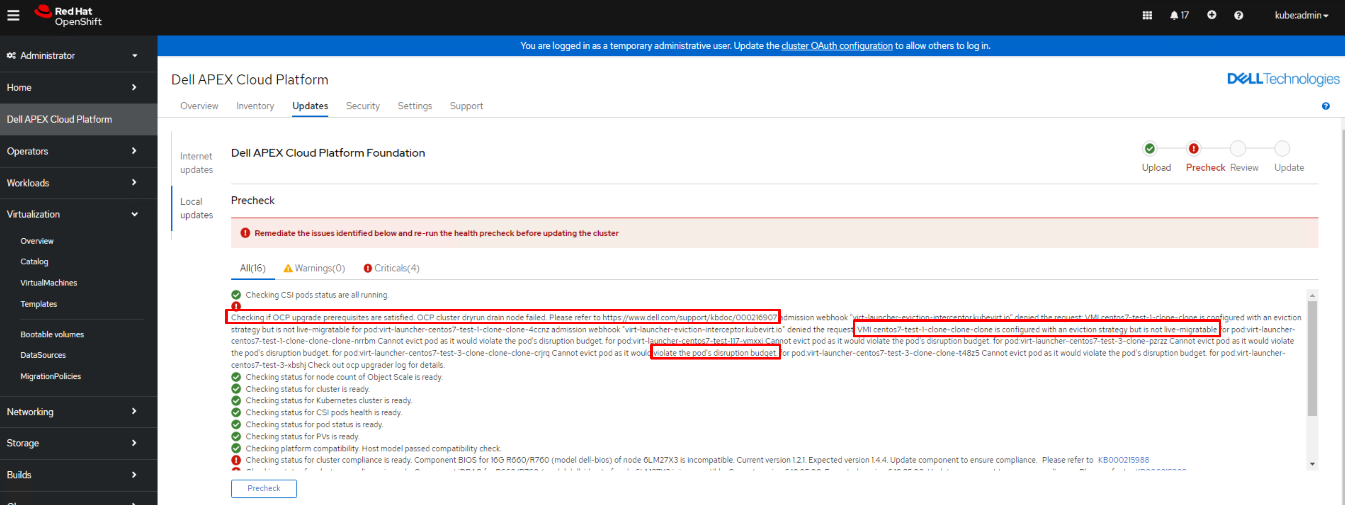
The error message could include but not limited to the following scenarios:
The error message could include but not limited to the following scenarios:
- Scenario 1: "VMI XXXXXX is configured with an eviction strategy but is not live-migratable."
- Scenario 2: "Cannot evict pod as it would violate the pod's disruption budget."
- Scenario 3: "pods xxx" not found for pod:xxxxxxxxxxxx
Causa
Scenario 1 root cause: The VM is configured with ReadWriteOnce(RWO) storage volume that cannot be live migrated on the error reporting node.
Scenario 2 root cause: The pod "PodDistruptionBudget" setting is configured as "minAvailable: 1", it will block pod eviction process.
Senario 3 root cause: Openshift scheduled job will start a pod and the pod is terminated after the job completes. So there is a chance that the pod cannot be found during precheck dryrun draining node step.
Scenario 2 root cause: The pod "PodDistruptionBudget" setting is configured as "minAvailable: 1", it will block pod eviction process.
Senario 3 root cause: Openshift scheduled job will start a pod and the pod is terminated after the job completes. So there is a chance that the pod cannot be found during precheck dryrun draining node step.
Resolución
Scenario 1 resolution
1. Stop the VM instance before changing its PV settings.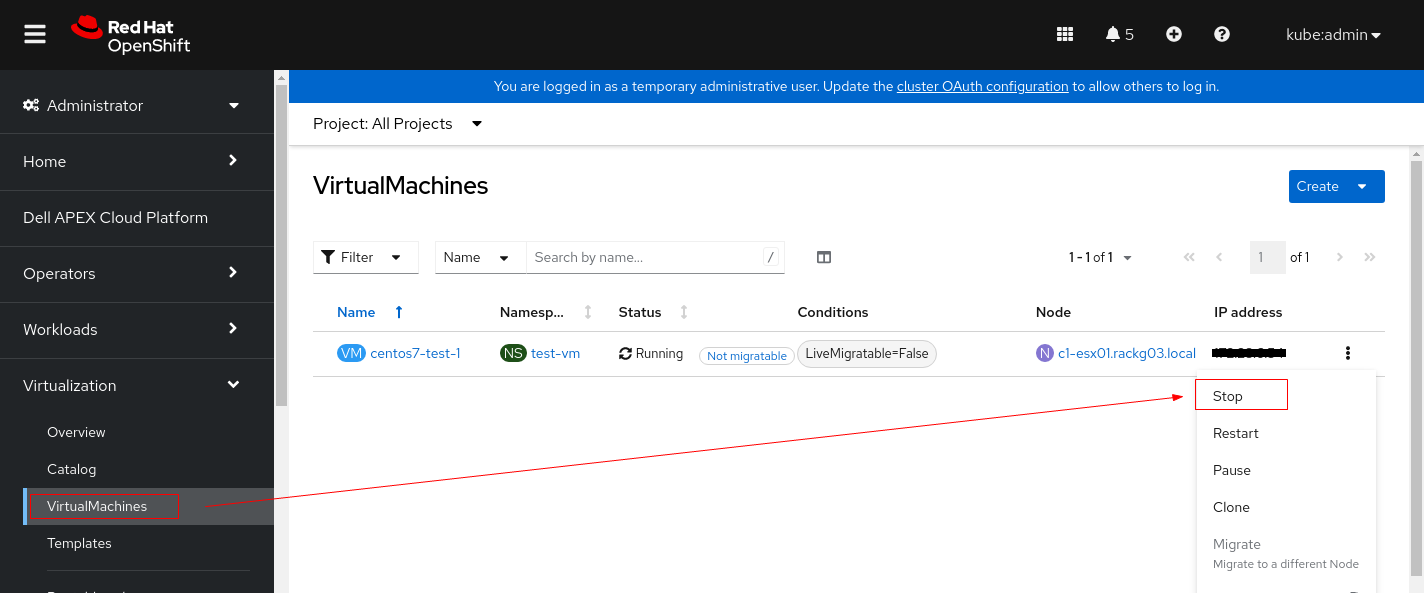
2. Click the VM and switch to YAML tab.
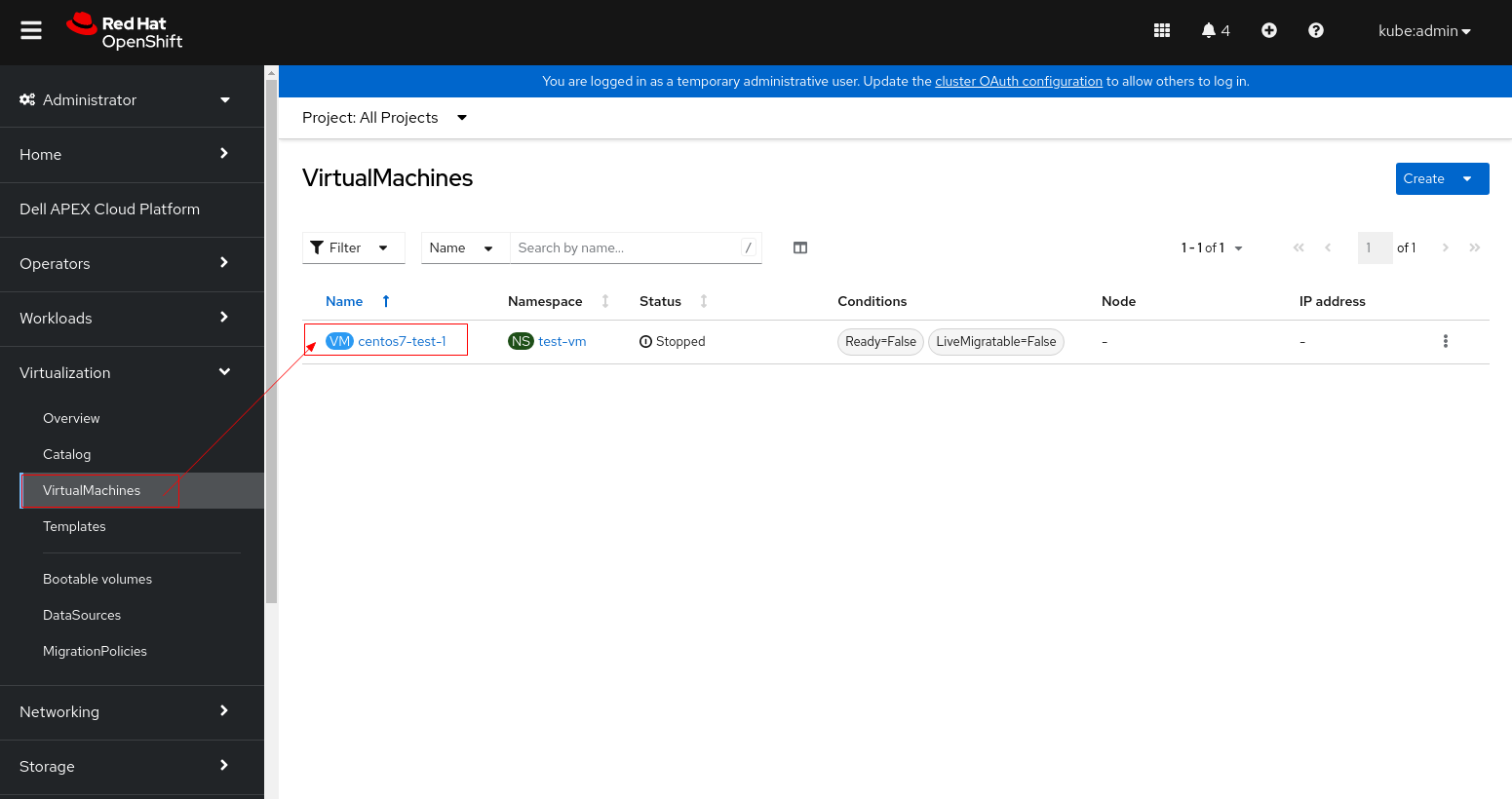
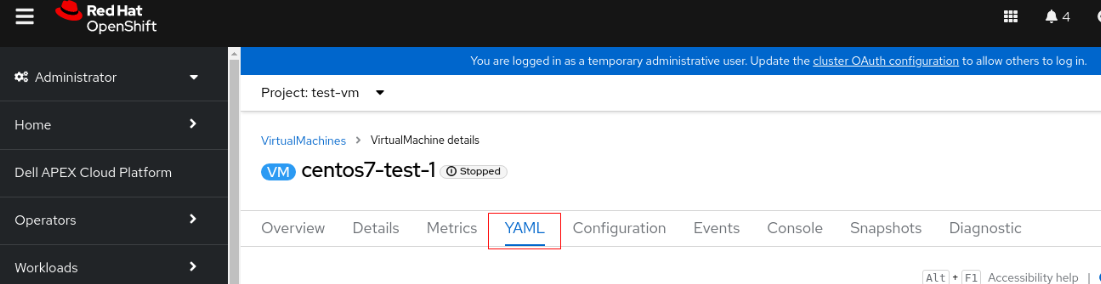
3. Change accessModes from "ReadWriteOnce" to "ReadWriteMany".
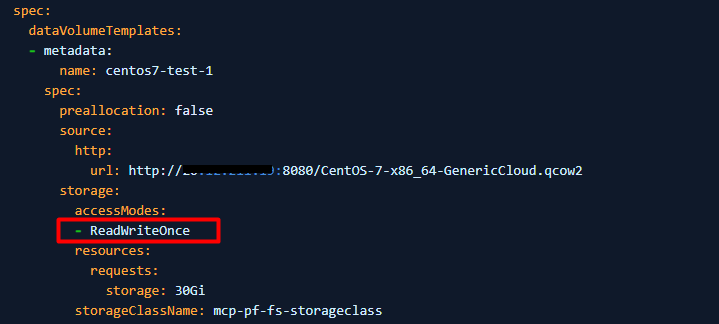
4. If PV cannot be set to ReadWriteMany (the VM cannot start use ReadWriteMany), then set evictionStrategy from "LiveMigrate" to "None".
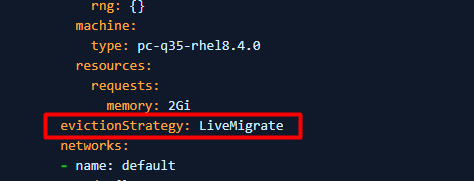
Note: Please perform either step 3 or 4 that applies to your environment, don't need to perform both steps.
5. Click save and restart the VM.
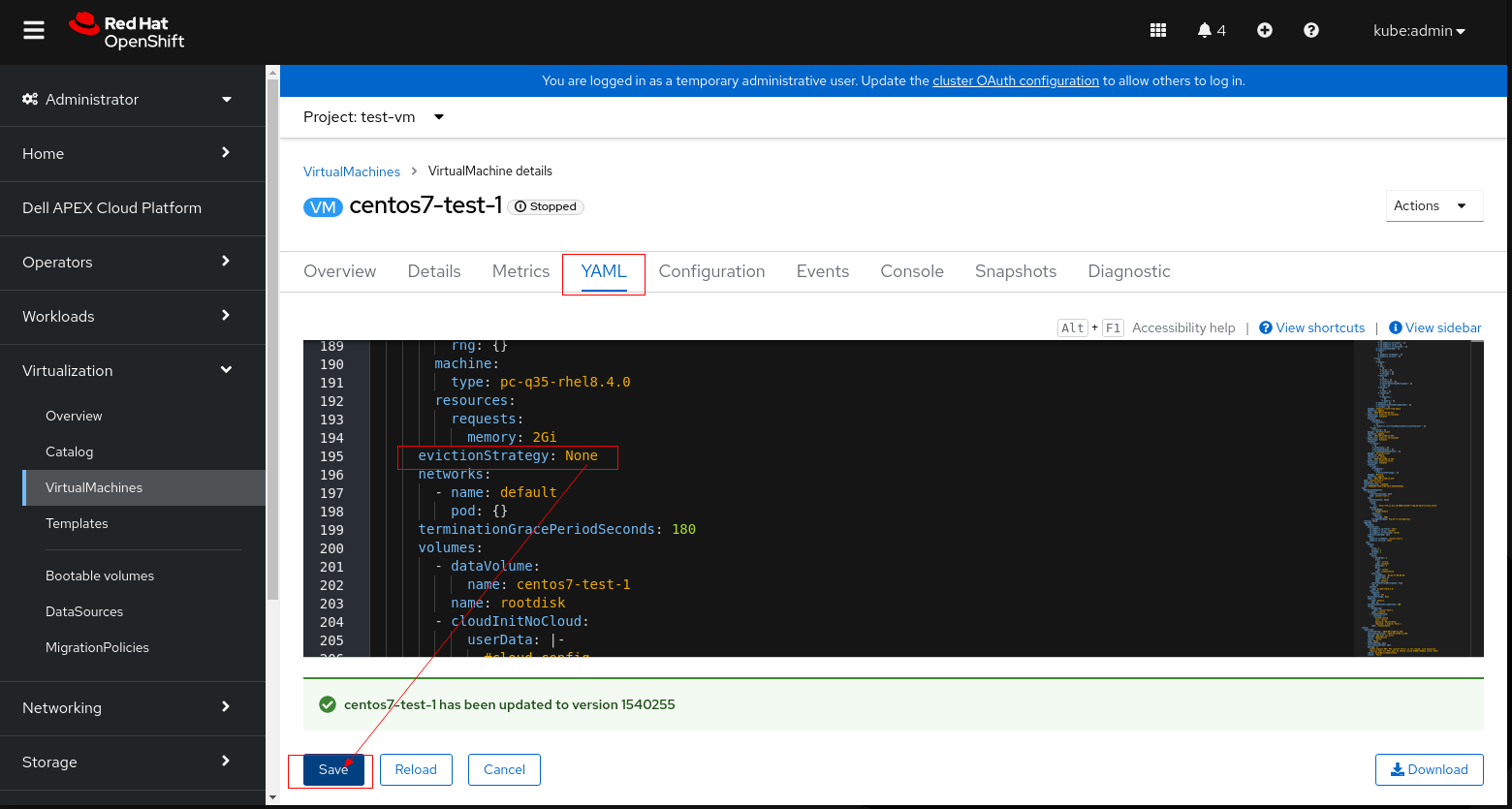
6. Retry LCM precheck and proceed the upgrade.
Scenario 2 resolution
Perform one of the following procedures that applies to your environment.
Procedure 1: Manually delete the pod/pods that cannot be evicted.
- Run below command to delete the pod/pods that cannot be evicted, and let them re-create in different nodes.
$ oc delete pod <pod_name> -n <pod_namespace>
- Retry LCM precheck and proceed the upgrade.
Procedure 2: If the pod cannot be manually deleted, patch the pod whose "PodDisruptionBudget" is configured as "minAvailable: 1"
- Run below command to check the pod "PodDisruptionBudget" value
For example:
$ oc get pdb <pdb_name> -n <pod_namespace>

NAME         MIN AVAILABLE   MAX UNAVAILABLE   ALLOWED DISRUPTIONS   AGE
<pdb_name>   1               N/A               0                     18h
- If the command output shows "MIN AVAILABLE" is "1", patch the PodDisruptionBudget minAvailable value to "0" by below command.
$ oc patch pdb <pdb_name> -n <pod_namespace> --type=merge -p '{"spec":{"minAvailable":0}}'
- Retry LCM precheck and proceed the upgrade.
- Wait until the upgrade is finished and the MCO is available, run below command to check everything is good.
$ watch -n10 "oc get clusterversion; echo; oc get mcp; echo; oc get nodes -o wide; echo; oc get co"
For example:
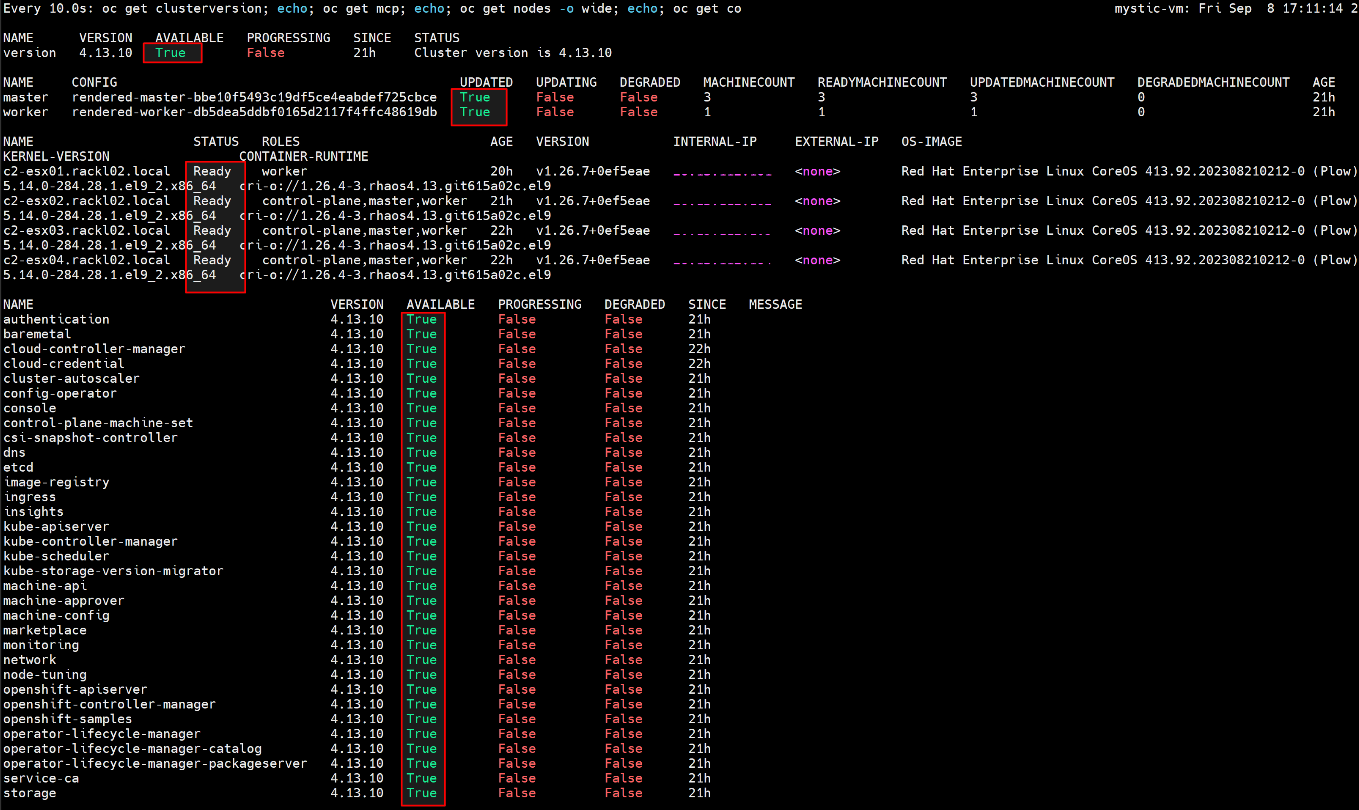
- After OCP upgrade is completed, restore the PodDisruptionBudget minAvailable value to "1"
$ oc patch pdb <pdb_name> -n <pod_namespace> --type=merge -p '{"spec":{"minAvailable":1}}'
Procedure 3: If patching the pod hit error "PodDisruptionBudget.policy "<pdb_name>" is invalid: spec: Forbidden: updates to poddisruptionbudget spec are forbidden.", follow below steps to workaround.
- Backup the PodDisruptionBudget which is configured with "minAvailable: 1"
$ oc get pdb <pdb_name> -n <pod_namespace> -o yaml > <pdb_name>_backup.yaml
- Remove the PodDisruptionBudget which is configured with "minAvailable: 1"
$ oc delete pdb <pdb_name> -n <pod_namespace>
- Retry LCM precheck and proceed the upgrade.
- Wait until the upgrade is finished and the MCO is available, run below command to check everything is good.
$ watch -n10 "oc get clusterversion; echo; oc get mcp; echo; oc get nodes -o wide; echo; oc get co"
For example:
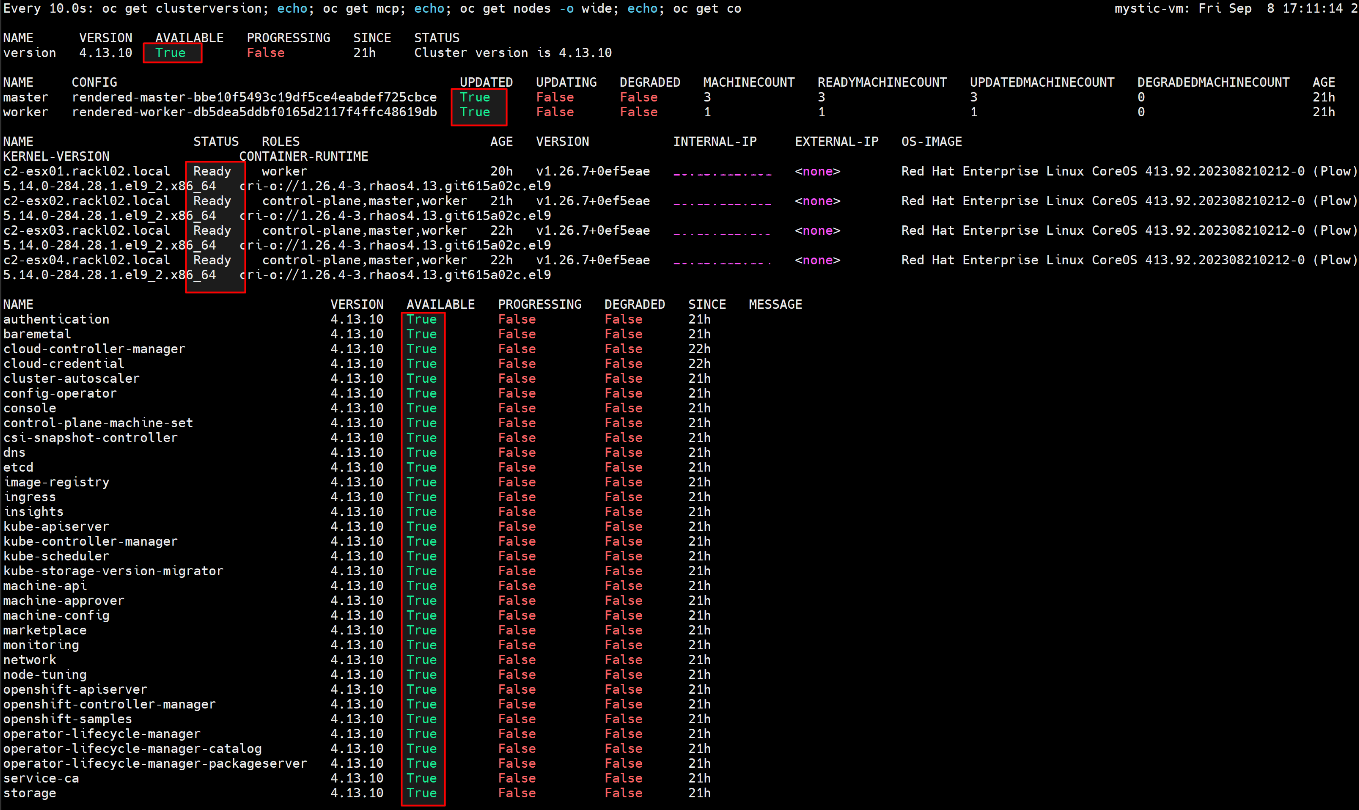
- After OCP upgrade is completed, restore the backup yaml file.
$ oc create -f <pdb_name>_backup.yaml -n <pod_namespace>
Scenario 3 resolution
Simply retry LCM precheck, it should pass this time.
Información adicional
Check below Openshift document for more information about storage volumes for virtual machine disks.
Productos afectados
APEX Cloud Platform for Red Hat OpenShiftPropiedades del artículo
Número del artículo: 000216907
Tipo de artículo: Solution
Última modificación: 18 feb. 2026
Versión: 3
Encuentre respuestas a sus preguntas de otros usuarios de Dell
Servicios de soporte
Compruebe si el dispositivo está cubierto por los servicios de soporte.