NetWorker: vProxy Performance mode cloning loses optimization with Retention Lock devices
Resumen: This article describes a bug which involves a flaw in the implementation of NetWorker's VMware vProxy backups when used with Data Domain Retention Lock devices.
Este artículo se aplica a
Este artículo no se aplica a
Este artículo no está vinculado a ningún producto específico.
No se identifican todas las versiones del producto en este artículo.
Síntomas
- Backup or cloning may appear slower than expected for NetWorker VMware Protection (NVP) vProxy save sets on Retention Lock devices
- Error appears in
ddfs.infolog despite apparent success of backup or clone job:
Attempt to rename non-empty directory /data/col1/mtree/device/active/abc3b7ed-00000006-fd27be29-6627be29-00045000-595e3c56
dboost-<nsrsvr.demo.local-55146>: ddboost_api ERROR: ddp_rename() failed, FromPath //mtree/device/active/abc3b7ed-00000006-fd27be29-6627be29-00045000-595e3c56, ToPath //mtree/device/21/06/abc3b7ed-00000006-fd27be29-6627be29-00045000-595e3c56,  Err: 5034-nfs rename failed (nfs: Permission denied)
- Impacted NetWorker releases:
- 19.9.0.x (and prior)
- 19.10.0.0 through 19.10.0.4
- 19.11.0.0 and 19.11.0.1
Causa
The problem results from an undiscovered flaw in implementation. Since Data Domain Retention-locked devices do not allow renaming of non-empty directories, part of NetWorker's normal backup and clone workflow silently fails, falling back to a different mechanism which prevents optimization success.
Resolución
The workflow in the following NetWorker releases:
- 19.10.0.5
- 19.11.0.2
- 19.12+
Workaround:
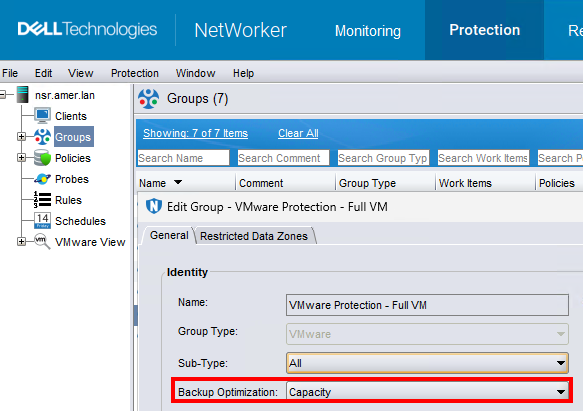
The problem does not appear to affect Capacity Mode. Switching to Capacity Mode as a workaround may alleviate the problem in the short-term, but upgrade will be recommended.
NOTE: Changing from one backup optimization mode to another (for example, from Optimized for Performance to Optimized for Capacity) requires performing a new full level-zero backup as the starting point for subsequent backups. Ensure that the Data Domain device has sufficient capacity. Since backups for each optimization mode must co-exist during this period, backups consume twice the usual storage capacity until the last Optimized for Capacity backup expires, as defined by the retention period. After this, storage consumption will return to normal.
Información adicional
NetWorker supports two types of backup optimization modes for vProxy backup to Data Domain systems—Optimized for Capacity, and Optimized for Performance. You can apply the optimization mode to vProxy protection groups during backup. The Optimized for Capacity mode uses variable size segmentation, which produces more overhead in data processing due to the higher deduplication rate, but reduces the capacity consumed on the Data Domain system. Optimized for Performance provides performance improvements during incremental back ups of virtual machines using Changed Block Tracking (CBT) and replicates data to a Data Domain system, and is effective when backing up large VMDK files. Although Optimized for Performance results in additional space use on the Data Domain device (around 20%), this mode significantly improves random I/O performance for instant access restores.
Productos afectados
NetWorkerProductos
NetWorker FamilyPropiedades del artículo
Número del artículo: 000225863
Tipo de artículo: Solution
Última modificación: 25 may. 2026
Versión: 3
Encuentre respuestas a sus preguntas de otros usuarios de Dell
Servicios de soporte
Compruebe si el dispositivo está cubierto por los servicios de soporte.