Cómo suscribirse a las asesorías técnicas de Dell (DTA) y a las asesorías de seguridad de Dell (DSA)
Resumen: Cómo suscribirse o darse de baja de DTA o DSA de Dell.
Este artículo se aplica a
Este artículo no se aplica a
Este artículo no está vinculado a ningún producto específico.
No se identifican todas las versiones del producto en este artículo.
Instrucciones
Dell Technologies emite asesorías para los productos Dell a fin de notificarle sobre problemas críticos y posibles impactos en su entorno. Configure notificaciones automáticas por correo electrónico cada vez que se emita una asesoría técnica o de seguridad de Dell o solo cuando se emita una asesoría para un producto específico.
Para conocer los pasos para corregir una asesoría, consulte Administración de asesorías técnicas y de seguridad en MyService360. Es necesario iniciar sesión en MyService360.
1. Inicie sesión en https://www.dell.com/support.
2. En la esquina superior derecha, coloque el cursor sobre Preferencias de Dell y haga clic en Dell. Se muestra la páginaConfiguración y preferencias de un contador A.
3. Haga clic en la pestaña NOTIFICACIONES Y ALERTAS y, a continuación, haga clic en la pestaña Asesorías de productos .
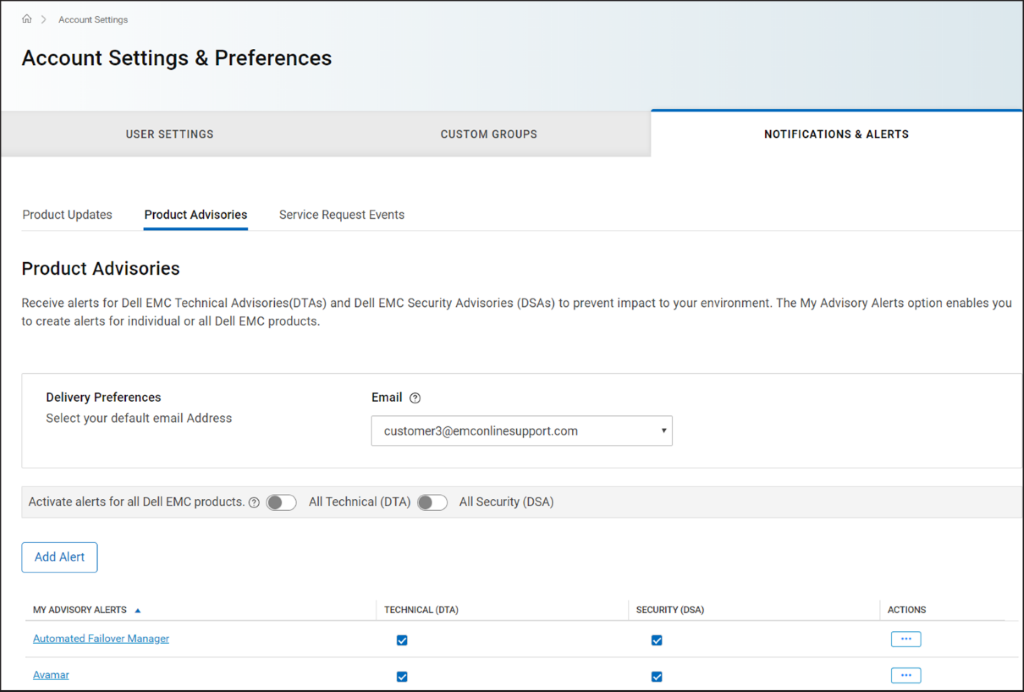
Figura 1 Pestaña
Asesorías de productos 4. En el panel Preferencias de entrega , seleccione la dirección de correo electrónico en la que desea recibir las notificaciones.
5. Para recibir notificaciones por correo electrónico cada vez que se emite una asesoría, realice lo siguiente:
NOTA: De manera predeterminada, se envían notificaciones por correo electrónico para asesorías técnicas y de seguridad. Según sus requisitos, puede desmarcar las casillas de verificación en las columnas TECHNICAL (DTA) o SECURITY (DSA).
Para conocer los pasos para corregir una asesoría, consulte Administración de asesorías técnicas y de seguridad en MyService360. Es necesario iniciar sesión en MyService360.
1. Inicie sesión en https://www.dell.com/support.
2. En la esquina superior derecha, coloque el cursor sobre
Preferencias de Dell y haga clic en Dell. Se muestra la páginaConfiguración y preferencias de un contador A.
3. Haga clic en la pestaña NOTIFICACIONES Y ALERTAS y, a continuación, haga clic en la pestaña Asesorías de productos .
Figura 1 Pestaña
Asesorías de productos 4. En el panel Preferencias de entrega , seleccione la dirección de correo electrónico en la que desea recibir las notificaciones.
5. Para recibir notificaciones por correo electrónico cada vez que se emite una asesoría, realice lo siguiente:
- Para las asesorías técnicas, active el switch de alternancia Todas las comunicaciones técnicas (DTA ).
- Para las asesorías de seguridad, active el switch de alternancia Todas las seguridades (DSA ).
- Haga clic en Add Alert.
- Ingrese un nombre de producto y haga clic en Agregar producto.
- La alerta se crea y se muestra en la página Asesorías de productos .
Propiedades del artículo
Número del artículo: 000113250
Tipo de artículo: How To
Última modificación: 18 abr 2026
Versión: 8
Encuentre respuestas a sus preguntas de otros usuarios de Dell
Servicios de soporte
Compruebe si el dispositivo está cubierto por los servicios de soporte.