如何启动 Windows 中的 Microsoft Copilot
Résumé: 本文介绍了如何使用键盘、快捷键或 Windows 和 Microsoft Edge 内的按钮来启动 Windows 中的 Microsoft Copilot。
Cet article concerne
Cet article ne concerne pas
Cet article n’est associé à aucun produit spécifique.
Toutes les versions du produit ne sont pas identifiées dans cet article.
Instructions
受影响的操作系统:
- Windows 11
- Windows 10
- Windows 中的 Microsoft Copilot 在中华人民共和国 (PRC) 不可用
- 回顾是一项 NPU 驱动的功能,仅在 Microsoft Copilot+ PC 上可用
- 在可用的情况下,用户也可以禁用 Windows 中的 Microsoft Copilot 和回顾功能,这会导致 Microsoft Copilot 键表现出不同的行为
- 该层次结构适用于安装了 Windows 11 的所有计算机
- 使用“Windows 更新”在安装了 Windows 10 的非 Copilot+ PC 上启用 Microsoft Copilot 键 — 待公布 (TBA)
Windows 中的 Microsoft Copilot 可通过多种方式启动。
| 启动 Microsoft Copilot | 键盘快捷键、图标或按键 |
|---|---|
| Windows 键 + C |  |
| Windows 任务栏 |  |
| Microsoft Edge |  |
| Microsoft Copilot 键 |  |
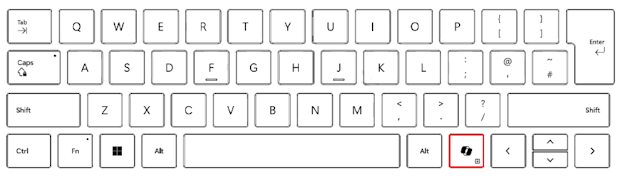
提醒:自 2024 年春季起,新上市的 Windows 11 设备将采用全新的键盘布局,并配备用于启动 Windows 中的 Microsoft Copilot 的专用键。该按键将替换右侧 Alt 键旁边的菜单键。按键位置可能因某些区域布局而异。
已知行为
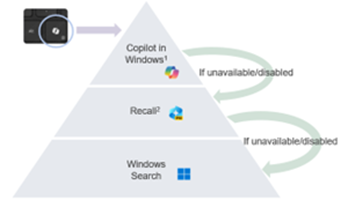
在 Microsoft Copilot+ PC 上,按 Microsoft Copilot 键将:
- 启动 Windows 中的 Microsoft Copilot。
- 如果 Microsoft Copilot 不可用或已禁用,则按下该按键将启动“回顾”功能。
- 如果“回顾”功能不可用或已禁用,则按下该按键将启动 Windows 搜索
按住 Microsoft Copilot 键可启动语音听写功能:
这允许用户向 Windows 中的 Microsoft Copilot 提问,或通过语音命令进行多轮交互。该此功能将在未来的某个时间点启用。
Informations supplémentaires

Propriétés de l’article
Numéro d’article: 000221081
Type d’article: How To
Dernière modification: 19 May 2026
Version: 9
Trouvez des réponses à vos questions auprès d’autres utilisateurs Dell
Services de support
Vérifiez si votre appareil est couvert par les services de support.