NetWorker: Steps to Restore a Single PostgreSQL WAL File Using NMDA OAPP for Accelerated Recovery
Résumé: Steps to Restore a Single PostgreSQL WAL File Using NetWorker Module for Databases and Applications (NMDA) OAPP for Accelerated Recovery.
Instructions
Steps to Restore a Single PostgreSQL WAL File Using NetWorker NMDA OAPP for Accelerated Recovery.
PostgreSQL database configuration
Configured the /var/lib/pgsql/12/data/postgresql.conf file to enable WAL configuration with these comments.
wal_level = replica
archive_mode = on
archive_command = '/usr/sbin/nsroappbackup -o pg_p_opt="%p" -o pg_f_opt="%f" -l txnlog -z /nsr/apps/config/postgresarchivetest.cfg'
NetWorker OAPP PostgreSQL Backup Configuration and Steps
PostgreSQL WAL backup configuration with NMDA OAPP
New client properties
Save Set: OAPP:
Backup Command: nsroappbackup -z /nsr/apps/config/postgresarchivetest.cfg
In /nsr/apps/config/postgresarchivetest.cfg, configured it as:
<?xml version="1.0" encoding="ISO-8859-1"?>
<OAPP>
        <NSR_SERVER> linux1 </NSR_SERVER>
        <NSR_CLIENT> db2linux1 </NSR_CLIENT>
        <NSR_DATA_VOLUME_POOL> dd1amerlan </NSR_DATA_VOLUME_POOL>
        <NSR_BACKUP_NAME> postarchivetest1  </NSR_BACKUP_NAME>
        <NSR_DATABASE_TYPE> postgres </NSR_DATABASE_TYPE>
        <NSR_INSTANCE_NAME> postgres </NSR_INSTANCE_NAME>
        <NSR_OS_USER> postgres </NSR_OS_USER>
        <BACKUP>
                <FULL>
                        <NSR_BACKUP_SCRIPT>/nsr/apps/config/archive_backup.sh </NSR_BACKUP_SCRIPT>
                        <USER_PSWD> </USER_PSWD>
                        <USER_PSWD_PROMPT>Password:</USER_PSWD_PROMPT>
                </FULL>
                        <USER_PSWD>"    $1$ADSOHJLHLSCEFNNN$0521437a15af9aee2d329561cbacd10a"</USER_PSWD>
                        <USER_PSWD_PROMPT/>
</BACKUP>
</OAPP>
And the archive_backup.sh is configured as:
#! /bin/sh
( set -x; /usr/pgsql-12/bin/pg_basebackup --pgdata=$OAPP_MOUNT_DIR/basebackup -Ft)
rc=$?
if [ $rc == 0 ]; then
echo "Continued processing with the returned value $rc."
else
echo "Exited processing with the returned value $rc."
exit $rc
fi
( set -x; /bin/cp /var/lib/pgsql/12/data/postgresql.conf $OAPP_MOUNT_DIR/ )
rc=$?
if [ $rc == 0 ]; then
echo "Continued processing with the returned value $rc."
else
echo "Exited processing with the returned value $rc."
exit $rc
fi
Run the Postgresql WAL backup on NMC and confirmed it succeeded.
NetWorker OAPP PostgreSQL WAL files Restore Configuration and Steps.
Run mminfo command on NW server to check save set's status and nsavetime
mminfo -s linux1 -avot -c db2linux1|grep _txn

Can see WAL 31 and 32 are in different SSIDs.
Then run below command for query the nsavetime and save set name.
mminfo -s linux1 -avot -c db2linux1 -r "nsavetime,name,savetime(17)"|grep -i post
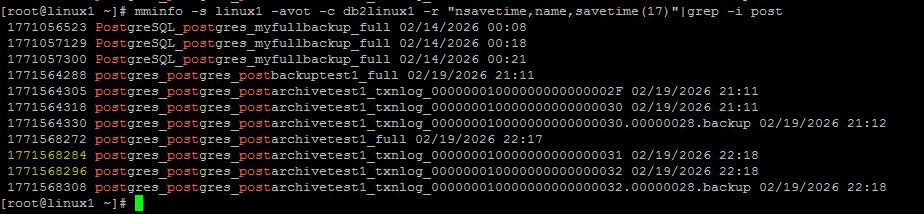
Create recovery configuration file "/nsr/apps/config/postarchiverestore.cfg" and set the recovery time and save set name properly.
vim /nsr/apps/config/postarchiverestore.cfg:
<?xml version="1.0" encoding="UTF-8"?>
<OAPP>
    <NSR_SERVER> linux1 </NSR_SERVER>
    <NSR_CLIENT> db2linux1 </NSR_CLIENT>
    <NSR_DATA_VOLUME_POOL> dd1amerlan </NSR_DATA_VOLUME_POOL>
    <NSR_BACKUP_NAME> postgres_postgres_postarchivetest1_txnlog_000000010000000000000031 </NSR_BACKUP_NAME>
    <NSR_DATABASE_TYPE> postgres </NSR_DATABASE_TYPE>
    <NSR_INSTANCE_NAME> postgres </NSR_INSTANCE_NAME>
    <NSR_OS_USER> postgres </NSR_OS_USER>
    <NSR_DEBUG_LEVEL> 9 </NSR_DEBUG_LEVEL>
    <NSR_DPRINTF> TRUE </NSR_DPRINTF>
    <RECOVER>
        <NSR_SAVESET_NAME> postgres_postgres_postarchivetest1_txnlog_000000010000000000000031 </NSR_SAVESET_NAME>
        <NSR_RELOCATION_DEST> /tmp/postrestore </NSR_RELOCATION_DEST>
        <NSR_RECOVER_TIME> 1771568284 </NSR_RECOVER_TIME>
    </RECOVER>
</OAPP>
Restore the backup data to local disk.
nsroapprecover -z /nsr/apps/config/postarchiverestore.cfg

Checked the restored file status, this time only the WAL 31 is restored.

And when changed the configuration file "/nsr/apps/config/postarchiverestore.cfg" to be:
<?xml version="1.0" encoding="UTF-8"?>
<OAPP>
    <NSR_SERVER> linux1 </NSR_SERVER>
    <NSR_CLIENT> db2linux1 </NSR_CLIENT>
    <NSR_DATA_VOLUME_POOL> dd1amerlan </NSR_DATA_VOLUME_POOL>
    <NSR_BACKUP_NAME> postgres_postgres_postarchivetest1_txnlog_000000010000000000000032 </NSR_BACKUP_NAME>
    <NSR_DATABASE_TYPE> postgres </NSR_DATABASE_TYPE>
    <NSR_INSTANCE_NAME> postgres </NSR_INSTANCE_NAME>
    <NSR_OS_USER> postgres </NSR_OS_USER>
    <NSR_DEBUG_LEVEL> 9 </NSR_DEBUG_LEVEL>
    <NSR_DPRINTF> TRUE </NSR_DPRINTF>
    <RECOVER>
        <NSR_SAVESET_NAME> postgres_postgres_postarchivetest1_txnlog_000000010000000000000032 </NSR_SAVESET_NAME>
        <NSR_RELOCATION_DEST> /tmp/postrestore1 </NSR_RELOCATION_DEST>
        <NSR_RECOVER_TIME> 1771568296 </NSR_RECOVER_TIME>
    </RECOVER>
</OAPP>
Restore the backup data to local disk /tmp/postrestore1
nsroapprecover -z /nsr/apps/config/postarchiverestore.cfg

Checked the restored file status, this time only the WAL 32 is restored:

Conclusion
WAL files (31 and 32) with different SSIDs can be restored separately.
Due to the limitations of OAPP backup configuration/design, it is required to use OS user with root privilege (for example. root) to restore individual WAL file.
If using OS user without root privilege, the recovery is completed with error.
Example error message:

It is suggested that:
After recovery by using OS user with root privilege, run the chown command for correct the UID/GID of the restored files, but the contents of the restored WAL files will not be affected by this.
Test result summary:
| Perform restore by OS user. | Original WAL file permission (backup image) | Individual WAL file restored successfully? | Restored Individual WAL file permission | ||
| Owner | Group | Owner | Group | ||
root |
postgres |
postgres |
Yes | 100 | ftp (ID 50) |
postgres |
postgres |
postgres |
No | N/A restore failed. | N/A restore failed. |