使用 Killer 乙太網路介面卡的網際網路速度緩慢
Résumé: Killer Control Center 軟體可讓您設定有線連線的速度限制。透過有線連線連接時,設定較低的值會導致速度變慢。
Cet article concerne
Cet article ne concerne pas
Cet article n’est associé à aucun produit spécifique.
Toutes les versions du produit ne sont pas identifiées dans cet article.
Symptômes
受影響的平台:
- Latitude
- OptiPlex
- Precision 工作站
- Inspiron
- Vostro
- XPS
- G 系列
- Alienware
在配備 Killer E2400 或 E2500 乙太網路介面卡的 Dell 或 Alienware 電腦上,最大化有線連線速度。
配備 Killer 乙太網路配接卡的電腦可能無法透過有線連線達到最大頻寬。
Cause
不適用
Résolution
Killer Control Center 軟體中有一個限速選項,您可以調整該選項以解決此問題。
以下是更改速度限制的步驟:
- 開啟 Killer Control Center
- 按一下左側功能表上的設定
- 按一下 設定頻寬限制 (圖 1)
- 根據您的連線設定上傳和下載速度,然後按一下套用設定 (圖 2)
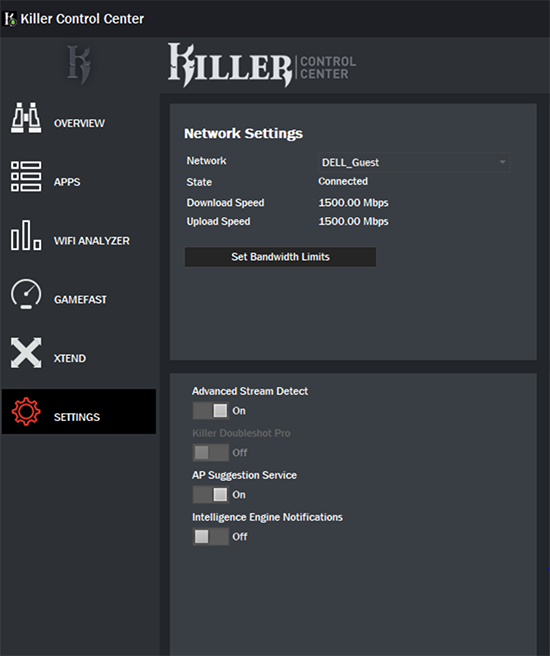 |
| 圖 1:(僅英文)Killer Control Center 設定 |
 |
| 圖 2:(僅英文)Killer Control Center 設定 |
如果問題仍然存在,請參閱以下文章,以取得其他故障診斷步驟:

Produits concernés
Inspiron, OptiPlex, Vostro, XPS, G Series, G Series, Alienware, Inspiron, Latitude, Vostro, XPS, Fixed Workstations, Mobile WorkstationsPropriétés de l’article
Numéro d’article: 000135709
Type d’article: Solution
Dernière modification: 15 Apr 2025
Version: 7
Trouvez des réponses à vos questions auprès d’autres utilisateurs Dell
Services de support
Vérifiez si votre appareil est couvert par les services de support.