Dell Networking Force10 OS9 如何将交换机配置为 FTP 服务器
Résumé: 本文介绍如何使用 DELL OS9 交换机作为 FTP 服务器,以便从本地闪存上传或下载文件。
Cet article concerne
Cet article ne concerne pas
Cet article n’est associé à aucun produit spécifique.
Toutes les versions du produit ne sont pas identifiées dans cet article.
Instructions
Dell Networking OS9 支持 FTP 服务器功能。这可用于将交换机中的核心转储或数据包捕获等文件传输到本地计算机并返回。
示例配置
配置语法
我们使用 winscp 等实用程序通过 FTP 访问交换机。
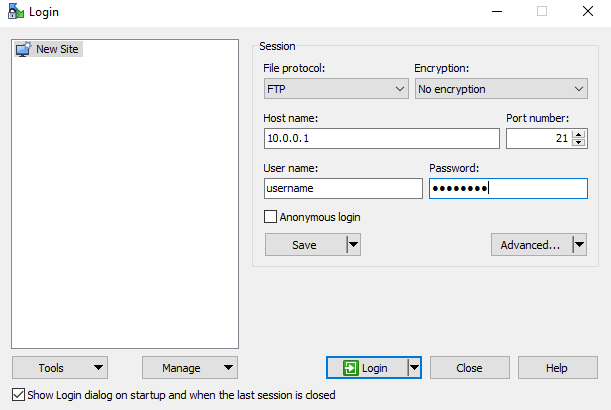
示例配置
DELLEMC#
DELLEMC#configure
DELLEMC(conf)#ftp-server topdir flash:
DELLEMC(conf)#ftp-server username <username> password <password>
DELLEMC(conf)#ftp-server enable
提醒:FTP 用户获得对 ftp-server topdir 中指定目录的读取和写入权限。我们可以将文件拷贝到交换机中,也可以从交换机中拷贝出来。
配置语法
| 命令 | 语法 |
|---|---|
DELLEMC#configure |
进入配置模式。 |
DELLEMC(conf)#ftp-server enable |
启用 FTP 服务器功能。 |
DELLEMC(conf)#ftp-server username <username> password <password> |
配置 FTP 用户名和密码。 用户名和密码的长度可以是 40 个字符。 |
DELLEMC(conf)#ftp-server username <username> password 7 <password> |
7 按如下所示指定 HIDDEN 密码。密码在配置中加密(可选)。 |
DELLEMC(conf)#ftp-server topdir flash: |
指定 FTP 要访问的目录。如果未指定任何内容 |
DELLEMC(conf)# ftp-server vrf <any/management> |
(可选)指定 any 以允许 FTP 服务器访问任何 vrf。 当 FTP 服务器访问仅限于管理 vrf 时,将使用管理。 |
我们使用 winscp 等实用程序通过 FTP 访问交换机。
Produits concernés
OS9Propriétés de l’article
Numéro d’article: 000211113
Type d’article: How To
Dernière modification: 31 Jan 2024
Version: 2
Trouvez des réponses à vos questions auprès d’autres utilisateurs Dell
Services de support
Vérifiez si votre appareil est couvert par les services de support.