Ustalanie wersji instalatora Master Installer programu Dell Data Security
Sommaire: Dowiedz się, jak zidentyfikować wersję instalatora głównego Dell Data Security (dawniej Dell Data Protection), wykonując poniższe instrukcje krok po kroku.
Cet article s’applique à
Cet article ne s’applique pas à
Cet article n’est lié à aucun produit spécifique.
Toutes les versions de produits ne sont pas identifiées dans cet article.
Instructions
Uwaga:
- Od maja 2022 r. oprogramowanie Dell Endpoint Security Suite Enterprise osiągnęło koniec konserwacji. Ten produkt i związane z nim artykuły nie są już aktualizowane przez Dell.
- Od stycznia 2019 r. oprogramowanie Dell Endpoint Security Suite Pro osiągnęło koniec konserwacji. Ten produkt i związane z nim artykuły nie są już aktualizowane przez Dell.
- Aby uzyskać więcej informacji, zapoznaj się z artykułem Zasady dotyczące cyklu życia produktu (koniec wsparcia technicznego i koniec przydatności do użycia) dla programu Dell Data Security. Jeśli masz pytania dotyczące innych artykułów, skontaktuj się z działem sprzedaży lub napisz wiadomość na adres endpointsecurity@dell.com.
- Aby uzyskać dodatkowe informacje na temat obecnych produktów, zapoznaj się z artykułem Endpoint Security.
Numer wersji instalatora Master Installer programu Dell Data Security (dawniej Dell Data Protection) można wykorzystać do:
- Identyfikować znane problemy.
- Zrozumieć zmiany przepływu pracy.
- Weryfikować wymagania systemowe.
Dotyczy produktów:
- Dell Encryption Enterprise
- Dell Data Protection | Enterprise Edition
- Dell Encryption Personal
- Dell Data Protection | Personal Edition
- Dell Endpoint Security Suite Enterprise
- Dell Endpoint Security Suite
Dotyczy systemów operacyjnych:
- Windows
- Przed ustaleniem wersji należy pobrać [MASTER INSTALLER].
- Nazwa produktu [MASTER INSTALLER] różni się w zależności od aplikacji:
DDSSetup.exedla Dell Encryption EnterpriseDDSSetup.exedla Dell Encryption PersonalDDSSuite.exedla rozwiązania Dell Endpoint Security Suite EnterpriseDDSSuite.exedla Dell Endpoint Security SuiteDDPSetup.exedla Dell Data Protection | Wersja EnterpriseDDPSetup.exedla Dell Data Protection | Wersja osobistaDDPSuite.exedla Dell Data Protection | Pakiet zabezpieczeń punktów końcowychDDPSuite.exedla Dell Data Protection | Endpoint Security Suite Enterprise
Uwaga: Aby uzyskać informacje na temat pobierania DDSSetup.exe lub DDPSetup.exe, zapoznaj się z artykułem Pobieranie oprogramowania Dell Encryption Enterprise lub Dell Encryption Personal.
- Kliknij plik [MASTER INSTALLER] prawym przyciskiem myszy, a następnie wybierz opcję Właściwości.

- Kliknij kartę Szczegóły.

- Zapisz informację znajdującą się w polu Wersja produktu.
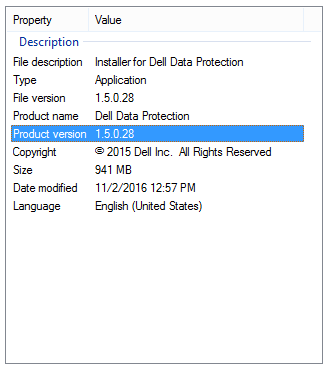 Uwaga: Wersja produktu Twojego klienta może różnić się od wersji widocznej na powyższym zrzucie ekranu.
Aby skontaktować się z pomocą techniczną, przejdź do sekcji Numery telefonów międzynarodowej pomocy technicznej Dell Data Security.
Przejdź do TechDirect, aby wygenerować zgłoszenie online do pomocy technicznej.
Aby uzyskać dodatkowe informacje i zasoby, dołącz do Forum społeczności Dell Security.
Renseignements supplémentaires
Vidéos
Produits touchés
Dell Encryption, Dell Endpoint Security Suite Pro, Dell Endpoint Security Suite EnterprisePropriétés de l’article
Numéro d’article: 000124917
Type d’article: How To
Dernière modification: 12 mars 2025
Version: 11
Obtenez des réponses à vos questions auprès d’autre utilisateurs de Dell
Services de soutien
Vérifiez si votre appareil est couvert par les services de soutien.