Dell Encryption Enterprise for Macのバージョンを特定する方法を教えてください。
Résumé: Dell Encryption Enterprise for Mac/Dell Data Protection Enterprise Edition for Macのバージョンは、次の手順に従って特定できます。
Cet article concerne
Cet article ne concerne pas
Cet article n’est associé à aucun produit spécifique.
Toutes les versions du produit ne sont pas identifiées dans cet article.
Instructions
注:
- 2021年2月で、Dell Encryption Enterprise for Macのメンテナンスが終了しました。この製品およびこの製品に関する記事は、Dellでは今後アップデートされません。詳細については、「Dell Data Securityの製品ライフサイクル(サポート終了およびライフサイクル終了)」を参照してください。代替記事に関する質問がある場合は、担当のセールス チームに連絡するか、またはendpointsecurity@dell.comにお問い合わせください。
- 現在の製品に関する追加情報については、Endpoint Securityを参照してください。
次の場合に、Dell Encryption Enterprise for Mac(旧Dell Data Protection | Enterprise Edition for Mac)のバージョンを把握しておくことが重要です。
- 既知の問題の確認
- UIの違いの確認
- ワークフローの変更の理解
- オペレーティング システムの互換性の確認。
対象製品:
- Dell Encryption Enterprise for Mac
- Dell Data Protection | Enterprise Edition for Mac
対象オペレーティング システム:
- macOS
- Mac OS X[Mac OS X]
バージョンは、製品のユーザー インターフェイス(UI)、または製品のインストーラーを使用して判断できます。詳細については、該当するオペレーティング システムをクリックしてください。
UI
UIを使用してバージョンを特定する前に、Dell Encryption Enterprise for Macをインストールする必要があります。
- Macエンドポイントにログインします。
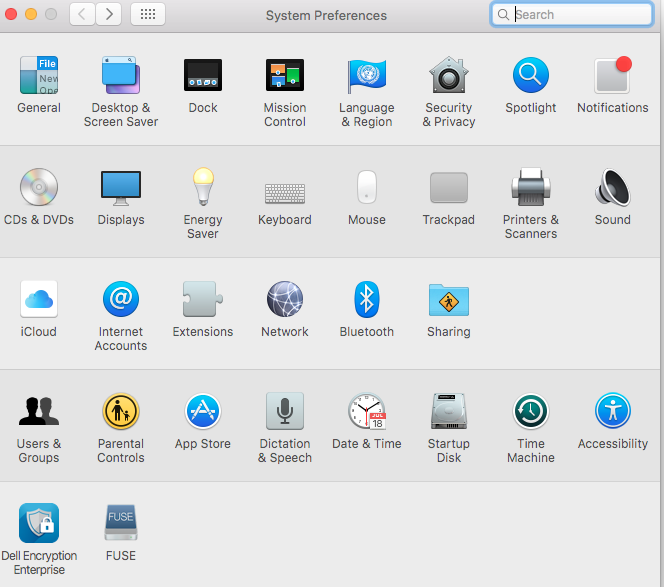
- [System Preferences]をクリックします。
![[System Preferences]](https://supportkb.dell.com/img/ka0Do0000005wOMIAY/ka0Do0000005wOMIAY_ja_1.jpeg)
- [System Preferences]で、[Dell Encryption Enterprise]をクリックします。
- Dell Encryption Enterprise UIの右下隅にあるバージョン番号をメモします。
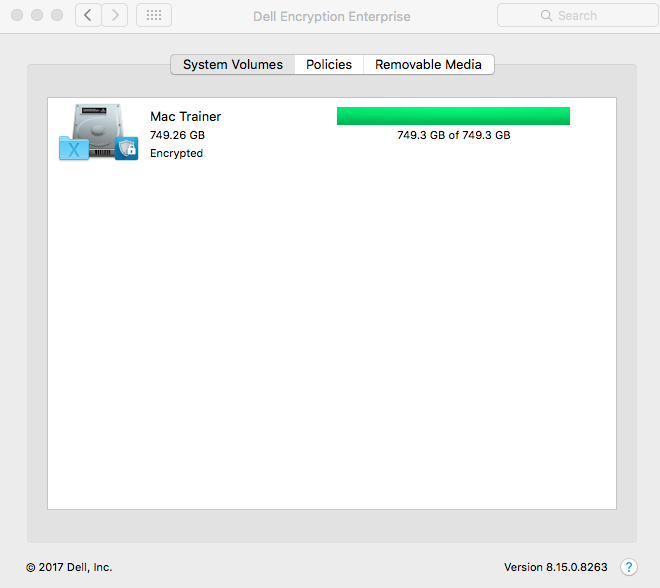 お使いのクライアントのバージョンは、上記のスクリーンショットとは異なる場合があります。
インストーラ
- インストーラーを右クリックして、[Get Info]を選択します。
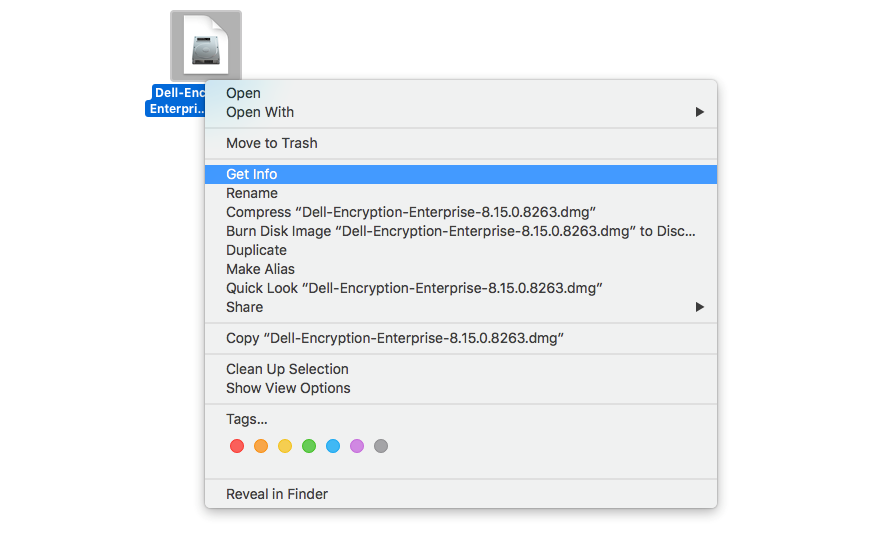
- [Name & Extension]を展開し、バージョンをメモします。
![[Name and Extension]](https://supportkb.dell.com/img/ka0Do0000005wOMIAY/ka0Do0000005wOMIAY_ja_5.jpeg) お使いのインストーラーのバージョンは、上記のスクリーンショットとは異なる場合があります。
お使いのインストーラーのバージョンは、上記のスクリーンショットとは異なる場合があります。
Informations supplémentaires
Vidéos
Produits concernés
Dell EncryptionPropriétés de l’article
Numéro d’article: 000124916
Type d’article: How To
Dernière modification: 05 août 2026
Version: 16
Trouvez des réponses à vos questions auprès d’autres utilisateurs Dell
Services de support
Vérifiez si votre appareil est couvert par les services de support.