我該如何識別 Mac 版 Dell Encryption Enterprise 的版本?
Résumé: 您可以依照以下指示識別 Mac 版 Dell Encryption Enterprise / Mac 版 Dell Data Protection Enterprise Edition 的版本。
Cet article concerne
Cet article ne concerne pas
Cet article n’est associé à aucun produit spécifique.
Toutes les versions du produit ne sont pas identifiées dans cet article.
Instructions
註:
- 截至 2021 年 2 月,Mac 版 Dell Encryption Enterprise 已達到維護結束的期限。Dell 已不再更新此產品及其文章。如需更多資訊,請參閱 Dell Data Security 的產品生命週期 (支援結束及壽命結束) 政策。如果您對其他文章有任何問題,請聯絡您的銷售團隊或聯絡 endpointsecurity@dell.com。
- 請參考端點安全性,以取得有關目前產品的其他資訊。
瞭解 Mac 版 Dell Encryption Enterprise (先前稱為 Mac 版 Dell Data Protection | Enterprise Edition) 的版本十分重要,可讓您:
- 識別已知問題
- 判斷 UI 差異
- 瞭解工作流程變更
- 確認作業系統相容性。
受影響的產品:
- Dell Encryption Enterprise for Mac
- Dell Data Protection | Enterprise Edition for Mac
受影響的作業系統:
- macOS
- Mac OS X
可透過產品使用者介面 (UI) 或透過產品安裝程式來判斷版本。如需詳細資訊,請按一下適當的方法。
UI
必須先安裝 Mac 版 Dell Encryption Enterprise,才能透過 UI 識別版本。
- 登入 Mac 端點。
- 按一下系統偏好設定。

- 在系統偏好設定中,按一下 Dell Encryption Enterprise。
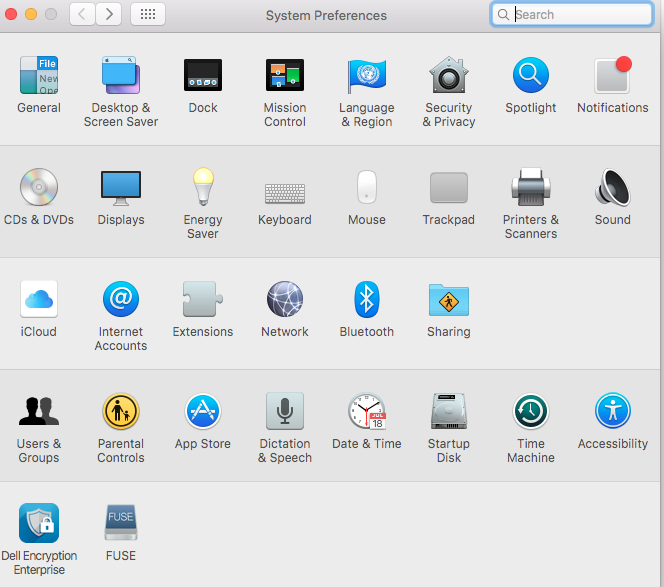
- 記錄在 Dell Encryption Enterprise UI 右下角的版本編號。
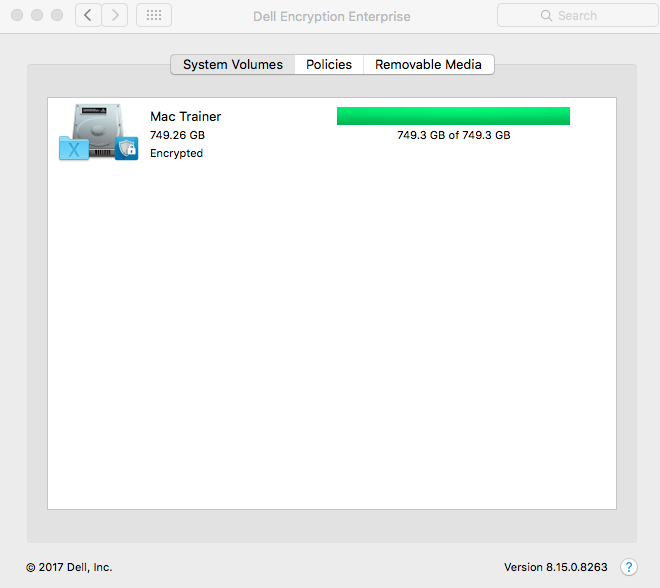 您的用戶端版本可能會與上述螢幕擷取畫面不同。
安裝程式
- 以滑鼠右鍵按一下安裝程式,然後選取取得資訊。
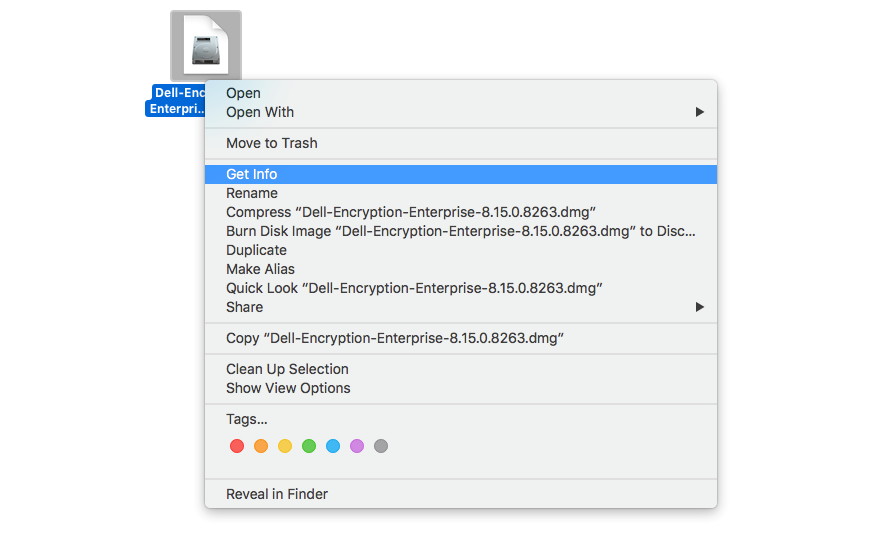
- 展開名稱和副檔名,然後記下版本。
 您的安裝程式版本可能會與上述螢幕擷取畫面不同。
Informations supplémentaires
Vidéos
Produits concernés
Dell EncryptionPropriétés de l’article
Numéro d’article: 000124916
Type d’article: How To
Dernière modification: 05 août 2026
Version: 16
Trouvez des réponses à vos questions auprès d’autres utilisateurs Dell
Services de support
Vérifiez si votre appareil est couvert par les services de support.