如何-識別-dell-data-protection-secure-lifecycle-的版本
Résumé: 瞭解如何依照以下指示識別 Dell Data Protection Secure Lifecycle 的版本。
Cet article concerne
Cet article ne concerne pas
Cet article n’est associé à aucun produit spécifique.
Toutes les versions du produit ne sont pas identifiées dans cet article.
Instructions
註:
- 截至 2018 年 11 月,Dell Data Protection | Secure Lifecycle 的支援壽命已結束。Dell 已不再更新此產品及其文章。如需更多資訊,請參閱 Dell Data Security 的產品生命週期 (支援結束及壽命結束) 政策。如果您對其他文章有任何問題,請聯絡您的銷售團隊或聯絡 endpointsecurity@dell.com。
- 請參考端點安全性,以取得有關目前產品的其他資訊。
瞭解 Dell Data Protection 的版本 |Secure Lifecycle 可讓您:
- 識別已知問題
- 判斷 UI 差異
- 瞭解工作流程變更
- 確認系統需求
受影響的產品:
- Dell Data Protection | Secure Lifecycle
受影響的作業系統:
- Windows
- Mac
識別 Dell Data Protection 的版本 |Secure Lifecycle,按一下 Windows 或 Mac。
Windows
可透過產品使用者介面 (UI) 或透過產品安裝程式來判斷版本。如需詳細資訊,請按一下適當的選項。
UI
必須先安裝 Dell Data Protection | Secure Lifecycle,才能透過 UI 識別版本。
- 登入 Windows 電腦。
- 在 Windows 系統匣中,以滑鼠右鍵按一下 Dell Data Protection | Secure Lifecycle 圖示,然後選取關於。
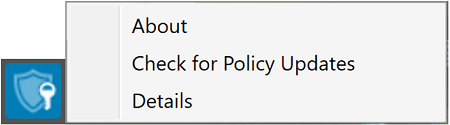
- 記下版本 X.X.X.X。在範例中,版本是 1.1.358.0。
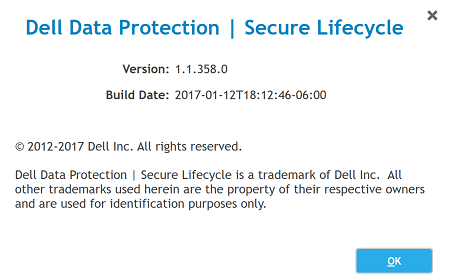 您的用戶端版本可能會與上述螢幕擷取畫面不同。
安裝程式
在執行這些步驟前,必須先下載 Dell Data Protection | Secure Lifecycle 安裝程式。
- 以滑鼠右鍵按一下 SecureLifecycle_64bit_Setup.exe or SecureLifecycle_32bit_Setup.exe,然後選取內容。
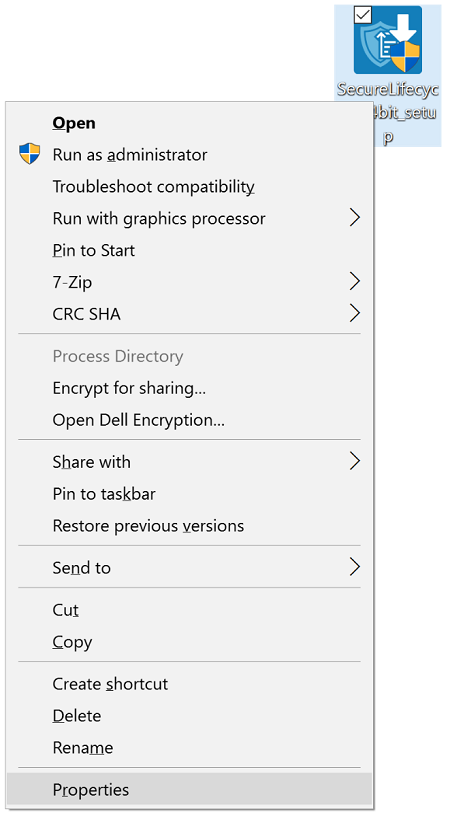
- 按一下詳細資料標籤。
- 記下檔案版本。在範例中,檔案版本是 1.1.358.0。
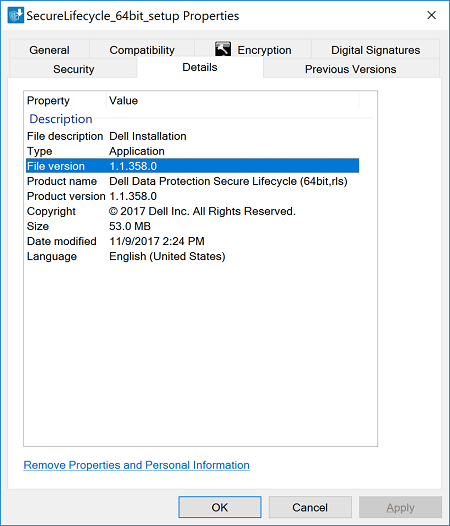 您的用戶端檔案版本可能會與上述螢幕擷取畫面不同。
Mac
可透過產品使用者介面 (UI) 或透過產品安裝程式來判斷版本。如需詳細資訊,請按一下適當的選項。
UI
- 按一下 WDA 圖示。

- 選取左側的應用程式。
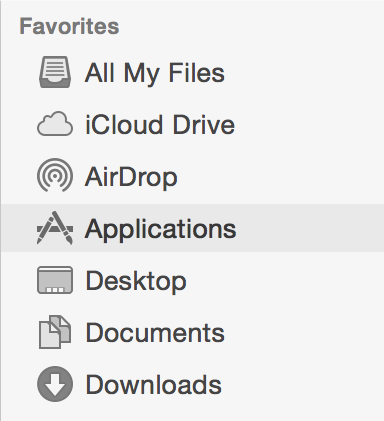
- 在應用程式中,按兩下 Dell Data Protection | Secure Lifecycle。
- 按一下關於 Cloud Edition,然後記下版本 X.X (XXXX)。在範例中,版本是 1.1.0 (7695)。
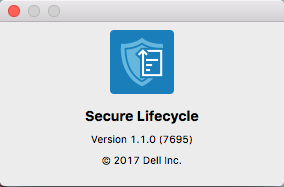 您的用戶端版本可能會與上述螢幕擷取畫面不同。
安裝程式
在執行這些步驟前,必須先下載 Dell Data Protection | Secure Lifecycle 安裝程式。
- 按兩下 DDPSL-Explorer-[VERSION].dmg
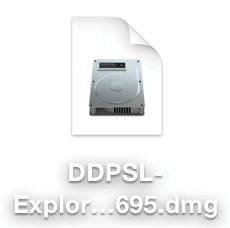 XXX 是您的安裝程式版本,可能會與上述螢幕擷取畫面不同。
 - 產品版本位於 DDPSL-Explorer 下。在範例中,產品版本是 1.1.0.7695。
 您的用戶端版本可能會與上述螢幕擷取畫面不同。
Informations supplémentaires
Vidéos
Produits concernés
Dell EncryptionPropriétés de l’article
Numéro d’article: 000131633
Type d’article: How To
Dernière modification: 10 août 2026
Version: 16
Trouvez des réponses à vos questions auprès d’autres utilisateurs Dell
Services de support
Vérifiez si votre appareil est couvert par les services de support.