Latitude 5300: Handleiding voor toetsenbordfuncties
Résumé: Deze handleiding bevat een overzicht van de beschikbare sneltoetsen en de functies die ze verrichten op de Dell Latitude 5300.
Cet article concerne
Cet article ne concerne pas
Cet article n’est associé à aucun produit spécifique.
Toutes les versions du produit ne sont pas identifiées dans cet article.
Symptômes
De volgende handleiding bevat de beschikbare sneltoetsen en de functies die ze verrichten op de Dell Latitude 5300.
Cause
Niet van toepassing
Résolution
Sneltoetsfuncties
De onderstaande tabel bevat een lijst met sneltoetsfuncties die beschikbaar zijn op de Latitude 5300.
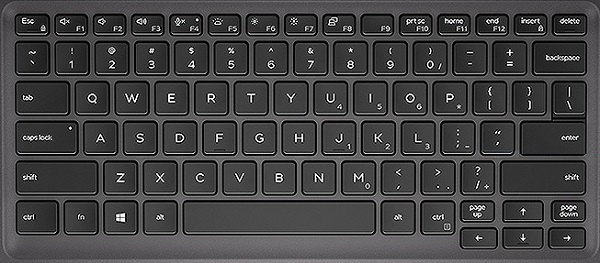
| Functietoetsencombinatie | Resultaat |
|---|---|
| Fn + Esc | Fn-wisseltoets |
| Fn + F1 | Audio dempen |
| Fn + F2 | Volume omlaag |
| Fn + F3 | Volume omhoog |
| Fn + F4 | Microfoon dempen |
| Fn + F5 | Toetsenbordverlichting (alleen voor computers die zijn aangeschaft met een toetsenbord met achtergrondverlichting) |
| Fn + F6 | De helderheid van het scherm verlagen |
| Fn + F7 | De helderheid van het scherm verhogen |
| Fn + F8 | Beeldscherm in-/uitschakelen (Windows + P) |
| Fn + F10 | Print Screen |
| Fn + F11 | Home |
| Fn + F12 | End |
| Fn + Insert | Num Lock |
 Ga naar onze Knowledge Base voor toetsenborden voor aanvullende bronnen en informatie.
 Ga voor meer artikelen en informatie naar onze touchpad supportpagina.
 Meer artikelen en informatie vindt u ook op onze muissupportpagina.
Produits concernés
Latitude 5300Propriétés de l’article
Numéro d’article: 000142995
Type d’article: Solution
Dernière modification: 01 May 2026
Version: 5
Trouvez des réponses à vos questions auprès d’autres utilisateurs Dell
Services de support
Vérifiez si votre appareil est couvert par les services de support.