Isilon:使用 Powershell 與平台 API - 建立物件和 RAN
Résumé: 本文說明如何使用 Powershell 搭配 OneFS 平台 API 建立物件和 RAN。
Cet article concerne
Cet article ne concerne pas
Cet article n’est associé à aucun produit spécifique.
Toutes les versions du produit ne sont pas identifiées dans cet article.
Symptômes
不需要
Cause
不需要
Résolution
JSON 簡介
PAPI 使用 JSON 作為資料交換格式。瞭解如何利用它來使用PAPI創建、修改或刪除資源至關重要。有關 JSON 的其他資訊,請訪問 www.json.org
- 名稱與值對的集合
- 值的有序清單
取得 API 物件的範例輸出可能如下所示:
{
"<object>": {
     "<property>": <value>,
     ...
}
要知道哪些 JSON 文字輸出可用,我們必須發出 POST 命令來創建物件;透過發送以下請求查看PAPI自文檔:
GET /platform/1/quota/quotas?describe
以下是相關的 Powershell 程式碼:
#Get PAPI self documentation for quotas
$resource = "/platform/1/quota/quotas?describe"
$uri = $baseurl + $resource
$ISIObject = Invoke-RestMethod -Uri $uri -Headers $headers -Method Get
$ISIObject
下面的示例輸出概述了創建新配額必須 POST 的內容。請注意所需的屬性,因為它們可能與相應的屬性不同 isi 命令為貴組織設定主要和次要 IT 連絡人。
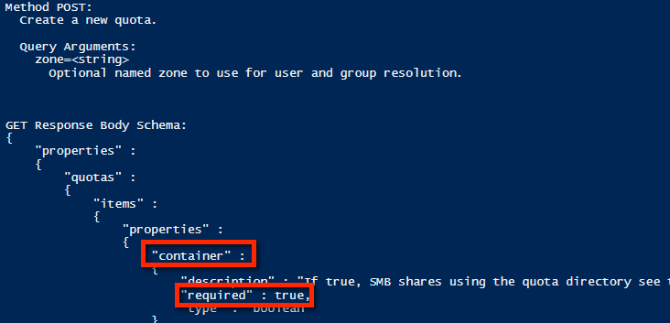
使用範例屬性,以下是可用於建立目錄硬配額的 JSON 字串範例:
$QuotaObject = @"
{"type":"directory","include_snapshots": false,"container": true, "path": /ifs/home/user1", "enforced": true, "thresholds": {"hard":10000000},"thresholds_include_overhead": false}
"@
完成 JSON 字串後,剩下的就是建置 Invoke-RestMethod 參數並提交。在下面的範例代碼中,JSON 字串是 POST 的主體,內容類型為 application/json:
$headers = @{"Authorization"="Basic $($EncodedPassword)"}
$uri = $baseurl + $resource
$ISIObject = Invoke-RestMethod -Uri $uri -Headers $headers -Body $QuotaObject -ContentType "application/json; charset=utf-8" -Method POST
Write-Host "   Resulting Quota ID: "  $ISIObject.id
把所有東西放在一起
舉個例子,假設您的環境在單一父目錄下有許多使用者主目錄,(範例: /ifs/home),並且您希望為每個主目錄設置目錄配額。使用 Isilon RESTful 存取命名空間 (RAN) API 取得每個使用者主目錄的路徑。以下代碼獲取指定路徑的子目錄,然後在每個子目錄上設置目錄配額:
# Get subdirectories of path specified
$resource = '/namespace/' + $path
$uri = $baseurl + $resource
$ISIObject = Invoke-RestMethod -Uri $uri -Headers $headers -Method Get
#Loop through each directory and set the quota
ForEach($folder in $ISIObject.children) {
#Create quota
$resource ="/platform/1/quota/quotas"
Write-Host "Setting a $quotasize byte quota on $quotapath"
$QuotaObject = @"
{"type":"directory","include_snapshots": false,"container": true, "path": "$quotapath", "enforced": true, "thresholds": {"hard":$quotasize},"thresholds_include_overhead": false}
"@
$headers = @{"Authorization"="Basic $($EncodedPassword)"}
$uri = $baseurl + $resource
$ISIObject2 = Invoke-RestMethod -Uri $uri -Headers $headers -Body $QuotaObject -ContentType "application/json; charset=utf-8" -Method POST
Write-Host "   Resulting Quota ID: "  $ISIObject2.id
}
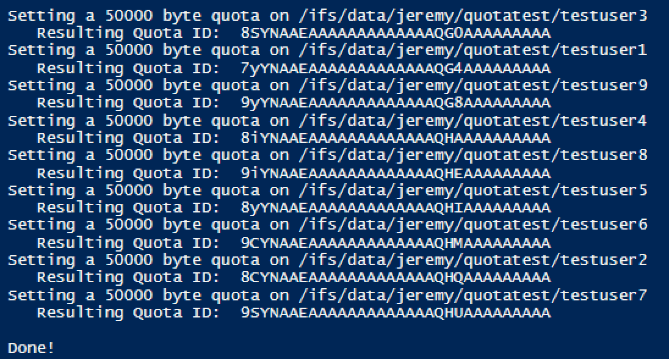
以下是運行此帖子附帶的腳本的輸出:

Produits concernés
Isilon, PowerScale OneFS, Isilon Platform APIPropriétés de l’article
Numéro d’article: 000132770
Type d’article: Solution
Dernière modification: 02 avr. 2026
Version: 7
Trouvez des réponses à vos questions auprès d’autres utilisateurs Dell
Services de support
Vérifiez si votre appareil est couvert par les services de support.